COPIED Act vs Watermark Removal: What's Actually Illegal (2026)
Mark Ma
Last updated: October 2026
Type a watermark question into a search engine and two industries answer at once. Download sites promise the original file with no mark attached; removal tools promise to scrub marks from files you already have. The results read like rival advertisements because they are — and almost none of them explain when each path is even possible.
We build UnMark, a watermark removal product, so the honest position matters: when a pristine source exists, fetching it beats anything post-processing can do, and saying so costs us business. The problem is that availability gets overstated. A large share of searches come from people whose clean source is long gone — the clip was saved years ago with the stamp inside it, the account went private, or the platform's own save button burns branding into every export. This guide separates those two worlds cleanly.
The mechanics decide everything. Fetching clean requests the stream a platform already encodes for its own player — the mark never touched that file, so nothing gets removed and nothing gets re-encoded. Removal reconstructs the marked region of a copy you hold, then re-encodes it. One route acquires; the other repairs. Quality cost, legal posture, and failure modes all hang on that single distinction.
Fetching clean requests the stream a service already serves to its own player — the mark never touched that file, so nothing is stripped and nothing is re-encoded. Removal rebuilds the marked region of a copy you already hold and re-encodes the result. One route acquires a clean file; the other repairs a stamped one.
The download side is mostly a misunderstanding about what platforms store. TikTok, for instance, encodes multiple renditions of every public upload: the clean stream its own player and embeds pull, plus a separate branded render stitched for the in-app save button. A no-watermark downloader simply grabs the first and never asks for the second — our TikTok walkthrough documents the exact stream families involved. Nothing is erased during that exchange, because nothing was ever added to the file being fetched.
The removal side starts where that option ends: with a file that already carries the mark in its pixels. Reconstruction masks the branded region and synthesizes replacement content from surrounding frames — an operation that alters real pixels and produces a new file that must be encoded again. Third-party reviews reach the same divide from the quality angle: the comparison table at curl-x prices a CDN source fetch at no quality loss and AI inpainting at "lossy, artifacts likely." "Sourcing the original, unwatermarked file directly from the platform's servers before the watermark and branding gets applied" is how one downloader's technical explainer describes its own pipeline — thessstik. Both industries agree on where the boundary sits; they disagree about which side of it most users are standing on.
The retrieval route wins outright when three conditions hold together: the video is public, the platform exposes a clean rendition, and a tool can reach it. Public TikTok posts and Instagram Reels meet all three, and the original quality arrives untouched because the platform never rendered a branded copy for you in the first place.
TikTok is the friendliest large platform: public videos expose the clean rendition, quality comes through at the source's own tier — typically up to 1080p — and the grab completes without an account. Instagram behaves differently but lands in the same column for Reels: the app's own download button, where enabled, hands over a branded render, yet the rendition stored server-side carries no overlay of its own, as we cover in our Instagram guide. Facebook and Twitch occupy similar territory with caveats — our Facebook guide and Twitch walkthrough detail where URL forms and clip types change the outcome.
There is also the prevent-it school, and its advice is correct as far as it goes: toggle save-to-device before you publish, because once a post is live the in-app save burns branding in — "Once posted publicly, the saved video file will include the watermark" — TerraZone. Anything that exports from your own project — team tools, cloud recording suites, your editing software — belongs to the same bracket: the master is yours and was never stamped. The full platform-by-platform availability list lives in our source-first guide; the remainder of this piece is about the world where that list has already failed you.
Reconstruction becomes the only route when no clean rendition exists to retrieve: files saved with the stamp already inside, posts deleted or switched private since, platforms whose save button stamps every export, and anything behind a login wall. The question stops being which route is better and becomes whether repair beats nothing.
The population is larger than the prevent-it school implies. Camera rolls and hard drives hold years of stamped saves; whole workflows — client approvals, internal archives, scheduled reposts — run on files whose clean source never existed on the user's device. "Not every creator has the foresight to save the original first" — CreatorTribune. For that backlog, fetching is unavailable by definition: a fetch requests a variant from a platform's servers, and no platform serves a clean rendition of a file whose mark was burned in before upload.
Platform behavior pushes people into this column constantly. TikTok's own save control on an already-published video hands you the branded render, not the master. X gates every download behind a login, and its tooling lives or dies with API changes — a boundary we track in our X guide. Deleted or private posts end the discussion entirely: there is no server-side duplicate left to request, and the sole file that exists is on your disk. That is reconstruction territory, and for bulk backlogs our batch workflow exists precisely because hand-cleaning hundreds of clips is not a plan.
Ownership changes the legal posture of both routes. Your own footage can be retrieved, saved, and cleaned without restriction — every option is yours. Somebody else's video makes the no-watermark fetch a terms-of-service gray zone, and cleanup changes nothing about the underlying rights: removing a mark never transfers ownership.
Start with your existing catalog. Every route is open: pull the master from your editing project, fetch your published posts back unbranded, or reconstruct a stamped copy — the mark on your work is a platform sticker, not rights information, which is the core argument of our ownership pillar. One nuance is contractual: where a platform's free tier stamps exports, its terms govern that export, and stripping the badge sits in civil contract territory rather than theft — the same divide our 2026 legality guide walks platform by platform.
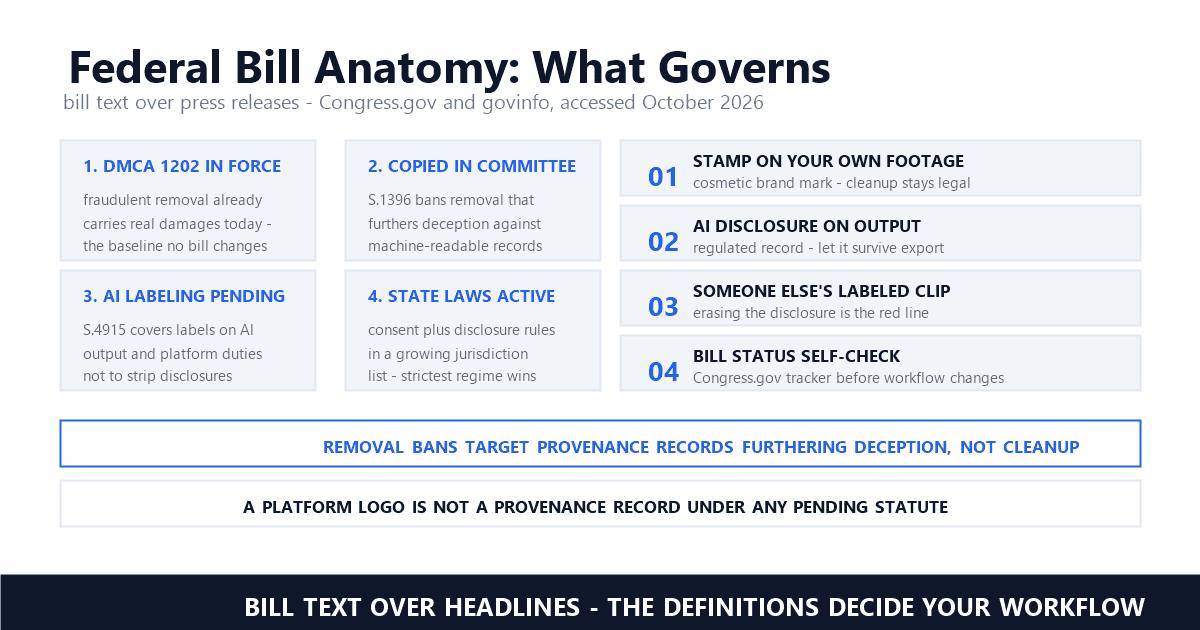
Other people's videos invert the analysis. The fetch itself likely violates platform terms even where copyright law stays quiet; cleanup does not cure it, because the infringement lives in the copying and the re-upload, not in the branding. Copyright management information — the identity of the copyright owner embedded in a work, as 17 U.S.C. § 1202 defines it — is why our Section 1202 explainer treats platform stickers and rights notices as different objects. Brands commissioning creator footage illustrate the proper order of operations — reviews note that sponsors requesting UGC for paid placements almost universally require clean files, which is why the ask should happen before the file changes hands, not after. Watermark state is evidence, not the crime.
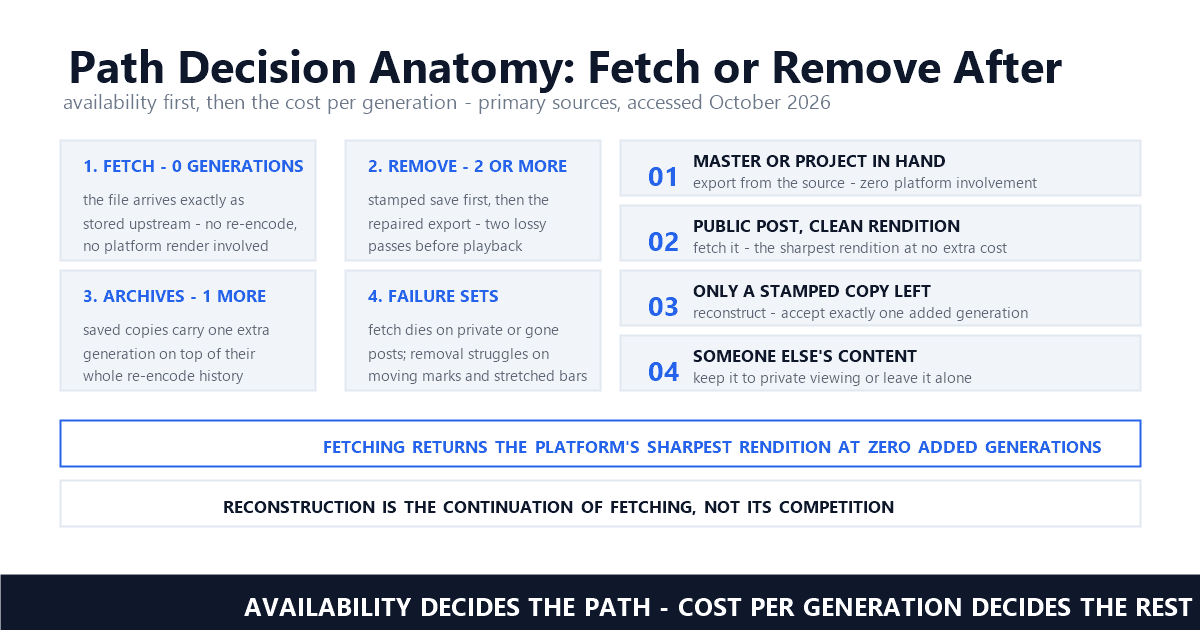
Every re-encode costs bitrate, fine color detail, and sharpness. A clean fetch costs 0 generations — the file arrives exactly as stored upstream. An official stamped save followed by reconstruction costs at least 2 generations: the branded render, then the repaired export. Old archived files carry 1 more generation on top of their history.
Counting generations makes the comparison concrete. Generation zero is the platform's own playback rendition, served to its player unmodified — this is what a fetch returns. The stamped save is already a lossy derivative, because platforms compress the branded render harder than the playback stream, so reconstructing from it means re-encoding a copy of a copy. Download sites admit this openly: "Downloading the master wins on quality every time" — SnapTikMate, and the mechanics behind the slogan hold on every platform that renders a separate branded file.
Post-processing has its own candid ledger. A repaired file is never identical to a master — rebuilding invents pixels in the masked region (the video-inpainting models documented in the open research literature, ProPainter above all, make exactly that trade), and the export pass re-encodes everything around it. One editor-side guide states where that leaves you: "you will still have a transcoded, downscaled, already-posted artifact" — Versely, and the verdict is fair for all such workflows that start from a stamped copy. The practical reading is not that repair is bad; it is that repair cannot recover detail the source never contained — a 720p stamped save reconstructs back to 720p, not to a resolution that never reached the disk. Our methods comparison — we compared inpainting, cropping, and blurring on the same footage so the fidelity gap is visible rather than asserted.
The two routes fail in different places, which is why the decision works. Fetch attempts die on private accounts, deleted posts, regional locks, and platforms that never exposed a clean rendition. Reconstruction struggles on marks that move across the frame, bars stretched across the whole image, and low-bitrate sources with scant signal left. The failure sets barely overlap.
On the fetch side, the failures are availability failures. Private accounts, followers-only posts, and removed videos have no publicly reachable rendition — a boundary that holds for any tool not asking for your password. Login-walled platforms move the same problem one step back. Extraction itself is maintenance work, too: platforms redesign players and endpoints, fetch helpers break until they are updated, and availability claims deserve a fresh test rather than a year-old review.
Reconstruction's failures are pixel failures. A stamp that hops positions frame to frame — TikTok's anti-crop design, which we documented in a frame-by-frame test — forces the model to rebuild different regions of different frames in sync, and weaker pipelines flicker; our series' temporal-consistency analysis shows what that looks like and why it happens. A translucent bar stretched across the full width is the opposite failure: too much marked area, too little untouched signal around it. None of these appear when retrieving, and none of the fetch failures appear here — which is exactly why availability, not preference, should drive the choice.
Pick by availability, in order. Master or original project still in hand — export from it; nothing beats the source you control. Video public somewhere with a clean rendition — take it. Only a stamped copy survives — reconstruct, accepting one added generation. Someone else's content — keep it to private viewing or leave it alone.
The order is strict because each step down costs fidelity. Re-exporting from your project returns the native resolution with no platform involvement at all. Fetching returns the platform's sharpest rendition at zero additional generations, and for public TikTok and Reels content it is the fastest route to a clean outcome. Reconstruction is the floor, not the challenger: it operates on whatever survives, and on old saves it is the difference between a usable file and a reshoot. For the most common crossover job — moving TikTok posts to Reels — our repurposing walkthrough shows both routes in sequence.
We built our product for the third line of that order, and the framing is deliberate: removal is not in competition with fetching, it is the continuation of it. Check availability first, fetch when the site still holds a clean rendition, and spend reconstruction effort only where no source exists. Every route-finder that skips that check — every tool list that opens with an advertisement — saves you 30 seconds and costs you a full generation of quality on files where the clean fetch was one paste away.
Is it better to download without a watermark or remove one afterward?
Better is the wrong frame — availability decides. A clean-source fetch returns original quality with zero re-encodes, so it wins whenever an unmarked rendition remains online. Reconstruction repairs the copy you currently hold, which makes it the only option the moment that rendition is gone. Most people find out which situation they are in mid-task.
Why does my no-watermark download still show a watermark?
Because the mark was inside the footage before any fetch tool saw it. A creator who uploads a TikTok export to Instagram has baked that logo into the pixels themselves; the platform then stores marked video, and that is what comes back. No fetch can help with a mark that predates the upload — only reconstruction on the file addresses it.
Is downloading videos without their watermark legal?
For videos you own, every route is legal without qualification. For videos you do not, the fetch probably breaches platform terms even where the law is silent, and cleanup creates no rights — the copying is the issue, not the branding. Private viewing sits in broadly tolerated territory; re-uploading or monetizing someone else's footage is infringement with or without a mark on it.
Last updated: October 2026
SnapTikMate — What Is the TikTok Watermark (and How to Skip It) (accessed October 2026)
TerraZone — Beyond the Logo: Your Complete Guide to Remove TikTok Watermark (accessed October 2026)
CreatorTribune — How to Cross-Post Without Watermark on Every Platform (accessed October 2026)
Versely — Do Not Cross-Post a Watermarked Download (accessed October 2026)
curl-x — TikTok Watermark Explained: Where It Lives and When It's Avoidable (accessed October 2026)
thessstik — How Watermarks Affect Video Quality (accessed October 2026)
Cornell LII — 17 U.S.C. § 1202 — Integrity of copyright management information (accessed October 2026)
StackInfluence — How to Remove TikTok Watermark from Your Videos (accessed October 2026)
arXiv — ProPainter: Improving Propagation and Transformer for Video Inpainting (ICCV 2023) (accessed October 2026)
Mark Ma is the founder and lead engineer at UnMark, where he leads the development of AI-powered video watermark removal technology. With over a decade of experience in computer vision, deep learning, and video processing, he has built production systems that process millions of frames per month across TikTok, Instagram Reels, and Google Veo content. His technical work focuses on motion-compensated watermark detection, spatial-temporal inpainting, and quality-preserving reconstruction for short-form vertical video. Before UnMark, Mark shipped computer vision infrastructure at scale for content moderation and ad compliance platforms. He writes this blog to document the real engineering, testing, and regulatory reasoning behind UnMark's processing pipeline — every test result, frame analysis, and benchmark published here is reproduced from actual production data, not synthetic examples. His goal is to give creators, brands, and regulators a verifiable technical reference for AI video watermark removal in 2026.