Agency Video Watermark Removal: The Client Handoff Guide
Mark Ma
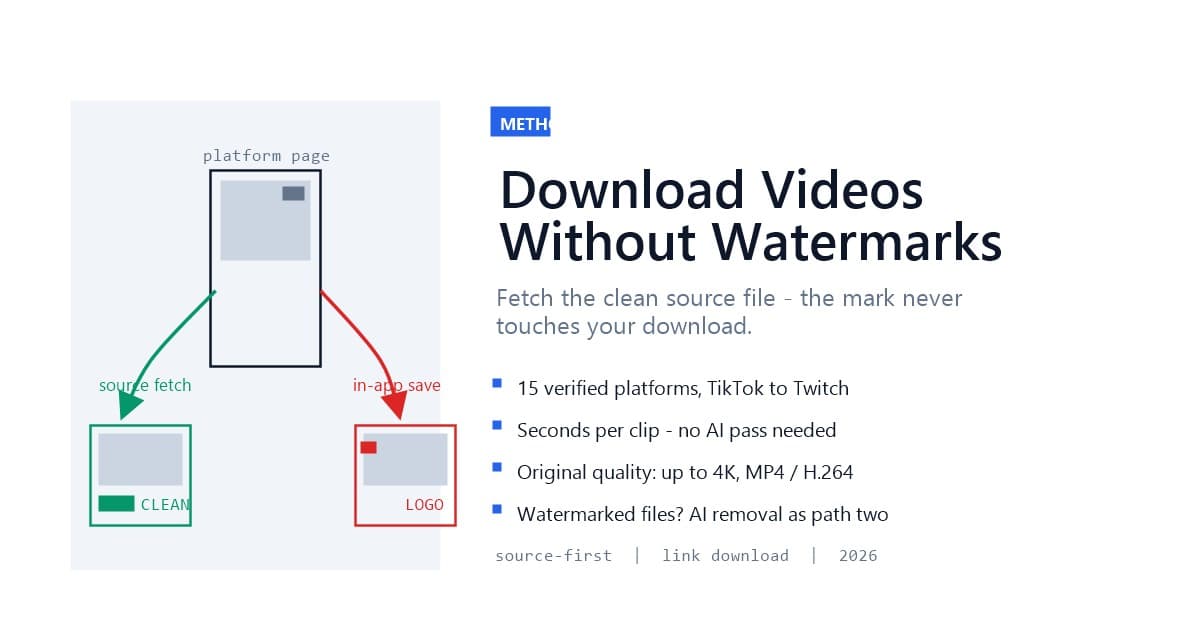
Downloading a video without a watermark does not have to mean removing anything. Every major platform stores two versions of a clip: the clean source file it uses for playback, and a branded copy it renders when you tap "save." The source-first method takes the first version — you paste a link, the service pulls the clean source file from the platform's own servers, and you get an MP4 at original quality with no logo and no username burned in. No AI processing, no cropping, no smudges: the watermark simply never touches the file.
That is half the story this guide covers. The other half is knowing when source-first works and when it cannot — because if a watermark already exists in the only file you have, a different method applies. We just shipped link-based source downloads at UnMark alongside the AI removal pipeline those readers know, so this is the complete two-path decision framework: fetch the clean source when it exists, reconstruct with AI when it does not.
Last updated: August 2026
The watermark is not part of the video. It is a branding layer the platform injects at download time. When you save a TikTok from inside the app, TikTok's servers hand you a re-rendered file with the logo and your username stamped into the pixels — attribution burned in by design, as we documented in our TikTok moving watermark test. Instagram suppresses watermarked cross-posts for the same reason, and Facebook, YouTube Shorts, and the rest run the same play, as our platform guides cover from Facebook Reels to YouTube Shorts.
Here is the part most people miss: the clean original still exists on the platform's CDN. The watermark injection happens at the export step, not the storage step. The file the platform streams to every viewer is the unbranded source. That is why a link-based downloader can return a completely clean MP4 — it reads the same source URL the player uses, before any branding pass touches it.
TikTok makes the mechanics unusually visible. Its API exposes separate stream sets: a download_addr family that carries the baked-in watermark, and play_addr streams that do not. A source-first tool simply never requests the watermarked family. Nothing is stripped — the branded render is just never fetched.
Source-first means getting the watermark-free original file directly, instead of downloading a watermarked copy and cleaning it afterward. You copy the video's link, paste it into a downloader that resolves the platform's source streams, pick a format, and save. Because the method transfers an existing file rather than re-rendering pixels, three properties follow:
The trade-off is scope: source-first only works when a clean source is reachable. It needs a public link, a platform that does not gate the source behind login, and content that is a single video — not a gallery, playlist, or live stream. Where those conditions hold, it is the strictly better path. Where they fail, AI removal is the fallback — and that boundary is the practical heart of this guide.
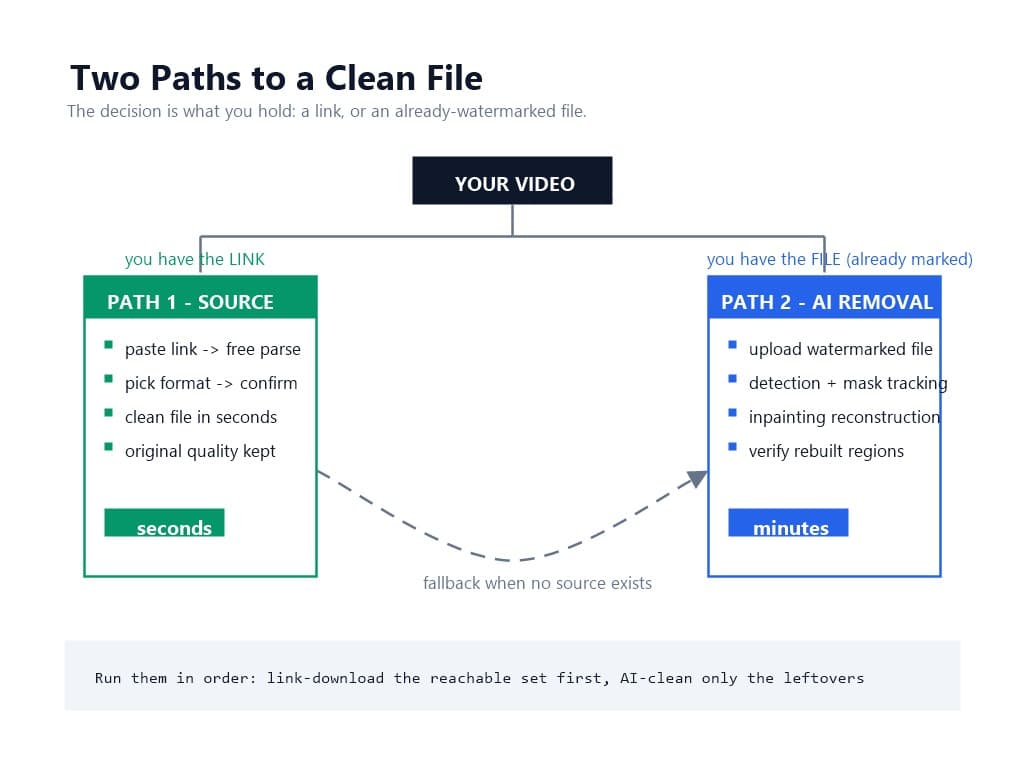
Use this decision frame before touching any tool:
Choose source-first download when the video is still where it lives. You have the link, the content is public, and you want the original quality. This covers most repurposing workflows: pulling your own posts for re-editing, archiving a creator's clip you have rights to, grabbing stock-quality B-roll from a public source. Paste the link, get the clean file, done in seconds.
Choose AI watermark removal when the watermark already exists in your only file. The video is on your camera roll already watermarked, the source is gone (a deactivated account, a deleted post), the content sits behind a login wall, or the file passed through enough re-encodes that no pristine source is worth chasing. Then inpainting is the right tool — our process walkthrough covers how detection and reconstruction handle what source fetching cannot.
Combine them in one pipeline. The two methods are not competitors; they are sequential filters. Source-first for everything reachable by link, AI removal for everything that reaches you as a file. Teams running volume workflows should order them exactly that way — batch-download the reachable set with link downloads, then feed only the true leftovers to the AI queue alongside the batch removal workflow.
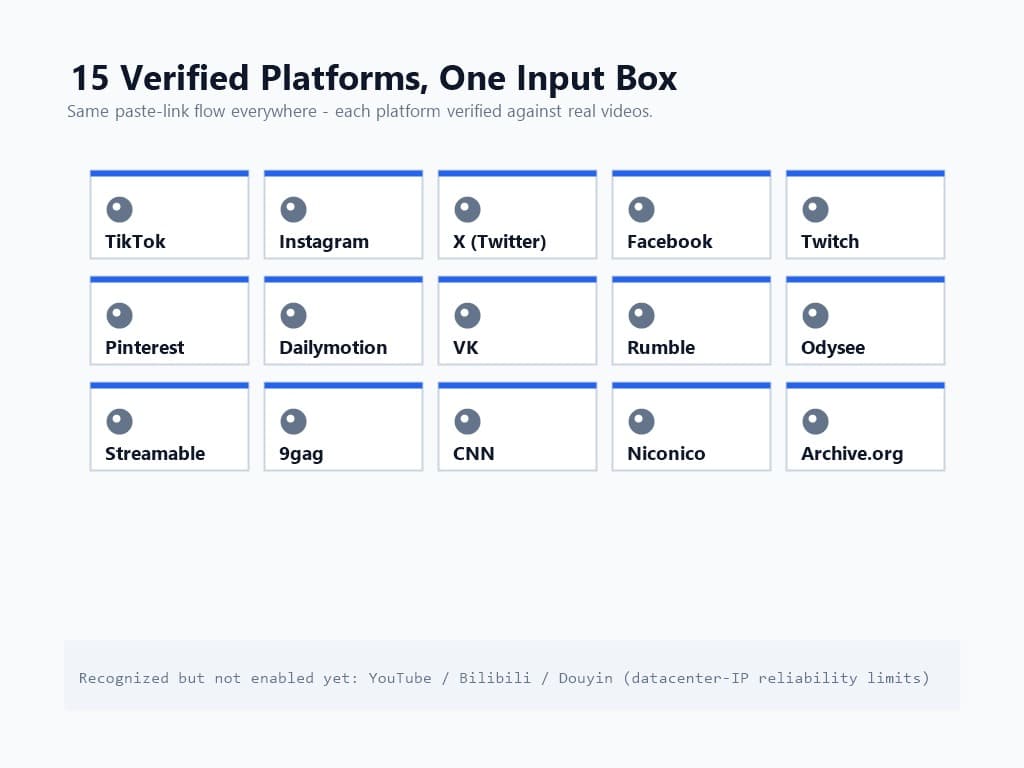
The UnMark link downloader currently resolves 15 verified platforms, each checked against real videos rather than promised in a marketing list: TikTok, Instagram, X (Twitter), Facebook, Twitch, Pinterest, Dailymotion, VK, Rumble, Odysee, Streamable, 9gag, CNN, Niconico, and Archive.org.
Two honest boundaries worth stating. First, YouTube, Bilibili, and Douyin are recognized by the resolver but are not enabled for downloads yet — datacenter-IP restrictions on those platforms make reliability worse than we will ship. Second, the list is verified per-platform, not aspirational: a platform lands on it after real-device checks pass, and platform health monitoring keeps the failure rates visible on our side.
Not every platform watermarks the same way, which matters for expectations. TikTok brands at download; Instagram mostly withholds the file instead of branding it; X simply offers no path off the platform. The source-first method handles all three shapes identically — that uniformity is its quiet advantage over learning each platform's quirks.
Open the video on its platform and copy its link. On mobile apps this is the share sheet's "Copy Link" — TikTok's share arrow, Instagram's three-dot menu, X's share icon. On desktop, copy the URL straight from the address bar. Short links (vm.tiktok.com/..., pin.it/...) resolve the same as full URLs.
Two validity rules save retries later. The link must be the video's own page — not a screenshot, not a share text blob with the URL buried in prose. And the video must be public: private accounts, followers-only posts, and login-gated content have no reachable source by design, which is a privacy boundary, not a tool limitation.
Head to the upload page and switch to the Paste Link tab. Paste the URL and hit Get Video. The parse step is free: the resolver identifies the platform, reads the video's metadata, and returns a preview — title, thumbnail, duration, and every format the source offers.
The preview-before-commit structure is deliberate. You see exactly what was found before anything is charged or downloaded: no blind downloads, no surprises. If the link is a gallery, a playlist, a live stream, or anything else that is not a single video, the parse step says so explicitly instead of silently grabbing the wrong thing.
Parsing runs in seconds because nothing is being processed — the resolver is reading metadata the platform already serves. That speed is also why failures surface immediately: a dead link, a private video, or a region block reports back at once, and failed downloads refund automatically rather than leaving you holding a charge.
The parse results show up to five format tiers — from 4K down where the source supports it, each labeled with resolution and frame rate. One is marked recommended, which is simply the highest tier your plan allows at full source quality; you can take a smaller tier when a lighter file serves you better. Every tier is MP4 with H.264 video, the maximum-compatibility combination that plays natively on phones, editors, and browsers without transcoding.
Confirm, and the download runs server-side: the file streams from the platform to storage and lands in your task history, with the progress visible in the dialog. Large files — up to 5 GB per download — are handled server-side precisely so your machine and connection are never the bottleneck.
Three details from the engineering side that users feel without seeing. File sizes are checked against reality, not estimates — where a platform reports a stream's size unreliably, the download measures it rather than guessing. The cost is shown before you confirm and never changes after. And if anything fails mid-flight — a platform revokes the stream link, a connection drops — the task fails cleanly and refunds in full.
The refusal list is short and principled:
Each refusal maps to the method's honesty: source-first fetches what publicly exists, and where nothing publicly exists, it says no. That is also why the method pairs with AI removal instead of replacing it — the two failure domains barely overlap.
Source-first closes the easy 80%. The remaining cases fall to reconstruction:
The AI path costs more time and credits per clip, which is precisely why the order matters: link-download everything reachable, and reserve inpainting for what remains. If you are auditing an archive, the batch workflow then clears the true leftovers in one run.
The method is neutral; the use carries the law. Downloading your own content is unambiguous — you are fetching your own original file, which is also the cleanest possible position under the DMCA Section 1202 framework: no rights-management information of anyone else is touched. Downloading someone else's public video for personal viewing sits in broadly tolerated territory; redistributing it, monetizing it, or stripping the creator's attribution crosses into copyright and platform-terms territory regardless of how the file was obtained.
One distinction matters for the provenance era: source-first downloads leave no provenance gap in your own files — you hold the original, not a laundered copy. For AI-generated content, the same logic as our Veo and Sora workflows applies: take the clean file, keep whatever C2PA credentials travel with it. The 2026 legal guide draws every line in detail.
Downloading videos without watermarks is two problems, not one. When the video still lives at its source, the source-first method wins outright: paste a link, get the original file — clean by construction, seconds in flight, full quality, across 15 verified platforms from TikTok to Twitch. When the only file you have already carries the mark, AI inpainting takes over and rebuilds what fetching cannot. Put in order, the two paths cover the whole landscape at the lowest cost each step allows.
Start with a link you already have open — paste it into the Paste Link tab and see the source come back clean. Your camera-roll backlog is what the AI queue is for.
Q1: Does downloading without a watermark mean removing the watermark?
No — and that is the point. Source-first fetching pulls the clean original file the platform uses for playback, before any watermark render exists. Nothing is stripped, cropped, or reconstructed; you receive the original encode.
Q2: Which platforms can I download from without a watermark?
Fifteen verified platforms, including TikTok, Instagram, X (Twitter), Facebook, Twitch, Pinterest, Dailymotion, VK, Rumble, Odysee, Streamable, 9gag, CNN, Niconico, and Archive.org. YouTube, Bilibili, and Douyin are recognized but not enabled for downloads yet.
Q3: Why is link parsing free?
Parsing only reads the video's public metadata to build a preview — no file is transferred and nothing is processed, so there is nothing to charge. You confirm and pay only after seeing what was found, and failed downloads refund automatically.
Q4: What quality do I get from a source download?
The source's original encode, up to 4K where the platform serves it, delivered as MP4 with H.264 video. You choose among up to five resolution tiers; the recommended tier is the highest your plan allows at full fidelity.
Q5: When doesn't source downloading work?
Galleries, playlists, live streams, audio-only content, and private or login-required videos have no fetchable public source. For files you already hold that carry watermarks, AI inpainting is the fallback path.
Mark Ma is the founder and lead engineer at UnMark, where he leads the development of AI-powered video watermark removal technology. With over a decade of experience in computer vision, deep learning, and video processing, he has built production systems that process millions of frames per month across TikTok, Instagram Reels, and Google Veo content. His technical work focuses on motion-compensated watermark detection, spatial-temporal inpainting, and quality-preserving reconstruction for short-form vertical video. Before UnMark, Mark shipped computer vision infrastructure at scale for content moderation and ad compliance platforms. He writes this blog to document the real engineering, testing, and regulatory reasoning behind UnMark's processing pipeline — every test result, frame analysis, and benchmark published here is reproduced from actual production data, not synthetic examples. His goal is to give creators, brands, and regulators a verifiable technical reference for AI video watermark removal in 2026.