Why Video Watermark Removal Flickers: Temporal Consistency from Per-Frame Fill to DiT, and a 60-Second Test for Your Own Clips
Last updated: September 2026
The single-frame preview looks flawless. Then you hit play, and the patch where the watermark used to be starts breathing — texture wobbles, edges shimmer, and the whole edit screams "something was done here." That is video watermark removal flickering, and it is the number-one reason clips come back to our queue for a second pass. It is not a rendering bug. It is what happens when a remover treats your video as a pile of photos instead of a moving thing.
We build a watermark remover at UnMark, so we have spent a lot of time studying why this happens and which model families actually fix it. This post explains the mechanism in plain language: why per-frame processing flickers, how optical flow bought its fix, why diffusion made things worse before they got better, and how Diffusion Transformers (DiT) learn time itself. At the end there is a sixty-second check you can run on any removal output — ours or anyone else's.
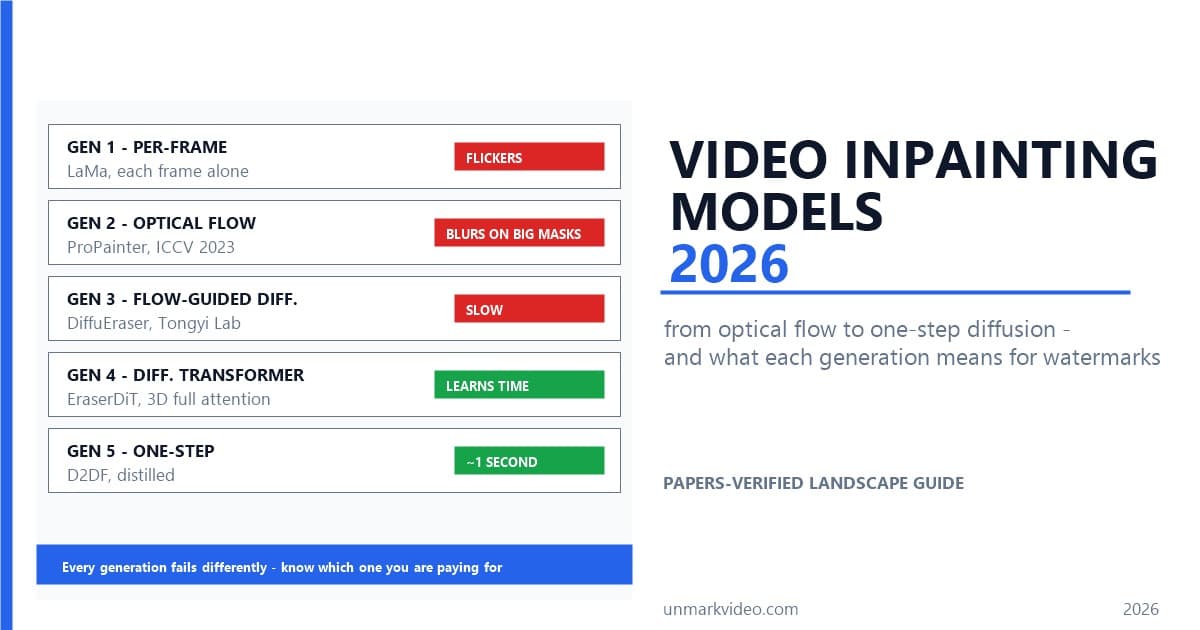
If you want the broader model-family timeline first, our video inpainting models walkthrough covers five generations end to end. Here we go deep on one axis only: temporal consistency.
Why Does Watermark Removal Flicker in the First Place?
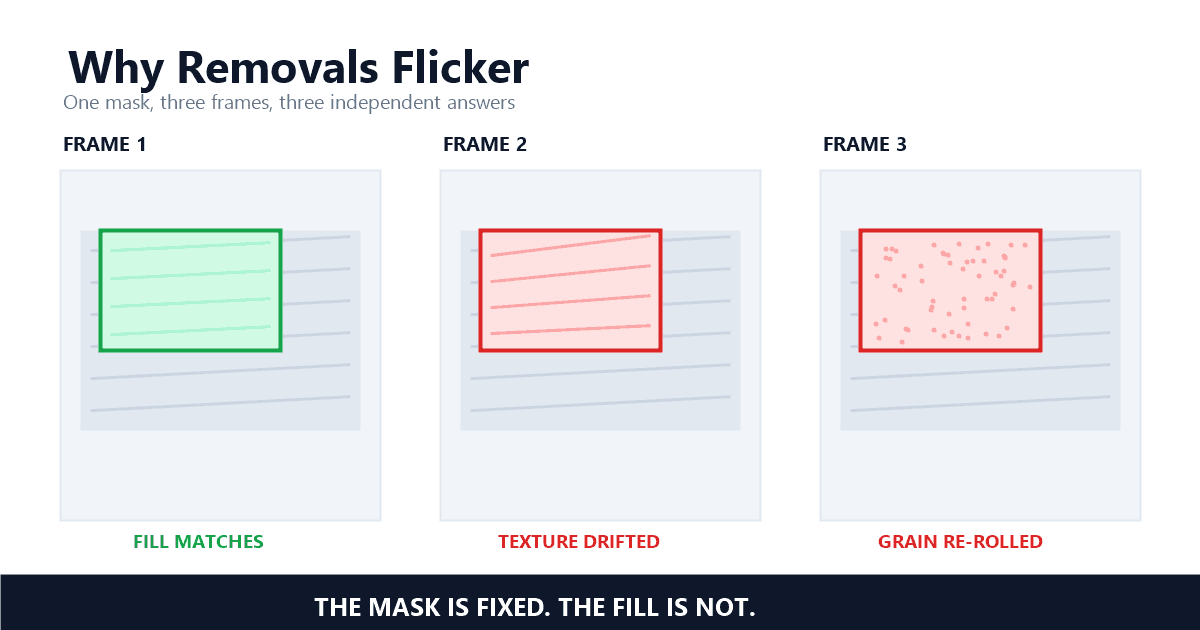
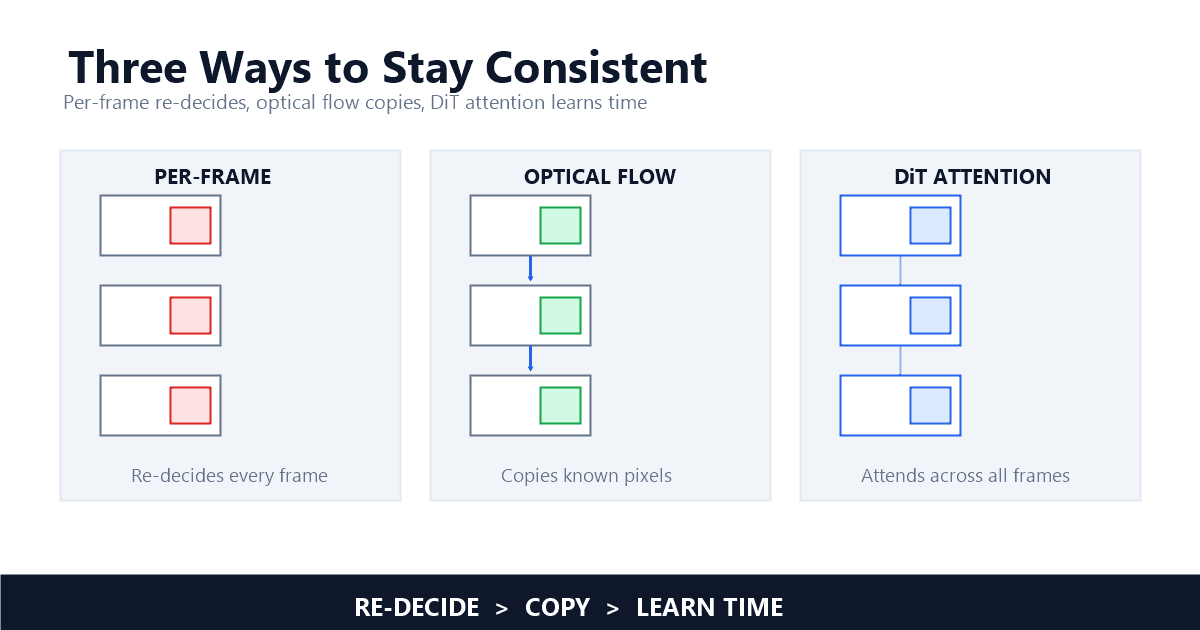
Flicker starts with a shortcut: many tools split your video into frames, erase each frame as a standalone image, and stitch the results back together. Every frame gets its own answer to "what should be here?", and every answer differs slightly — the surrounding pixels themselves shift a little each frame. Played back at speed, the differences become visible wobble.
Why would the surrounding pixels shift if the camera is steady? Compression. Inside an H.264 stream, most 1080p frames do not store a full picture; they store corrections relative to other frames. So the noise texture around your watermark is literally distributed differently across frames — the "source pixels" a per-frame inpainter leans on keep changing underneath it. Erase frame 102 and frame 103 as independent puzzles and you get two solutions that agree on the big shapes but disagree on fine texture.
The human eye is brutal at catching exactly this. We are far worse at noticing a slightly soft patch than at noticing a patch that changes every frame — motion draws the eye straight to instability. A remover can pass a single-screenshot quality check and still fail the only check that matters: pressing play. This is why flicker complaints survive even as per-frame sharpness gets better; the two qualities are unrelated. Frame-perfect pixels with frame-to-frame drift still read as broken.
One more aggravator worth knowing: large masks. The bigger the area a remover has to invent per frame, the more degrees of freedom each frame's answer has, and the more those answers diverge. A thin ticker text bar over a static wall barely flickers even with a weak remover. A big logo over foliage flickers with almost any per-frame tool — the fill is mostly invented, and inventions drift.
How Optical Flow Bought Consistency — and Where It Breaks
Optical flow fixed flicker by copying instead of re-deciding: estimate each pixel's motion between frames, then drag known pixels forward and backward along those vectors to fill the mask. Copying is inherently consistent — the same texture appears in every frame it passes through. The ProPainter line industrialized the idea into three cooperating modules.
The ProPainter paper, the ICCV 2023 reference implementation from S-Lab, describes the pipeline this way: "The state-of-the-art algorithm, Propainter, exemplifies this approach and comprises three key modules: recurrent flow completion, dual-domain propagation, and mask-guided sparse Transformer" — Xiaowen Li, DiffuEraser Technical Report. If the texture behind your logo is visible in frame 99 and the logo still covers it in frame 104, propagation drags the frame-99 pixels through the motion field to fill 104. Consistency comes for free — you are copying, not re-solving.
Copying is exactly why flow-based results are so stable on the easy majority of pixels. But the approach inherits a hard ceiling: when the watermark (or the object being removed) hides a region that is never visible in any neighboring frame, there is nothing to copy. The flow itself also fails on exactly the footage that is hard anyway. As the UnderEraser team put it: "Although flow-based techniques improve temporal coherence by propagating valid pixels across frames, they still struggle to handle large occlusions, leading to noticeable artifacts" — Dingming Liu, UnderEraser. Occlusions, motion blur, and fast camera moves corrupt the motion estimate, and corrupted motion smears whatever it propagates.
The failure has a signature look once you have seen it. Streaky smears along the motion direction. Ghost trails behind moving objects. The EraserDiT authors document one such case: "ProPainter's completion results lack ribbon consistency in the temporal domain" — Jie Liu, EraserDiT — describing a ribbon that dissolves and re-forms across frames because propagation cannot hold a thin, fast-moving structure together. On a moving watermark, that instability doubles: the mask moves, the flow estimate moves, and every error compounds.
Still, give the approach its due. For a static corner logo over a slowly changing background — the majority of real-world requests — flow propagation delivers consistency that per-frame processing never will. Our own detection-to-reconstruction walkthrough leans on propagation for precisely those pixels: everything that is visible somewhere else in the clip gets copied, and only the truly-never-visible residue is left to generation.
Why Diffusion Made Flicker Worse Before It Got Better
Generation is the only way out of the "nothing to copy" hole. Diffusion fills unknown regions by denoising noise into plausible content — texture that propagation cannot paint. But applied per frame, its randomness reintroduces flicker: each frame starts from different noise and invents slightly different grain. You trade smearing for shimmer.
The FloED paper frames the tension exactly: a recent family of methods uses "diffusion models, which have become essential for achieving high-quality video inpainting results, yet they still face performance bottlenecks in temporal consistency and computational efficiency" — Bohai Gu, FloED. Video diffusion adapted from text-to-video inherits the same tension from the other side: "directly applying these methods to video inpainting falls short in maintaining the necessary temporal consistency" — Bohai Gu, FloED.
The intermediate generation bolted the two ideas together: flow guidance steers the diffusion process so that motion information constrains what gets generated. FloED is the clean example — "FloED employs a dual-branch architecture, where the time-agnostic flow branch restores corrupted flow first, and the multi-scale flow adapters provide motion guidance to the main inpainting branch" — Bohai Gu, FloED. DiffuEraser works the same territory, adding priors to suppress hallucination and expanding how many frames the model can see at once.
These hybrid systems were the first to survive large masks without strobing. But they are expensive — two branches, multi-step denoising, flow estimation up front — and their consistency still depends on the flow estimate being decent. The compromise held until the architecture changed underneath it.
How DiT Models Learn Time Itself
A Diffusion Transformer flattens the whole clip into spatio-temporal tokens and applies attention across all of them — every token sees every other token, in every frame. Attention that spans time natively means the model is not gluing consistent frames together afterward. It learns, from raw video, what things look like as they move.
The EraserDiT paper states the architecture claim directly: "DiT synergistically combines the advantages of diffusion models and transformer architectures to maintain long-term temporal consistency while ensuring high-quality inpainting results" — Jie Liu, EraserDiT. The team adds an inference-time trick on top: "We propose a Circular Position-Shift strategy to further enhance long-term temporal consistency during the inference stage" — Jie Liu, EraserDiT — rotating token positions so a long video's segments overlap contextually instead of being processed as independent windows with hard seams. DiffuEraser's earlier work points the same direction from the diffusion side: "we expand the temporal receptive fields of both the prior model and DiffuEraser, and further enhance consistency by leveraging the temporal smoothing property of Video Diffusion Models" — Xiaowen Li, DiffuEraser Technical Report. Bigger time-view, smoother time-output.
Our interest in this family was sharpened by an engineering decision Volcano Engine (ByteDance's cloud arm) made for subtitle erasure, per its technical write-up: they deleted the text-prompt and cross-attention modules entirely, letting the model learn frame-to-frame dependency from the video sequence itself. That is a statement about where consistency actually comes from — not from language guidance, but from the statistics of video. Their two-stage training recipe (broad pretraining on random masks at 360P, then fine-tuning on font-level masks at 720P) targets the same lesson from the mask side: train on the shape of the problem you actually need to solve. They report PSNR above 38 on their benchmark set (vendor-reported, not independently verified), which matters less to us than the design logic behind it.
The reason this matters for watermark removal specifically: text, logos, and stamps are thin structures over moving content. Thin structures are where propagation smears and per-frame tools strobe. Models with native time-attention hold thin structures the way the original footage would — because they have seen thousands of hours of how thin structures behave in motion. Speed is coming along too: EraserDiT completes a 4K-class 2160 × 2100, 97-frame clip in 65 seconds on one NVIDIA H800, and the one-step distilled models behind it — like D2DF — bring a single video down to about 1 second. I compared clips from our older flow-guided stack against DiT-era output on the same footage: this is the generation boundary that shows up on playback, not in a screenshot.
How to Flicker-Test Your Own Video in Sixty Seconds
You can catch flicker in about 60 seconds: play at quarter speed, step frame by frame, and watch the seams in motion. Three passes, any player with arrow keys. A clip that runs 10 seconds holds 300 frames at 30 fps — 300 chances for the fill to drift — and in my testing they catch nearly everything:
Pass one — quarter speed, eyes on the patch. Play the clip at 0.25× speed and watch only the repaired region, not the subject. Healthy fill moves with the scene; unhealthy fill "boils" — grain that re-randomizes every few frames, or a texture whose apparent detail level oscillates. Boiling is the classic diffusion-randomness tell.
Pass two — step frame by frame. Most players support arrow-key stepping. Hop across the patched area one frame at a time and look for single-frame events: a flash of wrong texture, an edge that snaps one pixel sideways, a highlight that jumps. Single-frame events are invisible at full speed but read as "something flickered" even when the viewer cannot say why. This is the same manual check we run on moving watermarks, where per-frame divergence is worst.
Pass three — watch the seams in motion. Resume normal speed and track the boundary between the repaired region and untouched footage. A seam that stays put while the background moves means the fill is static — the remover painted one answer and pasted it, which reads as a floating patch the moment anything behind it moves. The fill's lighting and grain should track the scene around it.
What to do when a check fails, in order of cost: enlarge the selection slightly (tight masks starve the model of context), re-run the same tool (diffusion variance means a second pass can simply land better), trim the clip to the problem span and process it separately, then switch tools. If the same region fails across two different removers, the honest answer is that the region is mostly invented pixels — lower your expectation for that shot or compare removal against other approaches like reframing. Detection quality matters here too; a mask that wobbles frame to frame will produce a patch that wobbles, which is why detection models got their own deep dive.
One caution while you test: stepping through frames makes small timing artifacts look dramatic. Judge at quarter speed before deciding anything is broken — some single-frame variation in 1080p footage is simply video compression doing its job, and chasing it produces over-smoothed, plastic-looking patches.
What This Means for the Watermarks You Remove
Flicker is a generation marker, not bad luck. Per-frame removers flicker on invented pixels, flow-based removers smear on large occlusions, flow-guided diffusion balances both at high cost, and DiT-era models learn time directly. That hierarchy tells you which tools can hold thin structures through playback — and which will hand you a screenshot-worthy frame that falls apart in motion.
Two closing notes. First, a stable patch still has to be a patch you are allowed to make — removing rights-holder marks from footage you do not control is its own legal problem, separate from whether the output flickers. Second, whether you are cleaning 2 videos a week or 20 videos a day, build the sixty-second check into your export routine rather than your review-after-publish routine; flicker is cheapest to fix before an audience sees it. If a clip fails everything, send it through a second remover and compare — disagreement between tools on the same region tells you the region itself is the hard part, not the tooling. The full model-family timeline, including the one-step distillation models now collapsing minutes of denoising into about a second, lives in our video inpainting walkthrough.
References
- DiffuEraser: A Diffusion Model for Video Inpainting — Xiaowen Li, Haolan Xue, Peiran Ren, Liefeng Bo (Tongyi Lab, Alibaba Group), arXiv 2501.10018
- EraserDiT: Fast Video Inpainting with Diffusion Transformer Model — Jie Liu, Zheng Hui (Mango TV), arXiv 2506.12853
- Coherent Video Inpainting Using Optical Flow-Guided Efficient Diffusion — Bohai Gu, Hao Luo, Song Guo, Peiran Dong, Qihua Zhou (HKUST, DAMO Academy), arXiv 2412.00857
- From Understanding to Erasing: Towards Complete and Stable Video Object Removal — Dingming Liu et al. (Peking University, WeChat Vision Tencent), arXiv 2604.01693
- ProPainter: Improving Propagation and Transformer for Video Inpainting — Zhou, Li, Chan, Loy (S-Lab, Nanyang Technological University), ICCV 2023 (GitHub, S-Lab License)
- 火山引擎视频点播:基于 DiT 大模型与字体级分割的无痕字幕擦除(厂商技术说明)
Last updated: September 2026