China's AI Content Labeling Rules: What the CAC Measures Mean for Video Creators
Mark Ma
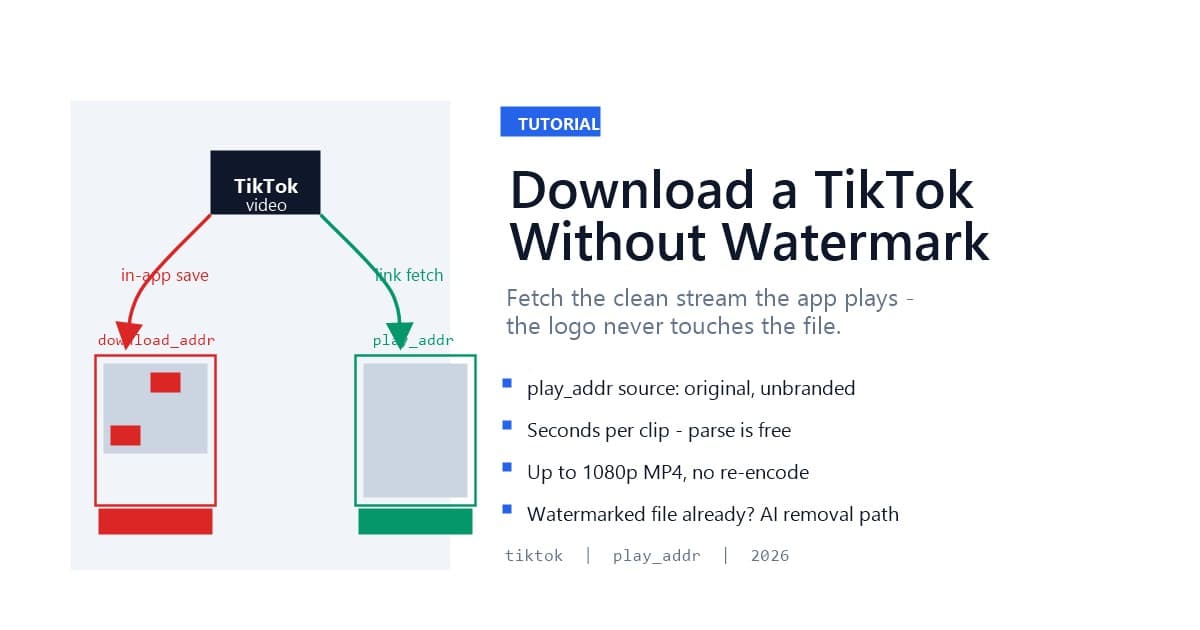
Downloading a TikTok without the watermark means skipping the branded render TikTok hands you at the save button — not scrubbing pixels afterward. TikTok keeps two copies of every clip: a download_addr version with the logo and username burned in, and a play_addr version, the clean file the app streams to viewers, that never receives the watermark at all. Paste the video's link into a link-based downloader and it fetches the second family: you get the original MP4, typically up to 1080p, with no logo and no handle — in seconds, with nothing removed because nothing branded was ever requested.
That distinction matters more on TikTok than on any other platform, because TikTok's watermark moves. It bounces between corners across the clip, which makes after-the-fact removal genuinely hard — the moving-target problem we documented frame by frame in our TikTok watermark test. Getting the clean source first, before any watermark exists, sidesteps the entire problem. This guide walks through exactly how, plus the quality, limits, and legality questions that come with it.
Last updated: August 2026
The in-app save is a re-render, not a copy. When you tap "Save video" inside TikTok, the platform does not hand you the file it streams to viewers — it produces a branded derivative: the TikTok logo and the creator's @username composited into the pixels, with the logo cycling between screen positions across the clip. The mark is baked in at the export step, which is why no setting, toggle, or account tier ships a clean file from inside the app.
Three practical consequences follow. The watermark is permanent in that file — cropping one corner misses the other positions, and blurring leaves visible patches, the failure modes our method comparison ranks in detail. The re-render can also cost quality versus the streamed original. And the branded file carries distribution penalties when reposted: Instagram has publicly confirmed it suppresses videos carrying other platforms' watermarks, a policy we covered in why cropping fails on Instagram Reels.
So the save button gives you the worst available version: marked, re-encoded, and penalized on arrival elsewhere.
Attribution and growth, engineered. The watermark stamps every re-shared clip with TikTok branding and the creator's handle — free distribution and free credit, traveling wherever the file goes. Every platform runs a version of this play now, from Facebook Reels to YouTube Shorts, but TikTok's implementation is the most aggressive: not a static corner logo, but a moving mark designed to survive casual cropping.
The watermark also does double duty as a signal to rival algorithms. A TikTok-branded clip posted to Reels identifies itself instantly as cross-posted content, which is precisely what Instagram's recommendation system penalizes. Creators who repurpose at scale — the TikTok-to-Reels workflow is our most documented case — treat the clean file as a reach requirement, not a preference.
A watermark-free TikTok download fetches the play_addr stream family — the source file TikTok serves to its own player — instead of the download_addr family the save button produces. The two families live side by side in TikTok's API: same video, different renders. The download family carries the baked-in logo and username; the play family is the creator's upload as viewers see it, unbranded.
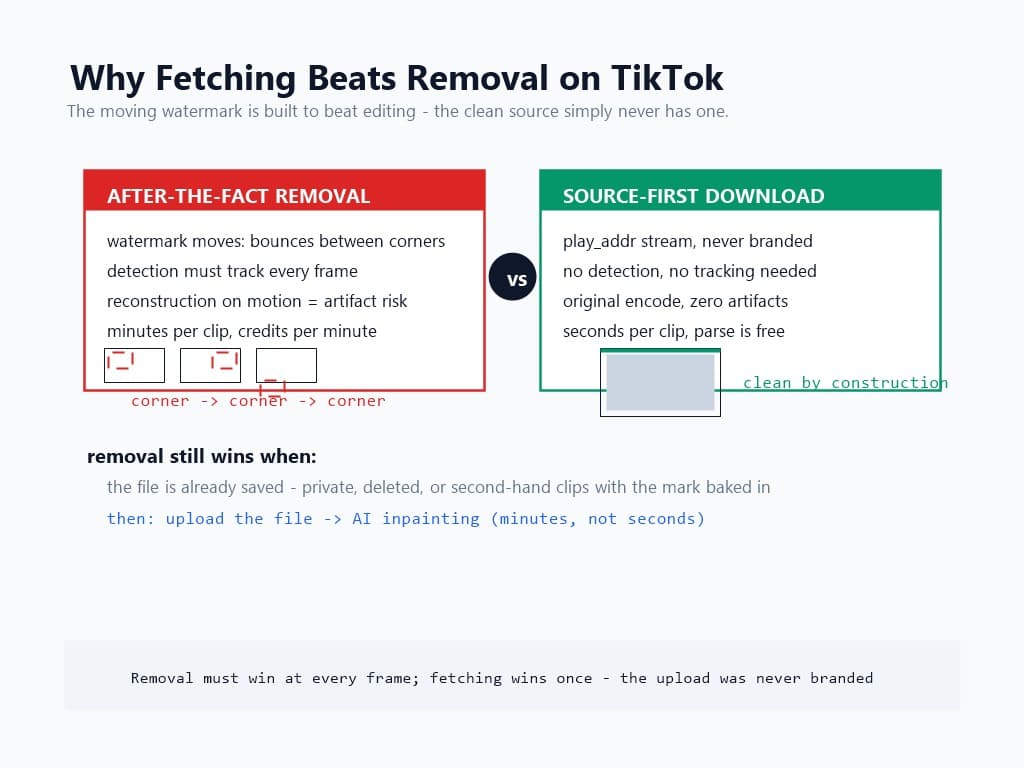
Because the clean family already exists on TikTok's servers, fetching it is a transfer, not a processing job. That is why a link download finishes in seconds while AI watermark removal takes minutes: nothing is being detected, masked, or reconstructed. It also means zero reconstruction risk — the failure modes of inpainting (ghost edges, shimmer on motion) cannot occur on a file that was never branded.
The method has one boundary, and it is structural: it needs the source to be reachable. A public TikTok with a copyable link qualifies. A private account, a followers-only post, or a deleted clip does not — no public source exists to fetch, and no downloader conjures one. For files already saved with the mark baked in, AI removal remains the fallback, and the source-first guide maps that two-path decision in full.
Three things, and only one of them is a tool:
tiktok.com/@user/video/...) and the short form (vm.tiktok.com/...) resolve identically.Note what is not needed: no screen recording, no third-party app install, no watermark-removal pass afterward. If a workflow you are following requires any of those for a TikTok that is still live at its URL, it is doing the hard version of an easy problem.
On mobile, open the video, tap the share arrow (bottom right), and choose Copy Link. The link lands on your clipboard in short form. On desktop, open the video at tiktok.com and copy the URL from the address bar — the full form works the same.
One habit worth adopting: copy the link from the video's own page, not from a chat or a share text. Share blobs often bury the URL in prose, and screenshots of videos carry no link at all — both fail immediately at parse time. Ten seconds of copying from the source saves a retry cycle.
If you are pulling several of your own clips — archiving a channel, or assembling a repurposing batch — copy links as you browse and keep them in a list. The parse step is free, so building the queue costs nothing until you choose to download.
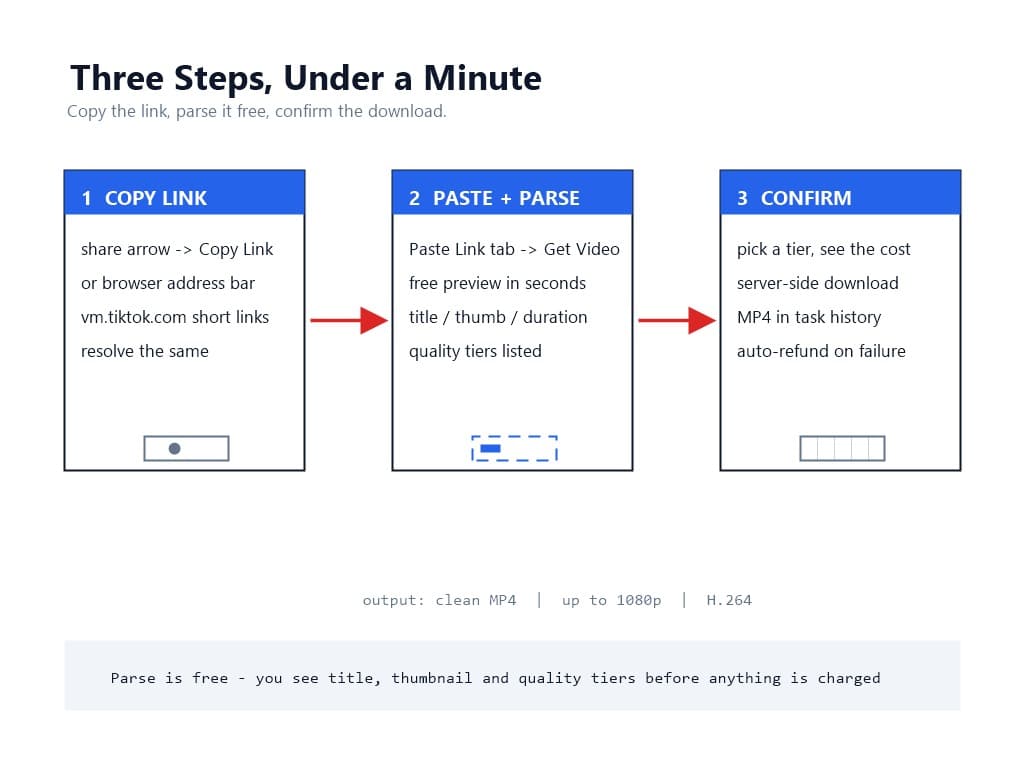
Open the upload page, switch to the Paste Link tab, paste the URL, and hit Get Video. Parsing is free and takes seconds: the resolver identifies the platform, reads the video's public metadata, and returns a preview card — title, thumbnail, duration, and the format tiers the source offers.
The preview exists so you confirm before anything is charged or transferred. For TikTok links, one check matters most: the preview should show the video you expected, not a different clip or an error. Three failure messages map to three causes, each actionable in one step:
None of these cost anything. The free-parse structure means dead ends are discovered at the preview, not after payment.
The parse results list up to five format tiers, labeled with resolution and frame rate, with one marked recommended — the highest tier the source offers at full fidelity. TikTok uploads are typically served at up to 1080p, so that is the practical ceiling on most clips; a minority of sources carry higher tiers, and the preview shows exactly what exists rather than promising a number the source cannot deliver.
Pick a tier and confirm. The cost displays before you commit and does not change afterward. The download then runs server-side — the file streams from TikTok's CDN into your task history, and if anything fails mid-transfer, the task fails cleanly with an automatic refund rather than a half-charged dead file.
The result is an MP4 with H.264 video: the same container and codec TikTok serves its own player, which plays natively in every editor, phone, and browser without transcoding. For repurposing pipelines, that matters — every re-encode costs a generation of quality, and starting from the original encode means your edit is the first re-encode, not the third.
Because the ceiling is the upload, not the tool. TikTok serves each clip at the quality its creator uploaded and processed — a 1080p upload streams as 1080p, and a clip shot and uploaded at lower resolution never gains resolution it never had. A downloader that faithfully fetches the source inherits that ceiling honestly.
This is also the honest way to evaluate any downloader's quality claims. A service promising "4K TikTok downloads" for every link is promising upscaling, not fetching — the extra pixels are invented, not recovered. The preview-before-commit structure exists precisely for this: the tiers you see are the tiers the source has, no marketing math applied.
For your own content, the workflow implication runs upstream: if you are archiving your own channel for repurposing, the download quality you get is fixed by what you uploaded. The cleanest archives come from the highest-quality uploads.
The refusal list is short and mirrors the method's boundary:
The common thread: source-first fetching reads what publicly exists. Where nothing publicly exists, it says no — which is what keeps it fast, free to check, and privacy-respecting.
Split it by whose content it is. Your own videos: downloading the clean source of your own upload is the cleanest case in the entire watermark landscape — you hold the copyright, and you are fetching the original file, not stripping anyone's rights-management information. The DMCA Section 1202 framework targets unauthorized removal of other people's CMI; your own content sits entirely outside that line.
Someone else's public video: personal viewing and private archiving sit in broadly tolerated territory, as with any platform's content. Republishing, monetizing, or re-uploading it as your own crosses into copyright infringement regardless of how the file was obtained — the watermark's absence changes nothing about ownership. The 2026 legal guide draws these lines in full.
One nuance specific to this method: fetching the play-family source does not strip any attribution metadata from TikTok's systems — the platform's own records are untouched, and you hold an original file rather than a laundered one. That is a materially different artifact from a watermarked download that was scrubbed, and it is the difference between archiving a source and altering a copy.
Downloading a TikTok without the watermark is a solved problem when you stop treating it as removal. The clean play_addr source exists for every public clip, the link is in your share menu, and the parse step is free — copy the link, paste it into the Paste Link tab, preview what comes back, and take the original MP4 at the quality the creator uploaded. For the clips that cannot be fetched — private, deleted, or already saved with the mark baked in — AI removal remains the second path, and the two-path guide tells you which you are holding.
Start with one link you already have open. The whole round trip is under a minute.
Q1: Can you download a TikTok without the watermark for free?
Parsing the link and previewing the video is free on UnMark's Paste Link tab — you see title, thumbnail, and available quality tiers before anything is charged. The download itself carries a cost shown before you confirm, refunded automatically if the transfer fails.
Q2: Does this remove the TikTok watermark from a video?
No — it never touches a watermarked file. The downloader fetches TikTok's play_addr stream family, the clean source the platform serves its own player. The branded download_addr render is simply never requested, so there is nothing to remove.
Q3: What quality is a watermark-free TikTok download?
The original upload's quality, typically up to 1080p, delivered as MP4 with H.264 video. The preview shows every tier the source actually offers — a downloader promising more than the source has is upscaling, not fetching.
Q4: Why does TikTok's watermark move around the video?
The logo cycles between screen positions across the clip specifically to defeat cropping — a design we documented frame by frame. That motion is also why source fetching beats removal on TikTok: the moving mark makes AI reconstruction the slow, harder path.
Q5: Does this work for private TikTok accounts?
No. Private videos, followers-only posts, and live streams have no publicly reachable source — a boundary that holds for any downloader not asking for your login credentials. For files you already saved with the watermark, AI removal is the fallback path.
Mark Ma is the founder and lead engineer at UnMark, where he leads the development of AI-powered video watermark removal technology. With over a decade of experience in computer vision, deep learning, and video processing, he has built production systems that process millions of frames per month across TikTok, Instagram Reels, and Google Veo content. His technical work focuses on motion-compensated watermark detection, spatial-temporal inpainting, and quality-preserving reconstruction for short-form vertical video. Before UnMark, Mark shipped computer vision infrastructure at scale for content moderation and ad compliance platforms. He writes this blog to document the real engineering, testing, and regulatory reasoning behind UnMark's processing pipeline — every test result, frame analysis, and benchmark published here is reproduced from actual production data, not synthetic examples. His goal is to give creators, brands, and regulators a verifiable technical reference for AI video watermark removal in 2026.