Grok Imagine Video Watermark Removal: What xAI's Rules Actually Allow (2026)
Mark Ma
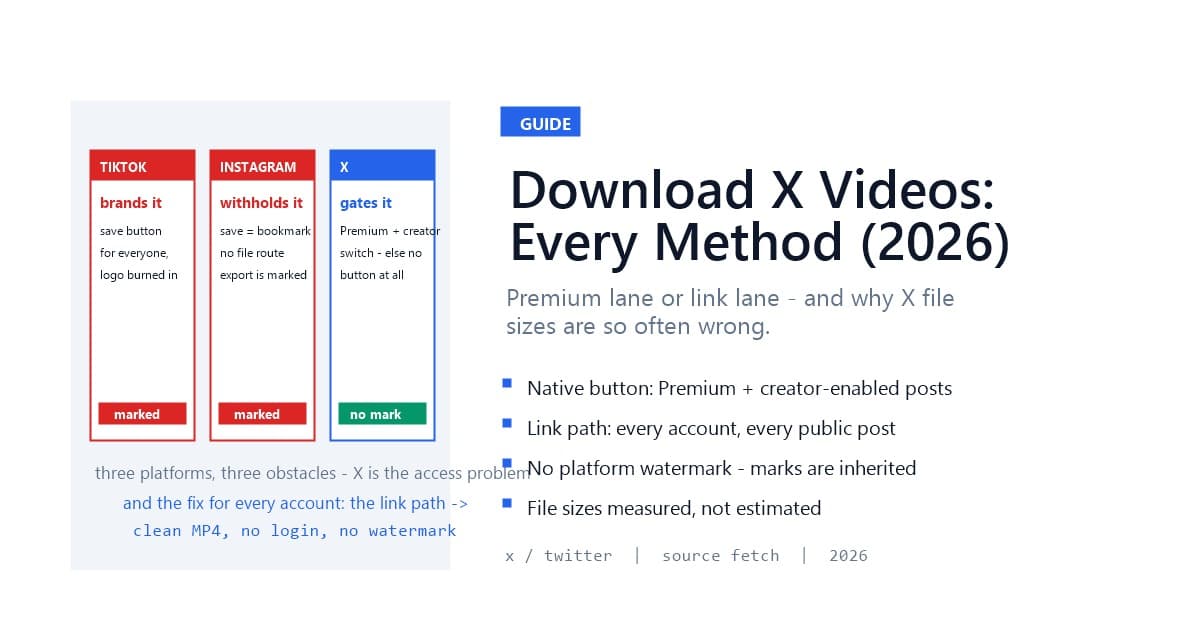
Downloading a video from X falls into one of two lanes, and which lane you are in depends on your account and the post itself. Premium subscribers see a native "Download video" option on eligible posts — the creator controls whether it appears. Everyone else, and every post where the creator left downloads off, uses the universal method: copy the post's link, paste it into a link-based downloader, and fetch the MP4 the platform serves its player. Either lane hands you a clean file, because X — unlike TikTok or Instagram — stamps no watermark on video in the first place.
That last detail is why X sits in a different bucket in our platform series. TikTok brands at download, Instagram withholds the file, and X simply gates who may take one. This guide walks both lanes with the exact conditions for each, then covers the engineering wrinkle unique to X that makes file-size estimates on this platform uniquely unreliable — a detail we handle in our own resolver and that explains half the "wrong size" complaints around X downloads.
Last updated: September 2026
Every major platform obstructs video downloads in its own shape, and X's shape is the third one. TikTok gives everyone a save button and brands the file it produces — the watermark problem, solved by fetching the unbranded play source. Instagram gives most users no file route at all and stamps the rare export it permits — the withholding problem, solved by fetching the CDN source. X gates the button by subscription and creator permission, and brands nothing — the access problem, solved by either qualifying for the native path or using the universal link path.
The contrast matters because it changes what "without watermark" means here. On X, there is no platform watermark to avoid — a downloaded X video is clean regardless of the lane you take. The marks you can encounter on X footage are marks that arrived with the content: a TikTok logo on a cross-posted clip, a creator's own overlay, a news chyron. Those are content, not platform branding, and the three-layer watermark check from our Instagram guide applies unchanged — look at the post in-app first, and you know what the fetched file will carry.
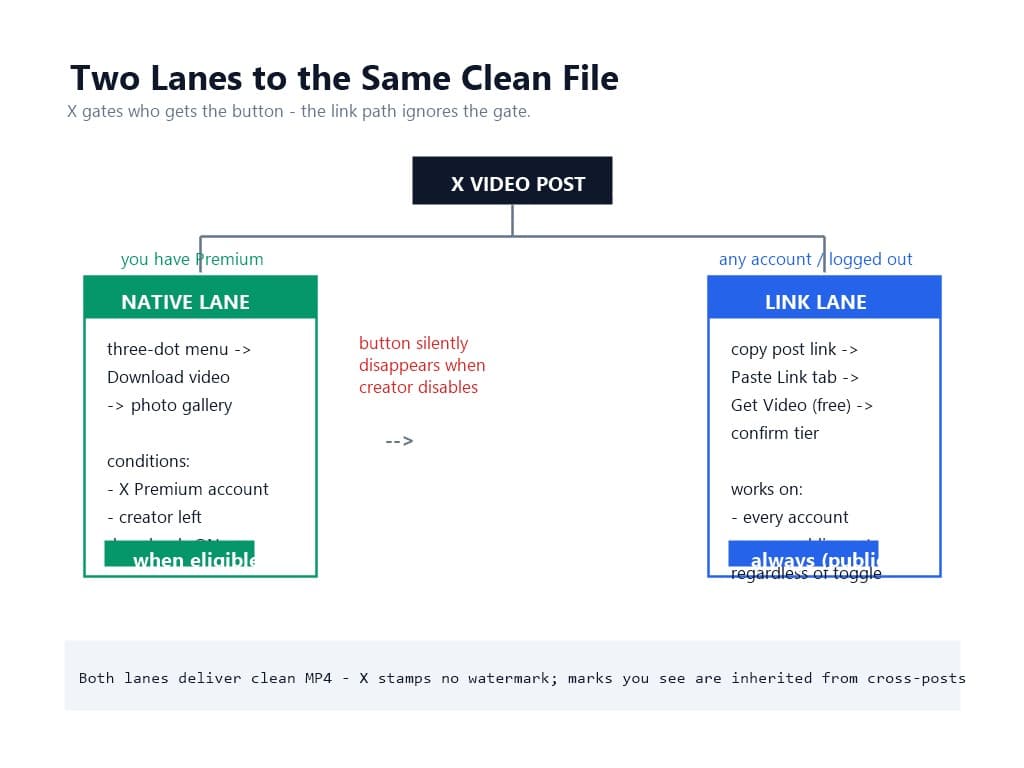
The in-app option exists for a narrow slice of users and posts:
When both conditions hold, the native path is the simplest one: no third party, no link copying, and the file quality matches what the app serves. It is also the lane with the most dead ends — the option silently disappears when the creator has disabled it, which is why "there is no Download video option" tops every troubleshooting list for X downloads.
One boundary on the native path that surprises people: eligibility is per-post, not per-creator. The same account's videos can be downloadable today and locked tomorrow, which makes any workflow built on the native button fragile at exactly the moment you need it. Creators archiving their own material, teams pulling reference clips, and journalists on deadline all hit the same wall — and the wall moves.
No — X stamps no platform watermark on video content, native download or fetched source alike. A video downloaded from X arrives as a clean MP4 in the resolution tier you selected. This is not a recent liberalization; X has simply never run the export-branding play that TikTok, Instagram, and Facebook built their download paths around, which our platform comparison tracks across all fifteen supported platforms.
What you can see on X footage is inherited branding. X is the internet's cross-posting hub: clips arrive from TikTok carrying their bouncing logo, from Instagram with the Reels glyph, from YouTube Shorts with the handle overlay, plus every creator-applied watermark in between. None of that is X branding, none of it can be avoided by any X downloader — it exists in the pixels the uploader provided — and all of it is removable afterward only by AI inpainting, the second path in our two-path framework.
The diagnostic is the same one-glance check from the platform series: if the mark shows while watching the post on X, it is baked into the content and travels with any download. If the post looks clean, the fetched file will be clean too. X adds nothing to either case.
The link path works for every account type — free, Premium, or logged out entirely — on every public post. You copy the post's URL, paste it into a link-based downloader, and the service resolves the video's stream metadata, lists the available quality tiers, and transfers the file you pick. Because it reads the same streams X's player reads, the result is the platform's own encode: no re-compression, no added marks, no app install.
Three properties make this lane the reliable one for anything recurring:
The boundary is publicity. Private accounts, followers-only posts, and age-gated media expose no source to any logged-out resolver — the same privacy line that holds across every platform in the source-first series. And direct-message video sits behind your session, which no link method reaches by design.
Three things:
x.com/status/... and the legacy twitter.com/status/... forms resolve identically.And one glance before pasting: the watermark check. If the clip is a cross-post carrying another platform's mark, decide at the preview whether that mark stays (fine for archiving) or whether the file is headed to AI removal after fetching. Deciding early keeps the workflow one path instead of two.
Open the post, tap the share icon, and choose Copy link. On desktop, copy the URL from the address bar while viewing the post. The link lands in the canonical x.com/.../status/... form; legacy twitter.com links work without conversion.
One habit from the resolver side: copy the link to the specific post containing the video, not to a thread or a profile. A thread URL resolves to its first post; if the video sits deeper in the thread, the parse returns that first post's content — usually "no video found" — when the correct link was one tap away. Share directly from the post that holds the video, every time.
If you are queuing several posts — pulling reference clips for research, or archiving your own thread media — copy links as you browse and hold them in a list. Parsing is free, so the queue costs nothing until you choose to download.
Open the upload page, switch to the Paste Link tab, paste the post URL, and hit Get Video. The parse is free and returns in seconds: the resolver identifies X, reads the post's public video metadata, and shows the preview — title, thumbnail, duration, and the quality tiers the source offers.
Use the preview for the two checks that matter on X. First, the content check: the thumbnail and first frames show whether the footage is clean or carries an inherited mark from a cross-posted platform. Second, the tier check: X sources commonly list from 1080p down through several lower tiers, and the recommended tier reflects the highest quality the source serves — if you need a smaller file for a specific use, pick it here, at preview, where the choice is informed.
Failure messages map one-to-one to causes: parse failed usually means a truncated link or a thread URL (re-copy from the post itself); "no video found" means the linked post holds an image or text, not video; "content not supported" flags GIF-style and multi-item edge cases the pipeline does not treat as standard video.
The results list the tiers the source actually has, labeled with resolution and frame rate, one marked recommended. Confirm the tier: the cost displays before you commit and does not change after. The download runs server-side — streaming from X's CDN into your task history — and a mid-transfer failure fails cleanly with an automatic refund rather than a charged dead file.
The output is MP4 with H.264 video, the compatibility combination that plays in every editor and browser without transcoding. For anyone repurposing X clips — and X is the internet's clip-sourcing hub, which is why journalists, meme editors, and compilation channels dominate this workflow — starting from the original encode matters for the same reason it does everywhere: your edit should be the first re-encode, not the third.
One expectation to calibrate: X's own upload ceiling shapes the tiers you see. Most X video lives at or below 1080p, and uploads are re-processed by the platform on ingest, so the source you fetch is X's processed encode of the creator's upload — the highest-quality version that exists on the platform, but not the creator's camera original.
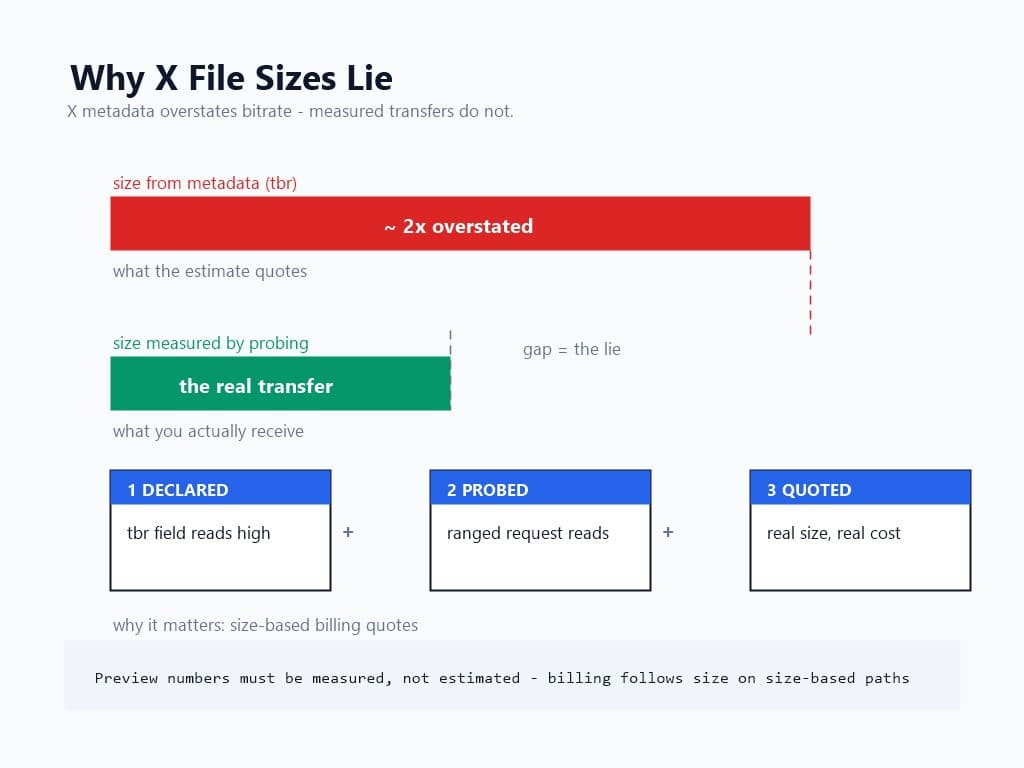
Here is the engineering wrinkle unique to X, and it explains a real share of confusion around X downloads: X's video metadata reports bitrate unreliably. In our resolver's testing, the metadata field tools conventionally use to estimate file size (the stream's tbr — total bitrate) reads materially higher than the actual stream delivers on X — inflated by roughly half again to double. Any tool that estimates your download size from that field alone is quoting a file substantially larger than the one you will receive.
The honest fix is measurement, and it is why our pipeline treats X differently on this step: instead of trusting the declared bitrate, the resolver probes the stream directly — a ranged request to read the true transfer size before anything is quoted or charged. The size you see at preview on X is a measured figure, not metadata arithmetic.
Why does this matter to a user and not just an engineer? Because billing follows size on any size-based download path. A tool quoting inflated estimates overstates your cost before you commit, and one that under-discloses surprises you after. The preview-then-confirm structure only works when the preview numbers are real — which is the entire argument for measuring instead of estimating, and the reason this is the one platform in the series where we flag file-size honesty explicitly.
The refusal boundaries on X specifically:
Each refusal is the method's honesty. Tools claiming to fetch DMs or private posts are claiming your credentials, not beating a wall.
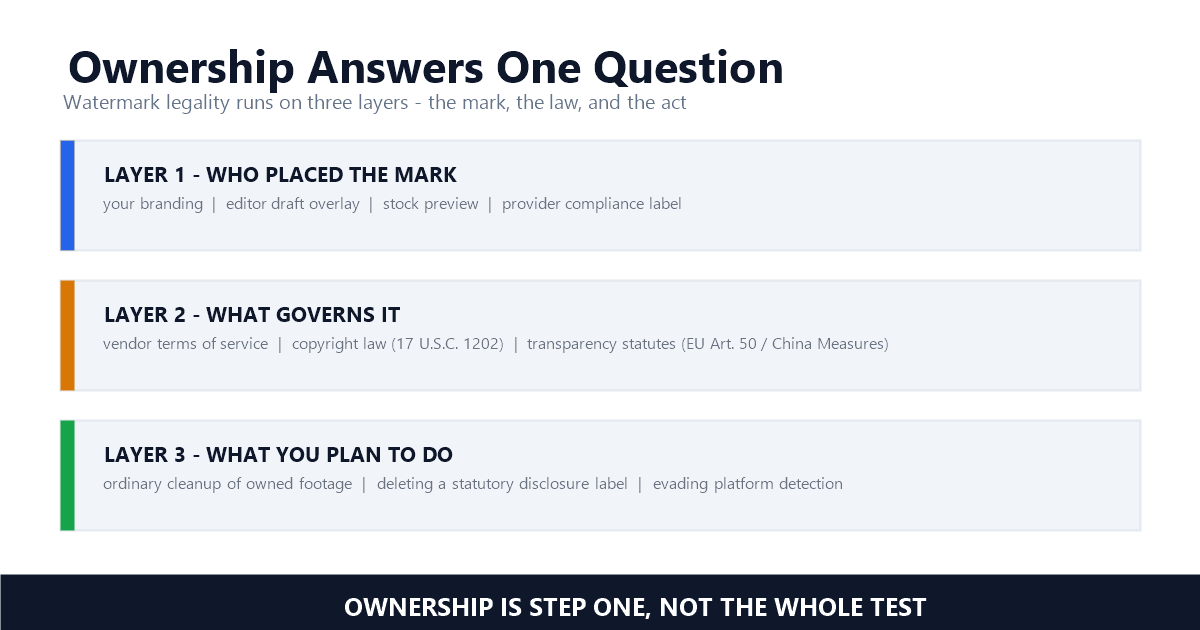
The framework carries over intact. Your own posts: fetching your own video's source is the cleanest case in the landscape — you hold the copyright and are retrieving the original, touching no one else's rights-management information, exactly as the DMCA Section 1202 analysis draws the line.
Others' public posts: personal viewing and private archiving sit in broadly tolerated territory — X's own Terms of Service frame content ownership as remaining with creators, and your obligations follow copyright, not the watermark state of the file. Reposting, monetizing, or presenting another creator's clip as yours is infringement regardless of how the file was obtained. Journalists should note the one X-specific carve-out worth respecting: the platform's role as a primary source does not suspend the creator's copyright in the footage, only in the facts it depicts.
One more carry-over from the series: fetching a source leaves no provenance gap — you hold the platform's own encode, not a laundered copy. The distinction keeps mattering as watermark and provenance regulation tightens through 2026.
Downloading X videos is an access problem, not a watermark problem: the native lane serves Premium subscribers on creator-enabled posts, and the universal link lane serves everyone else on everything public — both delivering clean MP4s because X brands nothing in the first place. Copy the post link, paste it into the Paste Link tab, check the preview for inherited marks, confirm the tier, and take the original encode with measured file sizes instead of inflated estimates. For cross-posted clips carrying other platforms' marks, the download-then-clean pipeline finishes the job.
The fetch takes less time than X takes to load the replies.
Q1: Can free users download X videos?
Not natively — the in-app download option appears only for X Premium subscribers, and only on posts where the creator has enabled downloads. Free users use the link path: copy the post URL, paste it into a link-based downloader, and fetch the same MP4 the platform serves its player.
Q2: Do X videos have a watermark when downloaded?
No. X stamps no platform watermark on video — native downloads and fetched sources both arrive as clean MP4s. Marks you see on X footage were inherited from cross-posted platforms (TikTok, Instagram, Shorts) or added by the creator, and travel with the content itself.
Q3: Why does the download button disappear on some posts?
The per-post control. Since July 2023, creators decide post-by-post whether downloads are allowed; when the option is off, the button does not render for anyone. The link path works on those posts regardless, because it reads the public source rather than the creator's download toggle.
Q4: Why did my downloader quote the wrong file size?
X's metadata reports stream bitrate unreliably — often inflated well above the actual transfer. Tools that estimate size from that field overstate what you will receive. Our resolver probes the stream's true size directly before quoting, so preview numbers on X are measured, not estimated.
Q5: Can I download videos from X DMs?
No — DM video lives behind your authenticated session, which link-based methods never touch. The same boundary covers private accounts and followers-only posts: no public source, no fetch, and tools claiming otherwise are after your login.
Mark Ma is the founder and lead engineer at UnMark, where he leads the development of AI-powered video watermark removal technology. With over a decade of experience in computer vision, deep learning, and video processing, he has built production systems that process millions of frames per month across TikTok, Instagram Reels, and Google Veo content. His technical work focuses on motion-compensated watermark detection, spatial-temporal inpainting, and quality-preserving reconstruction for short-form vertical video. Before UnMark, Mark shipped computer vision infrastructure at scale for content moderation and ad compliance platforms. He writes this blog to document the real engineering, testing, and regulatory reasoning behind UnMark's processing pipeline — every test result, frame analysis, and benchmark published here is reproduced from actual production data, not synthetic examples. His goal is to give creators, brands, and regulators a verifiable technical reference for AI video watermark removal in 2026.