COPIED Act vs Watermark Removal: What's Actually Illegal (2026)
Mark Ma
Last updated: October 2026
Search for a veed watermark remover and you land on a tool that answers a different question than the one you asked. VEED's remover crops or covers marks sitting on material you upload — a TikTok stamp, an outdated logo, a lower-third bar left by another app. What it cannot touch is the badge VEED itself renders onto every free-plan export. The tool and the badge share a name and almost nothing else.
UnMark, the watermark removal product I build for a living, exists because the gap between hiding a mark and reconstructing pixels is technology we sell, not marketing shorthand. VEED is the cleanest case study of that gap we have found in any editor: its own removal method, as three separate reviews describe it, is crop and cover; its badge is written into the file at encode; and its subscription page is the only exit it publishes. This piece works through what each path does to your frame, what a clean re-export actually requires, where the legal lines sit, and why six third-party outlets cannot agree on the price.
The short version: because the badge is baked in at encode, hiding it and removing it are different operations. Crop trims away footage. Cover paints something over it. An upgrade unlocks re-export from the original project — the only route to a genuinely clean file. AI inpainting rebuilds the corner from surrounding pixels on files you already have. Everything else, from the four ways the badge returns to the storage rule that quietly puts your project at risk, follows from those mechanics.
Yes — every export made on the free plan carries a "Made with VEED" badge: semi-transparent, anchored in the lower-right corner, rendered into the file at encode, and stacked on top of a 720p resolution cap. No free route produces an unmarked file. One review compresses the entire free tier into a single sentence, and every other source agrees.
That sentence is worth reading in full because each clause is a separate constraint: "Veed's free plan adds a 'Made with VEED' watermark to all exports, caps resolution at 720p, limits monthly export duration, restricts AI transcription to short clips, and does not guarantee permanent project storage" — VideoCaptions. Five limits in one line: branding, resolution, length, transcription, and storage. The last one looks minor yet proves to matter more than the others, for a reason that surfaces two sections from now.
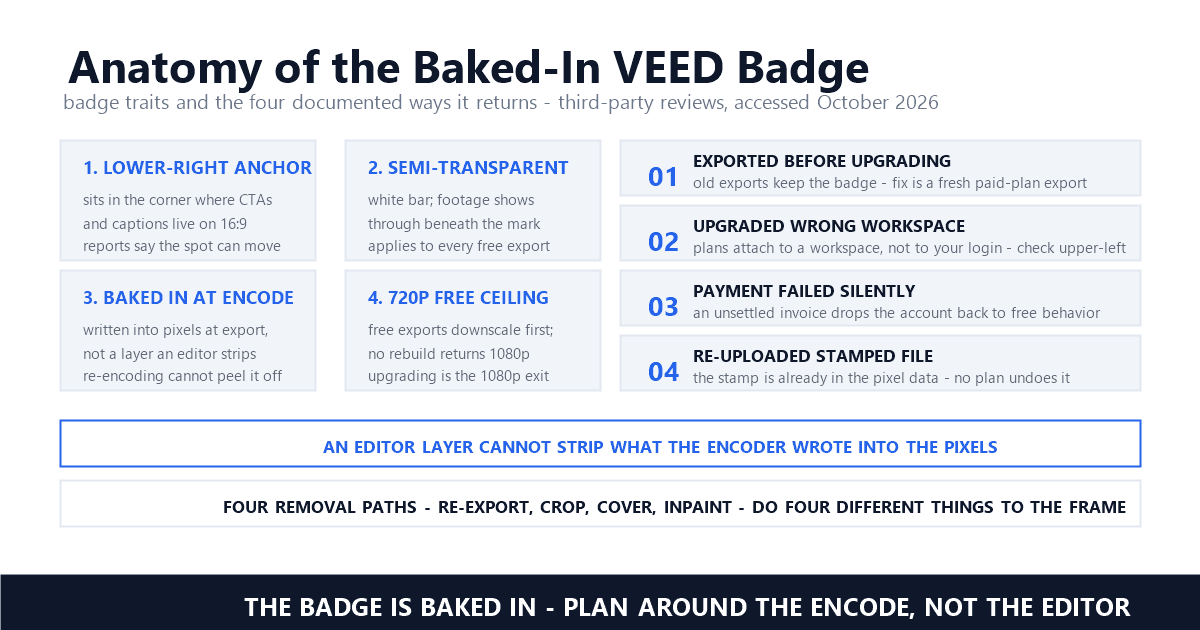
The badge itself has a consistent shape across reviews: a semi-transparent white bar in the bottom-right corner, plainly visible at normal viewing sizes. On vertical 9:16 footage it sits at the bottom edge, where caption tracks commonly run; on horizontal 16:9 video it occupies the quadrant where calls to action live. One reviewer, citing VEED's help center, reports the position shifts periodically — treat any fixed-corner assumption as something to verify per session, not per platform.
The remover and the badge serve different parties. The tool crops or covers marks on footage you bring in; the badge is part of your export's pixels, inscribed by the encoder. An editor layer cannot strip what the encoder wrote — and VEED documents no reconstruction capability anywhere in the methods reviewers describe.
Three independent write-ups describe the official method the same way. The remover page, as Zawa's July 2026 review walks it, offers crop, element overlay, and your own logo as the three hiding techniques; VMake's teardown says it more bluntly — VEED's approach is crop or overlay cover, not AI inpainting; and Filmora's tutorial walks the same three-step crop flow. Nobody who tested the tool describes reconstruction. The closest to a mechanism statement is Zawa's: "It is baked into the exported video file at encoding: it is not an overlay that can be removed after download" — Zawa.
Why does an editor ship a remover that cannot erase its own mark? Because the two products have different jobs. Inpainting is a reconstruction technique — a model reads the pixels around a masked region and synthesizes plausible replacement content for every frame, which is the operation that would be needed to truly erase a baked-in badge. VEED's tool performs none of it: "VEED has no AI inpainting at all. It has no way to predict or reconstruct what was behind the watermark" — Zawa. The remover exists to pull in footage carrying other platforms' marks; the badge exists to move free users up the plan ladder. For the distinction between hiding and restoring on genuine footage, our inpainting, cropping, and blurring comparison puts the three methods head to head.
Re-exporting clean needs four things to hold at once: an active paid plan, the proper workspace, a payment that actually settled, and the original project still stored in your account. Reviews record four separate ways the badge returns whenever any one of them fails.
Zawa's review catalogs the recurrence modes precisely. Exports produced before upgrading keep their badge indefinitely — the fix is opening the original project and exporting again under the paid plan. Plans attach to a workspace, so upgrading the wrong one changes nothing; the dashboard's top-left corner tells you which workspace you are in. A failed payment drops the account back to free behavior until the invoice settles. And re-uploading an already-stamped file into a new project changes nothing, because the mark lives in the pixel data, not on a removable layer.
The fourth requirement is the one competitors skip: the original project has to still exist. Recall the storage clause from the free-tier limits — VEED offers no guarantee of permanent project storage on the free plan. Delay the upgrade long enough and the draft you planned to re-export may simply be gone, leaving you with a stamped file and no pristine source. If a clean export is the goal, upgrading before you close the laptop is the only variant without any failure mode. The paid tier itself stays modest — the watermark-free Creator level runs roughly $10 to $12 a month billed yearly in the sources we surveyed, a figure dissected in the final section.
Crop deletes the corner of the frame; cover paints a sticker, shape, or logo over it. Both amount to concealment — the pixels beneath the badge end up gone or obscured, never restored. And on the free plan, re-exporting the edited project simply stamps a fresh badge onto the result.
The timeline explains why the official method cannot clean VEED's own exports. The crop and cover tools operate inside the editor, on materials you upload. Used on an original, unstamped source, they can hide a third-party mark — but the moment a free-plan export renders, the new badge lands in the encoded file. Upload that file back into the editor and crop the corner, and the next export burns the badge in again. Reviewers portray the loop exactly that way: you are swapping one mark for another. PDFChef states the download-side version of the same fact: "Every VEED free plan watermark export carries that badge baked into the file, so you can't simply crop or remove it afterward" — PDFChef.
Each hiding technique carries its own composition cost. Cropping the lower-right corner on vertical video cuts into the subtitle zone and unbalances the frame — the same failure mode we documented for Instagram Reels in why cropping fails on Reels. Covering trades VEED's branding for whatever you put there; your own logo is the only cover that adds something, so it leads the official list. For marks parked over faces, products, or on-screen text, neither method works at all — the region must remain visible. Handling marks on other platforms' footage is a different workflow entirely; our TikTok-to-Reels repurposing guide covers the legitimate version of that job.
A static corner badge represents the friendliest scenario — fixed position, low-texture surroundings, and a mask that never moves across frames. The ceiling is your source, not the algorithm: a 720p export was downscaled before the badge landed, and reconstruction restores the corner, rather than the resolution the free tier never delivered.
Mechanically, the model samples surrounding pixels and fills the masked region per frame, which is why the inpainting model landscape matters for anything harder than a corner stamp. We compared inpainting, cropping, and blurring on the same footage in our methods comparison, and a static translucent bar was the case where reconstruction beat both alternatives by the biggest margin. A bouncing, position-shifting watermark is the harder problem — that is the case our TikTok repurposing walkthrough handles frame by frame, and temporal consistency is where weaker pipelines betray themselves, the subject of our flicker analysis.
So when is reconstruction the right call here? When the project is already gone. If you still have the original inside your VEED account, the upgrade-and-re-export route beats any post-processing, because it returns a 1080p file with no mark and no reconstruction risk. Inpainting earns its keep on stamped files whose source projects no longer exist — the storage clause makes that population larger than most people assume. I documented the same editor-bakes-the-badge pattern in our CapCut guide, where the platform's in-house remover admits its pixel-sampling approach varies with background complexity; corner badges on static backgrounds are the one case every pipeline handles well. To see the reconstruction step in motion, here is the UnMark pipeline processing owned-asset footage:
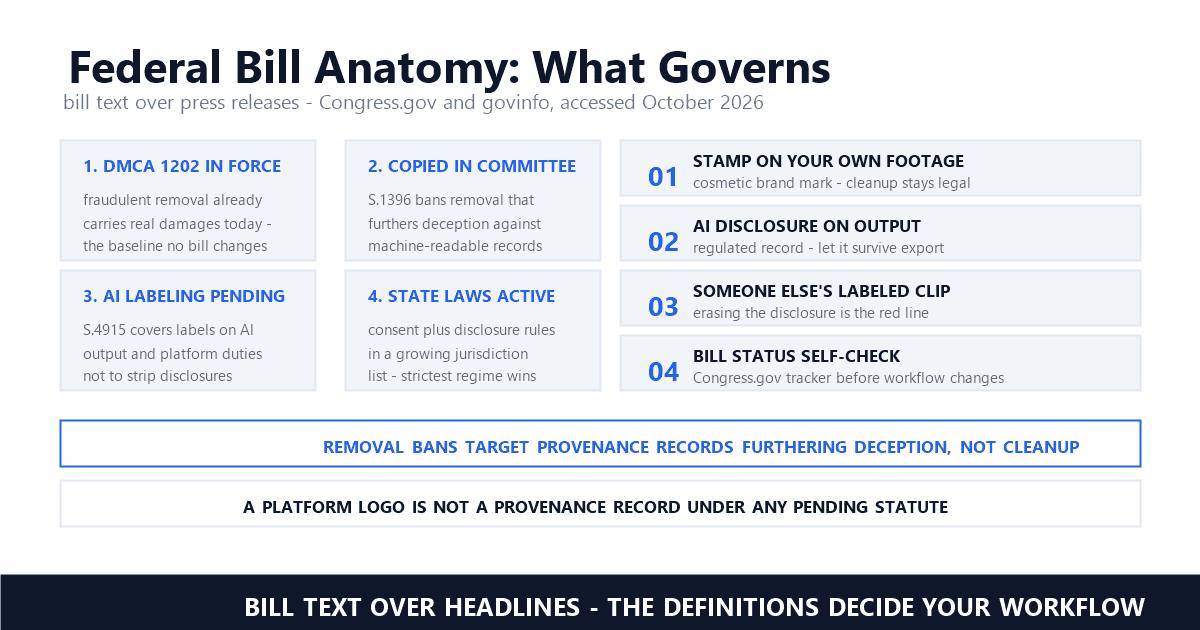
Three layers decide it. Contract: summaries of VEED's terms say stripping the badge from free exports breaches the agreement — a civil matter, not a crime. Copyright: the badge is not copyright management information in footage you own. Ownership of the underlying video decides the rest, and it remains the layer most search results blur.
On the contract layer, the honest citation is a third-party summary, because VEED's terms text sits behind pages that resist direct quoting: "VEED's ToS does not permit you to remove the watermark from free-tier exports" — VidCompress, and "Not criminally illegal in most jurisdictions, but it violates VEED's terms of service" — VidCompress. The same summary notes individual users rarely face consequences while commercial work can carry the breach further downstream. The tidy reading: the subscription is the release valve, and paying the Creator rate dissolves the contractual problem along with the badge.
The copyright layer is where our series has done its deepest work. Section 1202 of the DMCA protects copyright management information — the identity of the copyright owner embedded in the work. VEED's branding is not that; it is a platform sticker applied to your creation, which is a distinct object entirely from the watermark on someone else's footage. Our Section 1202 explainer defines the line, the legality guide maps it across AI-generated video, and the own-video pillar argues the ownership test that governs everything. Apply it here: your own VEED export is yours to clean under the contract analysis above; a client's or competitor's stamped file is not.
VEED's own pricing page is the number that counts: the watermark-free Creator tier lists at $10 per user per month billed yearly, with full-HD exports and no badge on paid output. Every third-party quote scatters around that anchor — $10 to $12 billed yearly in most surveys, one outlet quoting $26 monthly, another pricing in euros — because regional pricing, currency, and promotions move the figure, and because secondhand quotes age quickly.
Lay the sources side by side and the spread makes its own argument: Tooliverse lists Creator at $10 monthly billed annually; ToolColumn says $10 per month on a $120 yearly invoice and $26 month-to-month; TopReviewed starts at $10.75; CreativeVault and Zawa both quote $12, Zawa adding a $147 yearly total. ShareSpeak, quoting from Europe, prices the same tier at €11 per month billed yearly — €22 monthly. Those six figures describe one plan at one moment in 2026. Every one of them was accurate somewhere, which is the whole lesson: a subscription price amounts to a snapshot, not a constant, and the page that matters is the one VEED controls.
Price the free path honestly while you are at it. Its cost is not zero — it is a 720p ceiling, a baked-in badge, a monthly export-duration limit, and no storage guarantee, compounding into files that need rework the moment a client or platform demands clean 1080p. The decision rule that survives contact with reality: project still in your account, upgrade and re-export — it is the only route that upgrades resolution and removes the mark together; project gone, reconstruct the corner on the copy you hold; budget at zero, accept the badge or pick a tool whose free tier does not stamp output. Editors differ wildly on that last point — our Filmora guide documents a vendor whose trial marks survive even purchase unless you re-export from the project file, and our Canva guide covers the design-tool side of the same ladder.
Can you remove the VEED watermark for free?
Not cleanly. The free plan's hiding methods — crop and cover — work inside the editor on footage you upload, but any free-plan export re-stamps the result, so the cycle never ends with a clean file. The two genuine routes are paying for the Creator tier and re-exporting the original project, or using AI inpainting on a watermarked file whose source project is already gone. Free utilities that promise erasure should be checked against the baked-in-pixels reality before you hand anything over.
Why does the VEED watermark still show after I upgraded?
Four recorded causes cover nearly every case: the file was exported before the upgrade took effect, so it needs a fresh export from the original project; the plan was purchased on a different workspace than the one you edit in; a failed payment silently reverted the account to free behavior; or the file was re-uploaded with its badge already embedded in the pixels, which no plan can undo. Check the workspace name in the dashboard's upper-left corner first — it is the quickest to rule out.
Is the Made with VEED badge copyright management information?
No. Copyright management information identifies the copyright owner of the work, and the badge identifies the editing platform, not the author — it is VEED's branding on your creation. That distinction carries legal weight: Section 1202 claims attach to stripping rights information from works, most sharply when the footage belongs to someone else. Your own exports raise a contract question under VEED's terms; anyone else's stamped footage raises a copyright one.
Last updated: October 2026
VEED (official) — Pricing: Creator plan — watermark-free, full-HD exports (accessed October 2026)
Zawa — VEED Watermark Remover: How It Works and Its Limits (review, updated July 2026) (accessed October 2026)
VideoCaptions — Veed Free Plan Limits 2026: Watermark, 720p Cap, and More (accessed October 2026)
PDFChef — VEED Free Plan Limitations: What You Need to Know (accessed October 2026)
VidCompress — VEED Watermark Removal: Legal Ways and 3 Free Alternatives (accessed October 2026)
ShareSpeak — VEED Pricing 2026: Plans, Watermark & Teleprompter Cost (accessed October 2026)
Tooliverse — VEED.IO Review 2026 - AI Social Video (accessed October 2026)
ToolColumn — VEED AI Video Editor Facts (accessed October 2026)
Cornell LII — 17 U.S.C. § 1202 — Integrity of copyright management information (accessed October 2026)
Mark Ma is the founder and lead engineer at UnMark, where he leads the development of AI-powered video watermark removal technology. With over a decade of experience in computer vision, deep learning, and video processing, he has built production systems that process millions of frames per month across TikTok, Instagram Reels, and Google Veo content. His technical work focuses on motion-compensated watermark detection, spatial-temporal inpainting, and quality-preserving reconstruction for short-form vertical video. Before UnMark, Mark shipped computer vision infrastructure at scale for content moderation and ad compliance platforms. He writes this blog to document the real engineering, testing, and regulatory reasoning behind UnMark's processing pipeline — every test result, frame analysis, and benchmark published here is reproduced from actual production data, not synthetic examples. His goal is to give creators, brands, and regulators a verifiable technical reference for AI video watermark removal in 2026.