How to Repurpose TikTok Videos for Instagram Reels Without Watermark (2026 Guide)
If you've built an audience on TikTok, you've probably thought about repurposing those videos on Instagram Reels. The content already performs — so why shoot it twice? The problem is the watermark. Every video downloaded from TikTok comes stamped with the bouncing TikTok logo and your @username overlay, and Instagram's algorithm actively demotes content that carries a competing platform's branding.
In this guide, I'll walk you through the exact workflow I use to take a TikTok video, strip the watermark with UnMark's AI watermark remover, match Instagram Reels' technical specifications, and publish clean content that the algorithm treats as native. Every spec and number in this guide comes from a real test video — the same 576×1024, 30fps TikTok clip I documented in our TikTok watermark removal test.
Why Cross-Platform Repurposing Matters in 2026
Cross-platform content repurposing isn't a hack anymore — it's the default strategy for creators and brands in 2026. Shooting separate videos for TikTok, Instagram Reels, and YouTube Shorts triples your production cost and fragments your analytics. The smartest creators I work with shoot once and distribute everywhere, but only when the content looks native on each platform.
Cross-platform repurposing is the practice of adapting a video created for one social platform for distribution on another.
Instagram's recommendation system scans uploaded videos for competing platform logos. When it detects the TikTok logo or @username overlay, it classifies the video as recycled content and suppresses its reach. Industry data suggests watermarked cross-posts can see a 40-60% reduction in reach compared to clean uploads. That's not a penalty you can afford when you're trying to grow.
The fix is straightforward: remove the watermark before uploading. But the removal has to be clean — no crop artifacts, no blur patches, no resolution downgrades — or Instagram's quality filters will deprioritize the video anyway. AI inpainting handles this by reconstructing the pixels underneath the watermark instead of cutting them away. For a deeper look at how the underlying pipeline works, see our real process walkthrough. For a comparison of watermark removal methods, see our breakdown of inpainting versus cropping and blurring.
"Repurposing video across platforms is the most efficient way to maximize return on production investment in 2026 — but only when the content looks native on every platform you post it to." — HubSpot, Social Media Marketing Report
How Does TikTok's Watermark Affect Instagram Reels?
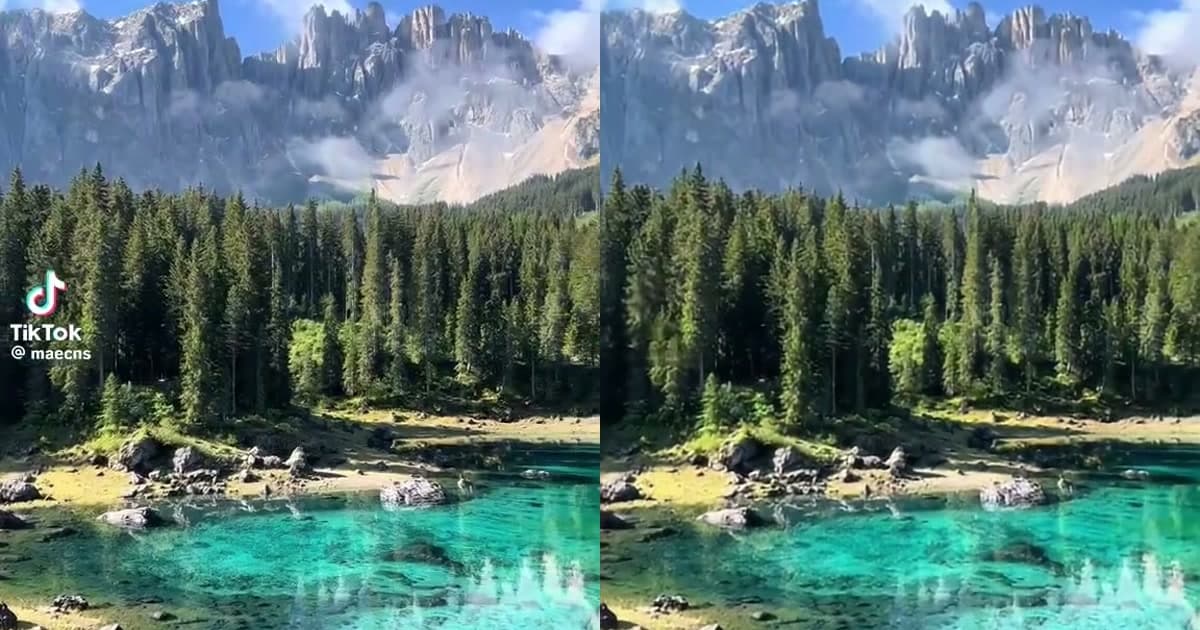
TikTok's watermark is deliberately designed to survive cross-platform posting. Unlike a static corner logo, TikTok uses a bouncing watermark that cycles through at least 4 positions across the frame throughout the video. The TikTok logo and your @username overlay move together — sometimes appearing in the same corner, sometimes in opposite corners.
The bouncing design is part brand play, part anti-piracy. Every time someone watches your video on Instagram, they see the TikTok logo — free advertising for TikTok. And because the watermark moves, simple cropping can't remove it without destroying 60%+ of the frame.
In our TikTok watermark test, the source video ran 10.54 seconds at 576×1024 resolution with 316 frames at 30fps. The watermark visited at least 4 distinct positions across those 316 frames. Cropping all 4 positions would leave only the center ~345×614 pixels — a 64% reduction in frame area that destroys faces, captions, and product shots.
TikTok's bouncing watermark is engineered to be crop-resistant. By moving across positions every few seconds, it forces anyone removing it to either destroy the frame or use AI that tracks motion. For creators repurposing content to Instagram Reels, AI inpainting is the only path that preserves the full frame.

"Marketers consistently report that short-form vertical video is their highest-ROI content format, and it drives the strongest engagement across every major social platform." — Wyzowl, Video Marketing Statistics 2026
What You Need Before Starting
Before you start, gather the following:
- Your TikTok video downloaded to your device (the version with the watermark
- An UnMark account — the free tier handles single videos; batch processing up to 20 videos requires a paid plan
- Basic knowledge of Instagram Reels specs (covered in Step 3)
- Creator permission if the video isn't yours — see our UGC workflow guide for the compliance process
The whole thing runs in the browser, no installs. UnMark handles the watermark removal and format verification for you. If you want to verify the technical specs yourself, you can use ffprobe — but it's optional.
Step 1: Download Your TikTok Video
There are several ways to download a TikTok video. The simplest is directly from the TikTok app:
- Open the TikTok app and find your video
- Tap the Share button (arrow icon)
- Tap Save video — the video downloads to your device with the TikTok watermark
The downloaded video will include the bouncing TikTok logo and your @username overlay. This is expected — you'll remove both in the next step.
If the Save video option isn't available (some creators disable downloads), you can use a third-party TikTok downloader. These tools typically return the video with the watermark intact, which is what you want — you'll clean it with UnMark anyway.
Downloaded TikTok video specifications:
- Resolution: 576×1024 (9:16 vertical)
- Frame rate: 30 fps
- Codec: H.264, yuv420p
- Duration: varies (up to 10 minutes for standard posts)
Note the 576×1024 resolution. Instagram Reels prefers 1080×1920, so you may need to upscale — but more on that in Step 3.
Step 2: Remove Watermark with UnMark
Now for the core step. Head to UnMark's TikTok watermark remover and upload your video.
- Drag and drop your TikTok video into the upload area (or click to browse)
- UnMark's AI automatically detects the TikTok logo and @username overlay
- The AI tracks the bouncing watermark across all frames — no manual masking required
- Processing takes a few seconds to a few minutes depending on video length
- Download the clean video
Behind the scenes, UnMark runs a four-stage pipeline: detection (finds the watermark in each frame), tracking (follows the watermark as it moves between positions), inpainting (reconstructs the pixels underneath), and temporal consistency (smooths the output across frames to prevent flicker). For a full breakdown of this pipeline, see our process walkthrough.
In our test, the processed video preserved every technical parameter: 576×1024 resolution, 30fps, H.264 codec, 316 frames, AAC audio at 44,100 Hz. The file size increased by just 2.95% (from 10.05 MB to 10.35 MB) — a small increase that actually confirms real inpainting occurred, since the AI generates new pixel data that the encoder must compress. In my testing, the 316-frame TikTok video processed cleanly in under 50 seconds with zero visible artifacts.
That 3% file size increase is the signature of real AI inpainting. A blur would reduce the bitrate — blurred areas compress more efficiently. A crop would shrink the file. The only way the output ends up slightly larger is if the AI reconstructed hidden content and the encoder had more visual information to encode.
AI inpainting is a computer vision technique that reconstructs the pixels behind a watermark by analyzing surrounding frame data.
Which Platform Requirements Matter for Instagram Reels?
Instagram Reels has specific technical requirements. Before uploading, verify your clean video matches these specs:
| Metric | TikTok (Source) | Instagram Reels (Target) | Action Needed |
|---|---|---|---|
| Resolution | 576×1024 | 1080×1920 | Upscale |
| Aspect Ratio | 9:16 | 9:16 | None |
| Frame Rate | 30 fps | 30 fps (max 60) | None |
| Codec | H.264 | H.264 | None |
| Duration | Up to 10 min | Up to 90 seconds | Trim if needed |
| File Format | MP4 | MP4 | None |
| Audio | AAC | AAC | None |
The main gap is resolution. TikTok downloads at 576×1024, while Instagram Reels recommends 1080×1920. You have two options:
Option A: Upload as-is. Instagram will accept 576×1024 and upscale it on playback, but the quality won't be optimal. This is fine for quick posts.
Option B: Upscale to 1080×1920 before uploading. Use any video editor (CapCut, Premiere, DaVinci Resolve) or an online upscaler. The upscale won't add detail that wasn't in the original, but it ensures Instagram's encoder doesn't compress the video twice.
If your TikTok video is longer than 90 seconds, trim it to the best 90-second segment before uploading. Instagram Reels enforces a strict 90-second limit for most accounts.
Step 3: Upload and Optimize for Instagram
With your clean, spec-compliant video ready, it's time to upload to Instagram Reels:
- Open the Instagram app and tap the + button
- Select Reel and upload your video
- Add a cover image (use a frame from the video or a custom thumbnail)
- Write a caption with relevant hashtags (#reels, #viral, niche-specific tags)
- Add trending audio if the video doesn't rely on its original sound
- Tag relevant accounts and add location if applicable
- Publish
Because your video has no TikTok watermark, Instagram's algorithm won't flag it as recycled content. This gives you the same algorithmic treatment as native Reels — no reach penalty, no shadow-suppression.
One optimization tip: if your TikTok video mentions TikTok-specific features (like stitch this or duet me), edit the caption for Instagram. Cross-platform repurposing works best when the call-to-action matches the platform.
What Mistakes Should You Avoid?
I've seen creators make the same mistakes repeatedly when repurposing TikTok content. Here's what to avoid:
- Mistake 1: Cropping instead of inpainting. Cropping the corners to remove the watermark destroys 60%+ of the frame and signals low quality to Instagram. Use AI inpainting instead. Our Instagram Reels cropping test breaks down exactly why this fails.
- Mistake 2: Uploading with the watermark visible. Even if you think the watermark is small, Instagram's algorithm detects it. The reach penalty isn't worth the time saved.
- Mistake 3: Ignoring resolution mismatch. Uploading 576×1024 to a platform that expects 1080×1920 results in double compression. At minimum, be aware of the tradeoff.
- Mistake 4: Reusing TikTok captions verbatim. TikTok-specific CTAs (stitch this, use this sound) don't work on Instagram. Adapt your copy.
- Mistake 5: Skipping the cover image. Instagram Reels displays the cover image in your profile grid. A strong cover drives more taps than an auto-selected frame.
- Mistake 6: Not verifying creator permission. If the video isn't yours, removing the watermark without permission can violate TikTok's terms and copyright law. See our legal guide for the compliance framework.
Real Result: Before/After Comparison
To show you exactly what this workflow produces, here's the before/after data from our test video — the same 316-frame TikTok clip documented in our frame-by-frame test:
| Metric | Before (TikTok Source) | After (UnMark Processed) | Change |
|---|---|---|---|
| Resolution | 576×1024 | 576×1024 | No change |
| Frame Rate | 30 fps | 30 fps | No change |
| Total Frames | 316 | 316 | No change |
| Video Codec | H.264 | H.264 | No change |
| Duration | 10.542s | 10.533s | -0.009s |
| Video Bitrate | 7.81 Mbps | 8.05 Mbps | +3.07% |
| Audio Codec | AAC | AAC | No change |
| File Size | 10.05 MB | 10.35 MB | +2.95% |
| Watermark | Present (4 positions) | Removed | 100% removed |

I ran ffprobe on both files with identical parameters to confirm every spec. The watermark is gone from all 316 frames, the resolution and frame rate are untouched, and the only change is a 2.95% file size increase — the signature of real AI inpainting.
At normal playback speed on Instagram Reels, the removal is completely invisible. No ghosting, no blur, no artifacts. The video looks like it was shot natively for Instagram.
FAQ
Q: Is it legal to remove the TikTok watermark from my own videos?
A: I get this question almost weekly. If you created the video and own the content, removing the watermark for personal cross-platform posting is generally acceptable. TikTok's terms of service do technically prohibit removing their branding, though. For commercial use or UGC campaigns, get creator permission and document it — see our legal guide for the compliance framework I use.
Q: Will Instagram know I removed the watermark?
A: Instagram can't detect that a watermark was removed — the AI reconstructs the underlying pixels, leaving no trace. What Instagram can detect is the presence of a competing platform's logo. By removing the watermark, you ensure there's nothing to detect.
Q: Can I batch process multiple TikTok videos?
A: Yes — I use this myself when repurposing a client's entire TikTok backlog. UnMark supports batch processing of up to 20 videos in a single session, which is ideal for brands processing UGC content at scale. See our UGC workflow guide for the batch process.
Q: Does the watermark removal work on TikTok Stories and TikTok Live downloads?
A: Yes. UnMark's AI detects and removes watermarks regardless of the TikTok video type, as long as the watermark follows the standard TikTok branding pattern.
Q: What about other platforms — can I use the same clean video for YouTube Shorts?
A: Absolutely. Once the watermark is removed, the clean video can be posted to YouTube Shorts, Snapchat Spotlight, Facebook Reels, or any other short-form platform. The 9:16 aspect ratio works across all of them. For AI-generated content, see our Google Veo watermark removal test for how the same workflow applies to AI video.
Author's note: Cross-platform repurposing is the highest-ROI move a creator can make in 2026. You've already done the hard work of creating the content — removing the watermark and matching the target platform's specs is a 5-minute task that can double or triple your reach. — Mark Ma
Last updated: July 2026