Loom Watermark Removal: the Branding Layer, the Download Gate, the Re-Record Fix (2026)
Last updated: September 2026
A Loom file breaks the pattern of everything else in our processing queue. The AI video platforms we test — Veo, Sora, Runway, Pika, Kling, Hailuo — stamp a logo into the pixels, and our detection models spend their days finding those regions and rebuilding what sat behind them. Loom recordings arrive with clean frames. The branding lives one layer out: on the share page, in the player chrome, in the "Made with Loom" card that trails every playback. And the real wall turns out not to be a stamp at all — it is that the free plan never hands you a file in the first place.
That inversion flips the usual advice, because the search results mostly treat Loom like every other watermarked video. This Loom watermark removal guide sorts the layers apart: what Loom branding actually is and where it lives, which plan lifts it, why download permissions are the trap people hit first, what re-recording costs you, and what to do about files that were never exported. Every plan, permission, and pricing fact below was checked against Loom's and Atlassian's own documentation in September 2026.
Does Loom Even Add a Watermark to Your Video?
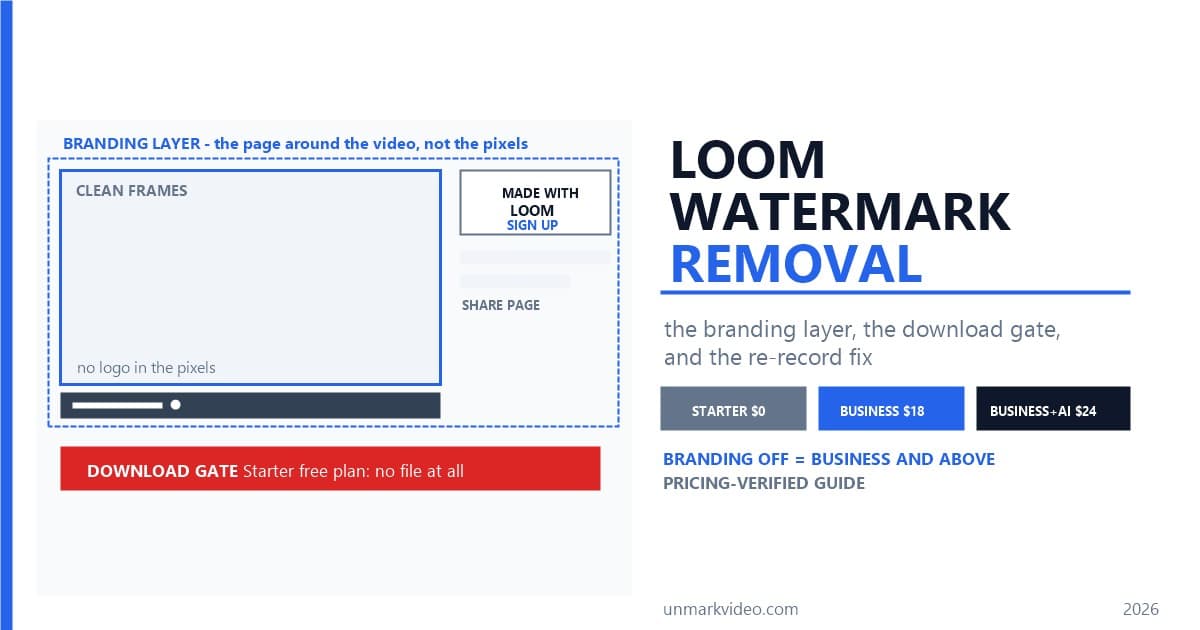
At the frame level, no — a Loom recording's pixels stay clean. The branding lives on the page around the video: the Loom Branded Player, the "Made with Loom" popup at the end of playback, and a sign-up prompt shown to logged-out viewers. Lifting it is a settings change, not a frame edit, and the settings are gated to paid plans.
The confusion is understandable, because Loom's own pages describe two different products. Its marketing page for a free no-watermark screen recorder states, "Loom is a screen recorder without a watermark, even in its free version" — Loom, No Watermark Screen Recorder. Its pricing page, the same company, lists "Remove Loom branding" as a Business-plan feature at $18 per user per month. Both statements are true because they describe different layers. The video file is clean; the viewing experience that wraps it is not. Atlassian's custom branding documentation describes the paid layer precisely: workspace admins can remove the Loom branding, add their own logo, and recolor the player — and the fine print matters, because an uploaded logo "will not appear within the video playback itself" — Atlassian Support, Configure Custom Branding.
Loom branding is the wrapper, not the tattoo: player chrome, page furniture, and end cards that surround a clean recording instead of being burned into its frames. That definition decides everything downstream. A tattoo needs inpainting or a re-render; a wrapper needs a plan, a toggle, or — if the wrapper got captured into someone else's recording — the same reconstruction work we apply to platform stamps. The series' other platforms drew their clean-output lines in the pixels; Loom drew its line one layer out.
Which Loom Plan Removes the Loom Branding?
Business and above. Custom branding — the controls that remove Loom's player branding and swap in your own logo and colors — is available to Business, Business + AI, and Enterprise users only, per Atlassian's support documentation. Business runs $18 per user per month; Business + AI runs $24.
The plan ladder, read off the pricing page in September 2026:
- Starter — $0: up to 25 videos per person, 5-minute recording cap, 720p quality, up to 50 members. No downloads, no branding controls.
- Business — $18 per user/month: unlimited videos and recording length, 4K recording, basic waveform editing, "Remove Loom branding," and upload and download videos.
- Business + AI — $24 per user/month: everything in Business plus the Loom AI suite — auto titles, summaries, chapters, filler-word removal.
- Enterprise — custom pricing: everything in Business + AI plus SSO/SCIM, a 99.95% uptime SLA, and download rights extended to members.
Two details worth catching before you buy. The pricing page's fine print splits the branding benefit into two rows — "Remove Loom branding on the video page" and "Remove Loom branding on embedded video player" — so both the share page and any embeds you publish get cleaned on the same plan. And there is a 14-day free trial of Business + AI if you want to check the branding toggles before the first invoice lands.
Can You Download a Loom Video on the Free Plan?
No — and this is the wall people hit first. Atlassian's download documentation states it plainly: "Admins/creators on a Starter Free plan cannot download videos" — Atlassian Support, Download Your Loom Video — and troubleshooting adds that "the download feature is only available on Business, Business + AI, or Enterprise plans." When a download does go through, it arrives as an MP4.
The permission matrix from the official download guide:
- Business / Business + AI: admins and creators.
- Education: admins only.
- Enterprise: admins and members.
- Creator Lite and Viewer roles: no download permission on any plan.
This is where Loom inverts the rest of the series. A watermarked platform hands you a stamped file and lets you decide what to do with it; Loom's free tier keeps the file. Every other guide in this series starts from "here is what the stamp looks like" — Loom's starts one step earlier, at "here is how to get the video at all." The same logic extends to your viewers: the download doc notes that viewers who are "not signed in to Loom or have the Starter free plan will not be able to download your video regardless of your video settings." A client on the Loom free plan cannot save the clip you sent them, no matter which toggles you flip.
The exported file has its own fine print, all documented: trims survive the MP4 export, but CTAs, filler-word and silence removal, chapters, and closed captions do not. Variables-based videos cannot be downloaded at all, meeting recordings belong to the organizer alone, and anything over 20GB — roughly three hours recorded in 4K — needs a support request. A freshly recorded video can also need processing time before the download appears; the support KB suggests allowing at least 30 minutes before assuming a failure.
How Do You Turn the Loom Branding Off on the Share Page?
With a Business-level plan and two switches. The "Made with Loom" popup goes away through the Show Loom branding toggle, and each video's Loom Branded Player toggle controls the "Get Loom for Free" prompt that logged-out viewers see. Both live in workspace settings, and both require an admin.
Atlassian's branding guide walks the actual controls:
- Show Loom branding — the workspace-level toggle that removes the "Made with Loom" branded popup at the end of a recording. Admins toggle it off from the appearance page of the workspace settings.
- Loom Branded Player — a per-video toggle under Video settings. The doc is blunt about what leaving it on does: "viewers who aren't logged into Loom will see the Get Loom for Free prompt." Turning it off makes the share page read as yours rather than as an ad for Loom.
- Your own logo and player colors — also admin-only, also Business-and-above. The logo renders below the video title on the share page and, per the doc, never inside the playback itself.
Notice what none of these switches do: touch a single frame. Nothing was drawn into the video, so nothing needs to be scrubbed out — the entire operation is debranding the wrapper. That is the clean case, and it costs $18 per user per month. The messy case is what people do when they cannot or will not pay it, and it deserves its own section.
Why Do People Re-Record Loom Videos Instead of Downloading Them?
Because the download gate leaves no other self-serve route. Free-tier users with 25-video libraries, teams migrating off Loom, and viewers who were only sent a link all end up in the same place: playing the video and capturing the screen. It works — at the cost of quality, framing, and player chrome baked into the frames.
The stranded-library scenario is real enough that third-party coverage turned it into a genre. Clipy's writeup of Loom pricing after the Atlassian acquisition describes the flashpoint — the retirement of the free Creator Lite role around February 2026, which reclassified passive viewers as billable seats and produced the bill-shock threads that pushed Loom's Trustpilot score to roughly 1.4 out of 5 as of early 2026. We can't verify Atlassian's internal rollout numbers from outside, but the official download doc still lists Creator Lite as a role with no download permission on any plan, which tells you where those accounts stand: they can watch, and they cannot export.
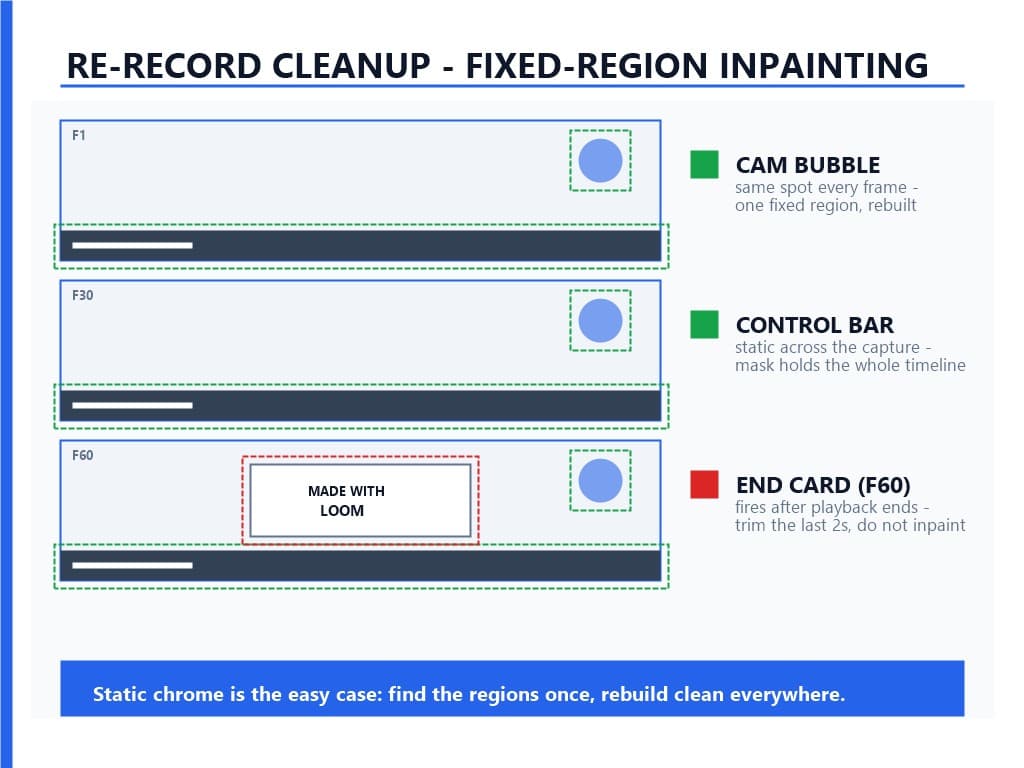
What does a re-record actually cost? Three things, all measurable. First, resolution: Starter recordings cap at 720p, and the re-record inherits whatever the player renders on your screen — never more than the source. Second, framing: the support docs note the web player adjusts playback to a 16:9 aspect (1280 x 800 — the doc's own pairing), while a downloaded file comes back "in the original aspect ratio the video was recorded in" — so the re-record bakes the player's framing in. Third, and this is the part that shows up in our queue, the capture grabs everything the player draws: the control bar, the camera bubble in its corner, the progress bar, and if the capture runs long enough, the "Made with Loom" end card. The pixels stop being clean the moment you press record.
How Do You Clean Loom Branding Out of a Re-Recorded File?
Targeted AI inpainting — the same pipeline we run on AI-platform stamps, with one structural advantage: Loom's player chrome holds still. Controls, camera bubble, and progress bar sit in fixed screen regions across the whole capture, which makes this the static-stamp case rather than the tracking-heavy moving-stamp case.
In our testing, screen-recorded player chrome behaves like the fixed corner logos in Veo and Hailuo files, not like the drifting stamps we broke down in the Kling guide. The pipeline runs detection, mask, rebuild: the detector finds each branded region on every frame, the mask isolates it, and the rebuild regenerates the pixels behind it. Because the regions never move, the detection pass is cheap — find them once and the mask holds across the timeline. We compared the three removal approaches in AI inpainting versus cropping versus blurring, and the full pipeline is documented in our processing walkthrough; the detection side is covered in our watermark detection models explainer.
Two judgments make the difference between a clean result and a smudged one. The "Made with Loom" end card fires after playback ends — don't inpaint it, trim it; the last two seconds are the cheapest cut you will ever make. The cam bubble and control bar are different: they sit over real content for the whole video, so they need the rebuild, not the scissors. We tested both judgments against files captured from branded and debranded players alike — the chrome regions behave identically either way, because the toggles change the page, and a screen capture records whatever the page shows. A folder of re-recorded Loom files goes through the batch workflow in one session — a migrating team's whole library, cleaned in an afternoon. Upload a file to UnMark's processing page and the fixed regions are found and rebuilt without drawing a single mask by hand:
Does Loom Have a Free Education Plan?
No — and this is the most-copied error in the search results. Loom's education offer today is a discount, not a free tier: Atlassian's Classroom licenses take 75% off Loom Business and Business + AI for eligible students and teachers, and Academic licenses take 50% off for institutions. At $18 list, the classroom rate lands at $4.50 per user per month.
The governing document is Atlassian's Purchasing & Licensing FAQ. For students and teachers, it offers "discounted product subscriptions—called Classroom licenses—to eligible collegiate students, graduate students, and teachers using Atlassian Cloud apps for classroom or learning activities" — Atlassian, Purchasing and Licensing FAQ. The 75%-off list includes "Loom Business, Business + AI" by name. For institutions, the academic track covers "Schools, colleges, and educational institutions" plus research institutes and teaching hospitals, at 50% off list price for Loom Business, Business + AI, and Enterprise. Loom's own pricing page now routes educators there — "Are you a student or teacher? Try our discounted plan" — which is a long way from the free education plan that third-party posts still describe.
Two boundary details complete the picture. The Classroom discount covers Loom Business and Business + AI but not Enterprise, and eligibility is verified per application — Atlassian notes it reviews the discounted-license programs in partnership with Goodstack and grants them at its sole discretion. And the Education plan's download permission stays narrow: admins only, per the download matrix above, so a teacher on the classroom rate should confirm who on the team can actually export files before the semester's recordings pile up.
What Do Third-Party Loom Downloaders Actually Do?
They automate the viewer download path — which only exists when the video's owner is on a paid plan and has enabled downloads, and the downloader operates with a signed-in paid role. Free-tier videos have no public file to fetch, so downloader promises built on free Loom links don't survive contact with the permission model.
The official rule from the download doc: "If you have a paid workspace role (creator or admin) and have enabled download access for viewers in your video settings, then viewers signed into Loom can download" — Atlassian Support, Download Your Loom Video. Everything else — logged-out viewers, Starter-plan viewers — is locked regardless of settings. A downloader tool cannot conjure a file that the permission system never exposed; it can only replay the signed-in path faster. That is also why the tool category clusters around migration: teams extracting their own libraries before downgrading, exactly the flow the re-record section above describes for people without any paid seat. It is also why a search for a Loom watermark remover lands on downloaders and capture advice rather than scrubbing tools — on a clean source file there is no stamp for a remover to lift.
One boundary belongs here too: everything above concerns videos you recorded or otherwise have rights to. Stripping attribution marks from footage you didn't create is different territory — the ground DMCA §1202 penalizes, and the line our legal guide to AI video watermarks holds across the series.
While we are correcting the record, two rows from the current search results need fixing. First, a comparison site lists a "Starter ($12.50/mo)" tier — Loom's pricing page sells four tiers, Starter at $0, Business at $18, Business + AI at $24, and Enterprise at custom pricing, and no paid Starter exists on Loom.com. Second, a competitor post claims native MP4 export "stays locked even on the mid-tier Business plan" and is "reserved for the top Business+ tier" — the pricing page lists "Upload and download videos" under Business, and the download doc grants it to Business admins and creators. Check any Loom claim against the two official pages before building a workflow on it.
What Are Common Loom Watermark Problems and Fixes?
Five diagnostics cover most Loom branding cases that reach us: an upgrade that didn't debrand the page, a viewer blocked from downloading, a stretched MP4, a greyed-out download button, and a file that lost its chapters. Each has a short fix, and none of them requires re-recording anything.
You upgraded and the page still shows Loom branding. The controls are admin-only and split across two places — the workspace appearance page for Show Loom branding and your logo, and each video's settings for the Loom Branded Player. If your role isn't admin, the appearance page is not yours to touch; ask whoever holds the keys.
A viewer says the download option never appears. Signed-in paid viewers only — the doc rules out logged-out and Starter-plan viewers "regardless of your video settings." Either the viewer needs a paid seat, or you hand over the file yourself.
The downloaded MP4 looks stretched. The web player adjusts playback to 16:9 (1280 x 800) so it's shown to "appear proportional," while the file keeps the original aspect ratio it was recorded in. Reframe in your editor, or record at custom dimensions — a Business-level feature — so the file and the player agree from the start.
The download button is greyed out and you never upgraded. That is the plan wall, not a bug: Starter has no download path at any role. Upgrade, or use the re-record route and budget for the chrome cleanup.
The exported file is missing chapters or captions. Documented behavior, not data loss: trims survive the export, but CTAs, filler-word and silence removal, chapters, and closed captions do not. Keep the Loom link for the interactive version and treat the MP4 as the plain-footage copy.
Conclusion
Loom watermark removal is the inverted case this series has been building toward: the pixels are clean, the branding is a wrapper, and the hard wall is a download gate that sits under both. The sequence that actually works: get a file first — download it on Business, or extract it by re-recording if the plan is out of reach; debrand the wrapper second, through the two admin toggles; and reserve inpainting for the chrome that a re-record baked into the frames. Loom is also the seventh platform we've documented end to end, and the pattern holds across the whole watermarking landscape — every vendor draws its clean-output line somewhere different, and Loom drew its a layer out from the video entirely.
If you have already paid the $18, the toggles are the whole job. If you are holding a folder of re-recorded Loom files with control bars and camera bubbles stamped into them, that is our home turf — upload the file and let detection and rebuild run themselves. And if you are a teacher who came here looking for the free education plan: it ended with the Atlassian integration, but the 75% classroom discount is the closest thing still standing, and it includes the plan that turns the branding off.
References
- Loom — Pricing (plan ladder, Remove Loom branding rows on the video page and embedded player, upload and download videos under Business, 14-day Business + AI trial)
- Atlassian Support — Configure custom branding for your videos (Business/Business + AI/Enterprise gate, admin-only appearance page, Show Loom branding and Loom Branded Player toggles, logo not in playback)
- Atlassian Support — Download your Loom video (per-plan and per-role download matrix, Starter free plan exclusion, MP4 format, 20GB cap, exported-file limitations)
- Atlassian — Purchasing & Licensing FAQ (Classroom licenses at 75% off including Loom Business and Business + AI, Academic licenses at 50% off including Loom Enterprise)
- Loom — Free No Watermark Screen Recorder (the frame-level "no watermark, even in its free version" claim this article reconciles with the paid branding controls)
- Clipy — Loom Pricing After Atlassian (Creator Lite retirement timeline and bill-shock coverage, the "Business can't download" claim this article corrects)
FAQ
Q1: Does Loom have a watermark on the free plan?
Not in the frames — the recording's pixels stay clean on every plan. What the free plan shows is Loom branding around the video: the branded player, the "Made with Loom" popup, and a sign-up prompt for logged-out viewers. Removing that branding requires Business and above, and the free plan cannot download files at all.
Q2: Which Loom plan removes the branding?
Business, at $18 per user per month. Custom branding — removing Loom's player branding and adding your own logo and colors — is available to Business, Business + AI ($24), and Enterprise users only, and the controls are admin-only.
Q3: Can you download a Loom video without paying?
No. Official documentation states that admins and creators on a Starter free plan cannot download videos, and the download feature exists only on Business, Business + AI, or Enterprise plans. Viewer downloads additionally require the viewer to be signed in with a paid role.
Q4: Is Loom free for teachers?
Not any more — the Loom education plan is now a discount, not a free tier. Atlassian Classroom licenses take 75% off Loom Business and Business + AI for eligible students and teachers (about $4.50 per user per month at list price), and Academic licenses take 50% off for institutions. On the Education plan, only admins can download videos.
Q5: How do I get a Loom video without the branding for free?
The self-serve route is re-recording the playback, which leaves player chrome burned into the frames. Trim the "Made with Loom" end card rather than inpainting it, and route the control bar and camera bubble through fixed-region AI inpainting, which rebuilds those static regions cleanly.
Last updated: September 2026