Grok Imagine Video Watermark Removal: What xAI's Rules Actually Allow (2026)
Mark Ma
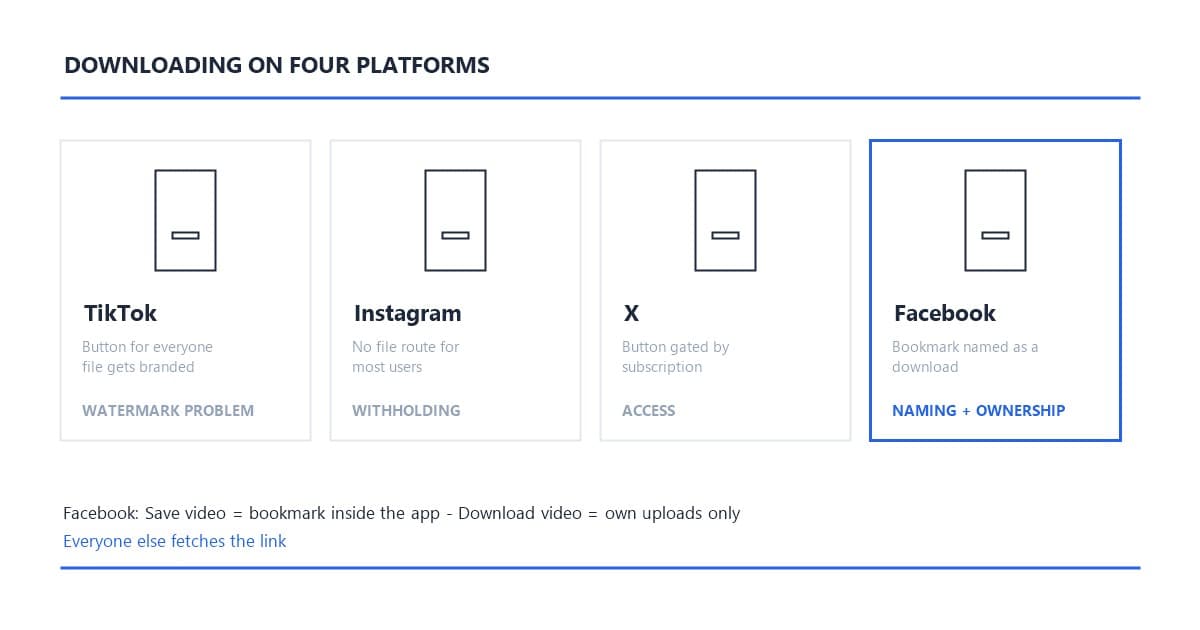
Downloading a Facebook video looks simple until you press the wrong button. Facebook runs two features with dangerously similar names: "Save video" files the post into a bookmarks list inside the app, and "Download video" — which appears only on videos you uploaded yourself — hands you the actual file. Everyone else, on every other public video, takes the universal path: copy the video's link, paste it into a link-based downloader, and fetch the MP4 Facebook's player streams. Done right, the file arrives clean, because Facebook — like X — stamps no watermark on standard video. The exception is Reels, where the in-app export burns in a logo, and that one has its own fix.
This is the fourth platform in our download series, and Facebook adds a fourth shape to the taxonomy. TikTok hands everyone a button and brands the file. Instagram withholds the file outright. X gates its button by subscription. Facebook muddles the naming and gates the real download by ownership — your own uploads only. This guide walks every lane, names the traps (there are three), and covers the URL quirk unique to Facebook that trips up half the downloaders on the market.
Last updated: September 2026
Every platform in this series obstructs downloads in its own shape, and Facebook's is the fourth. TikTok gives everyone a save button and brands the file it produces — the watermark problem, solved by fetching the unbranded play source. Instagram gives most users no file route at all — the withholding problem, solved by fetching the CDN source. X gates its button by subscription and creator permission — the access problem, covered in the X download guide. Facebook's shape is twofold: it names a bookmark as if it were a download, and it reserves the real download for videos you own.
The ownership gate has a silver lining the other platforms lack. When you download your own video natively, Facebook serves the original upload quality straight from its CDN — no re-render pass, no branding. Our platform comparison across all fifteen supported platforms rates this the cleanest native download of any major network. The catch, again, is scope: the moment the video belongs to someone else, the native path closes, and the link path is the one that works.
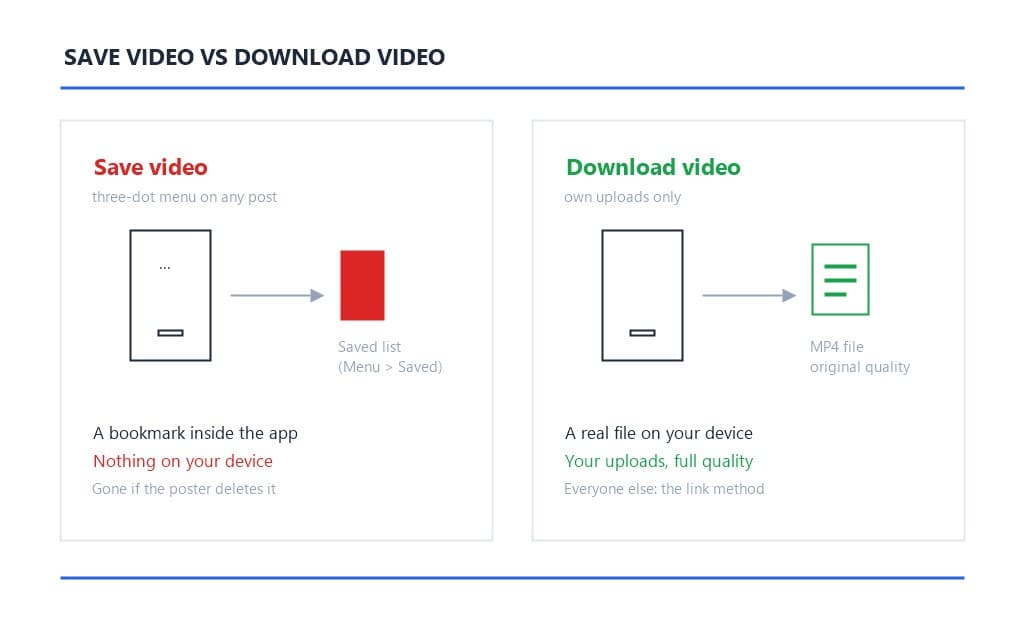
Because it was never a download — it is a bookmark. Tap the three-dot menu on someone else's video and choose "Save video", and Facebook files that post into your Saved collection (Menu → Saved), ready to replay inside the app whenever you like. Nothing lands on your device. If the original poster deletes the video, your saved entry goes with it. We tested this exact flow on a public page video: saved on Monday, the entry still played on Friday; the downloaded-files folder stayed empty the whole time.
The naming collision causes a real share of the confusion in Facebook download searches, and tool pages that blur the distinction make it worse. The vocabulary to keep straight:
If your goal is a file — for editing, archiving, or re-posting elsewhere — only the second and third deliver, and the third caps out at a resolution too low for most uses. That leaves the native lane for owners and the link lane for everything else.
The in-app "Download video" option exists for one group: people downloading their own uploads.
For creators pulling their own material, the native lane is genuinely good — original quality, no third party, no cost. The limits are the scope (your uploads only) and the shape of the library: videos live scattered across timelines, groups, and Business Suite, and finding the three-dot menu on a weeks-old post takes longer than pasting a link. Page admins running content calendars tend to end up on the link path anyway, for the same reason editors skip manual exports anywhere: the queue beats the click-path.
Standard Facebook videos do not. A video fetched from a timeline, watch page, or group — by native download or by the link method — arrives as a clean MP4. Facebook has never run the export-branding play on standard video that it runs on Reels.
Reels are the exception, and it is the one place in the Facebook ecosystem where the watermark problem is real: save a Reel through Facebook's own in-app route and the file arrives stamped with the Reels logo and the creator's handle, burned into the pixels exactly the way TikTok brands its saves. We mapped that stamp and its removal in the Facebook Reels watermark cleanup guide — the short version is that the export is branded but the source is not, so fetching the stream directly skips the stamp entirely, and files already exported clean up with AI inpainting.
The one-glance diagnostic from the series applies before any download: watch the video in the app. Marks that show during playback — a cross-posted TikTok logo, a creator overlay, a news chyron — are baked into the content and will ride along in any file you fetch. Marks that appear only in the exported file are platform branding, and the link path avoids them. Facebook adds nothing in the first case and, for standard video, nothing in the second either.
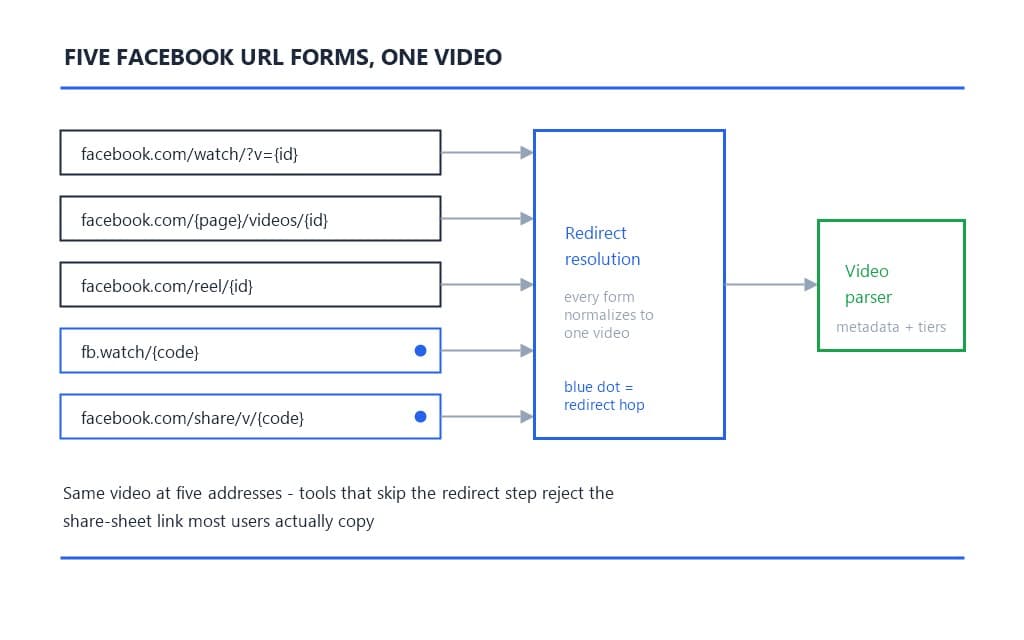
Here is the engineering wrinkle unique to Facebook, and the reason links that "work" in one tool fail in another: the same video can live at four different address shapes.
facebook.com/watch/?v={id}, the format the feed and watch pages servefacebook.com/{page}/videos/{id}, the classic form on pages and timelinesfacebook.com/reel/{id}, Reels' dedicated endpointfb.watch/{code}, the compressed form the share sheet copies, which redirects to one of the aboveA fifth form, facebook.com/share/v/{code}, entered circulation as Meta reshuffled its share URLs, and it redirects like the short links do. In our resolver's testing, tools that handle only one or two of these shapes fail on the rest — the share-sheet link, the one most users actually copy, is the form least often supported, because the short-link hop requires a redirect resolution step before any metadata read can happen. A video we tested parsed fine as a watch URL and returned "link not recognized" as an fb.watch short link in two of the five tools we tried.
Our pipeline resolves all of the above to the same underlying video before parsing — the redirect first, then the metadata. The practical takeaway for users: copy whatever link the share sheet gives you and paste it; if a tool rejects the link, the tool is the problem, not your copy. And one habit transfers from the X guide: share from the specific post holding the video, not a profile or a search result, so the parse lands on the right media.
Three things:
And the pre-paste glance: run the watermark diagnostic. If the clip is a cross-post carrying another platform's logo, decide at the preview whether that mark stays (fine for archiving) or the file heads to AI removal after fetching. Facebook is the series' cross-posting hub in many niches — family, local news, community groups — and inherited marks are common there.
Open the video, tap the three-dot menu, and choose Copy link. On desktop, copy the URL from the address bar. The share sheet hands you the fb.watch short link or a share/v link — both fine, since the resolver untangles redirects before parsing.
One Facebook-specific habit: for videos inside groups, open the post first and copy from the post itself rather than from the group feed preview. Feed previews sometimes carry a truncated link that parses as a page URL with no video attached — the "no video found" result, when the right link was one menu away.
Queueing several videos — archiving a page's back catalog, pulling reference clips — works the same way as the rest of the series: copy links as you browse, hold them in a list, and paste them one by one. Parsing is free, so the queue costs nothing until you confirm a download.
Open the upload page, switch to the Paste Link tab, paste the URL, and hit Get Video. The parse is free and returns in seconds: the resolver identifies Facebook, unwraps any short-link redirect, reads the video's public metadata, and shows the preview — title, thumbnail, duration, and the quality tiers the source offers.
Use the preview for the two checks that matter here. First, the content check: the thumbnail shows whether the footage is clean or carries an inherited cross-post mark. Second, the tier check: Facebook sources commonly serve two stream families — an SD stream around 360p and an HD stream at 720p or 1080p — and the recommended tier is the highest the source actually has. Pick a lower one only when file size matters more than fidelity; the choice is informed at preview, before anything is charged.
Failure messages map to causes: parse failed usually means a truncated link (re-copy from the post); "no video found" means the link points at a post without video, or a photo album; "content not supported" flags edge cases the pipeline does not treat as standard video — the same refusal vocabulary as every platform in the series.
The results list the tiers the source actually serves, labeled with resolution, one marked recommended. Confirm the tier: the cost displays before you commit and does not change after. The download runs server-side — streaming from Facebook's CDN into your task history — and a mid-transfer failure fails cleanly with an automatic refund rather than a charged dead file.
The output is MP4 with H.264 video, the combination that plays everywhere without transcoding. For repurposing — and Facebook is where local businesses, community pages, and family archives live, which makes re-use a common reason to fetch — starting from the platform's own encode keeps your edit the first re-encode rather than the third.
One expectation to set: the tiers reflect Facebook's processed encode, not the uploader's camera original. Facebook re-processes on ingest, so 1080p means the platform's 1080p — the highest-quality version that exists on Facebook, which for most timelines is exactly what it says on the tier list.
Live replays deserve their own clock, because Facebook deletes them. Since the storage policy change in February 2025, Live broadcasts are automatically removed after 30 days unless the creator saves them first. If you went Live and want the replay, download it from your own archive before the window closes — the native path serves it at full quality. If someone else's Live is the target, the link path fetches the replay like any other public video, subject to the same publicity boundary.
Thirty days is a short archive window for content that often represents real events — community meetings, local sports, product launches. Teams that treat Facebook Live as an archive keep learning this the hard way; the practical rule is to fetch replays within the month or plan to lose them.
The refusal boundaries on Facebook specifically:
Each refusal is the method's honesty. Tools claiming to fetch private or friends-only videos are claiming your credentials, not beating the wall — and handing a Facebook login to a third-party site trades a video for the whole account.
The framework carries over intact. Your own uploads: the cleanest case in the landscape — you hold the copyright, the native path exists for exactly this, and fetching your own source touches no one else's rights-management information, as the DMCA Section 1202 analysis draws the line.
Others' public videos: personal viewing and private archiving sit in broadly tolerated territory — Facebook's Terms of Service keep content ownership with the poster, and your obligations follow copyright, not the file's watermark state. Reposting a community group's video, monetizing a local news clip, or presenting a business's product video as your own is infringement regardless of how the file was obtained, and Facebook's reporting channels handle it like any other platform's.
One carry-over from the series worth repeating here: fetching the source leaves no provenance gap. You hold the platform's own encode, not a laundered copy, and that distinction keeps mattering as Meta tightens its content-protection stack through 2026.
Downloading Facebook videos is a vocabulary problem before it is a technical one: "Save video" files a bookmark, "Download video" belongs to your own uploads, and the link path serves everyone else on everything public — resolving the four URL forms, skipping the Reels stamp entirely, and delivering the platform's own MP4 encode. Copy the link, paste it into the Paste Link tab, check the preview, confirm the tier, and take the file before Live replays hit their 30-day ceiling. For Reels already exported with the stamp, the AI cleanup path finishes the job.
The parse takes less time than Facebook takes to load the comments.
Q1: Why can't I find the Download video option on Facebook?
Because the video is not yours. Facebook's native "Download video" appears only on uploads from your own profile or Page. On other people's videos, the three-dot menu offers "Save video", which bookmarks the post inside the app — everyone else uses the link method to fetch the file.
Q2: Do downloaded Facebook videos have a watermark?
Standard videos arrive clean — Facebook does not brand them. Reels are the exception: Facebook's own export stamps the Reels logo and handle into the file. Fetching the Reel's source directly skips the stamp, and already-exported files can be cleaned with AI inpainting.
Q3: Which Facebook link formats work with downloaders?
All five: watch URLs (facebook.com/watch/?v=), video permalinks (/videos/), Reel links (/reel/), fb.watch short links, and share/v links. Short links need a redirect resolution before parsing — tools that skip that step fail on exactly the link your share sheet copies.
Q4: Can I download a private or friends-only Facebook video?
No. Audience-restricted content exposes no public source, and any tool claiming otherwise is asking for your Facebook login — which trades one video for the whole account. The boundary covers friends-only posts, private groups, and members-only content.
Q5: What happens to Facebook Live replays?
They are deleted 30 days after the broadcast unless the creator saves them — a policy Facebook applied in February 2025. Creators should download their own replays within the window; replays from other people's public Lives are fetchable by the link method until removal.
Mark Ma is the founder and lead engineer at UnMark, where he leads the development of AI-powered video watermark removal technology. With over a decade of experience in computer vision, deep learning, and video processing, he has built production systems that process millions of frames per month across TikTok, Instagram Reels, and Google Veo content. His technical work focuses on motion-compensated watermark detection, spatial-temporal inpainting, and quality-preserving reconstruction for short-form vertical video. Before UnMark, Mark shipped computer vision infrastructure at scale for content moderation and ad compliance platforms. He writes this blog to document the real engineering, testing, and regulatory reasoning behind UnMark's processing pipeline — every test result, frame analysis, and benchmark published here is reproduced from actual production data, not synthetic examples. His goal is to give creators, brands, and regulators a verifiable technical reference for AI video watermark removal in 2026.