Ecommerce Product Video Watermark Removal: A Developer's Guide to Supplier Clips, Platform Reuse, and Listing Rules (2026)
Last updated: September 2026
I build watermark removal software. UnMark is my product, and its processing pipeline has chewed through enough watermarked footage to fill a small film festival — a lot of it product videos headed for Amazon listings and Shopify stores. The same email lands in my support inbox every week: a seller pastes in a clip with a ©SUPPLIER stamp, or a TikTok logo drifting across the corner, or their own logo from 2023, and asks how to make it listing-safe by Friday.
Here's what I tell them. An ecommerce product video watermark is never one problem — it's three, and the fix (and the legal ground under it) depends on where the mark came from. Diagnose the source first, clean second, then match the file to the platform's specs. That order saves people more time than any editing trick I know, so this guide walks through all three sources from the perspective of someone who tuned the detection models behind the scenes: the removal method that fits each, the rules Amazon and Shopify actually enforce, and the fastest way to handle a hundred-SKU catalog without re-shooting anything.
Where Does an Ecommerce Product Video Watermark Come From?
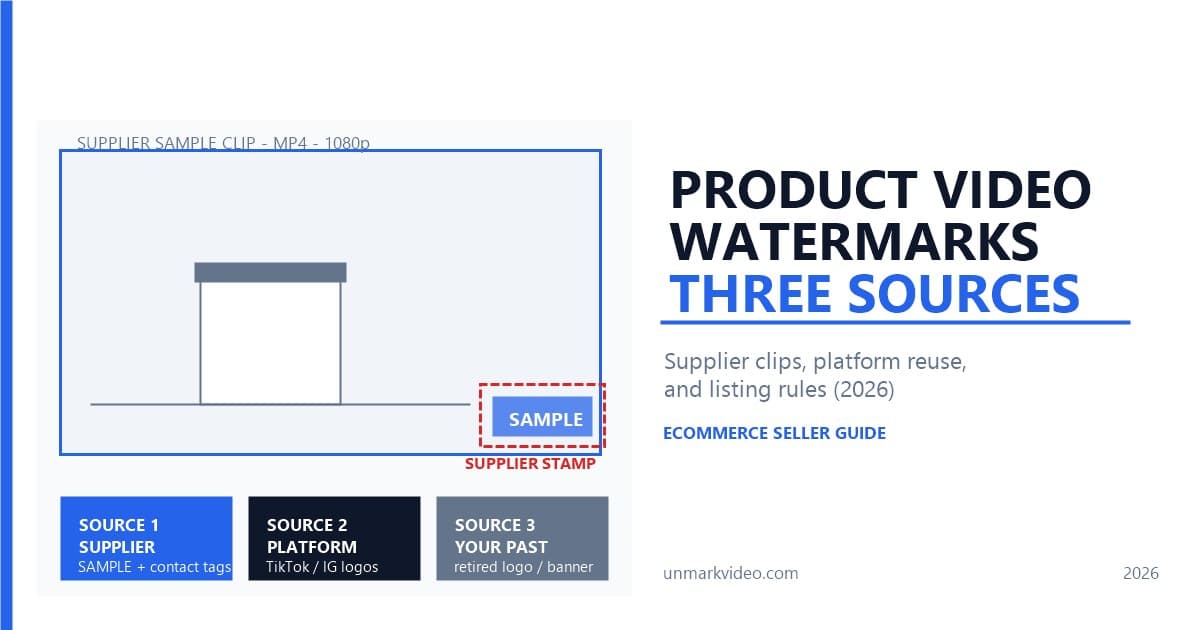
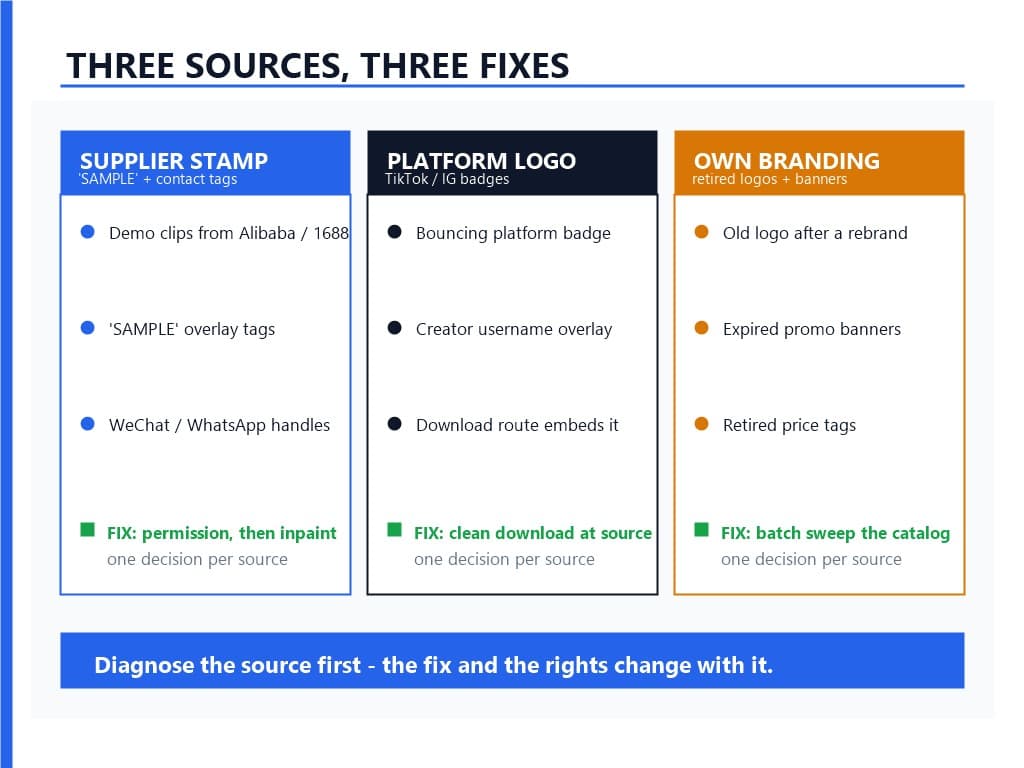
An ecommerce product video watermark comes from one of three places: a supplier stamp on factory demo footage, a platform logo baked in when a clip is pulled from TikTok or Instagram, or your own retired branding left inside videos you filmed. Each source needs a different fix, so diagnose before you edit.
That triage isn't a slogan — it's how our pipeline is structured. When a file lands, the detector classifies the mark before anything is rebuilt. Supplier stamps are static: a "SAMPLE" tag, a ©SUPPLIER line, a WeChat or WhatsApp handle in the lower corner, sometimes the factory's 1688 shop link. Platform logos move — TikTok's badge hops corner to corner on purpose, which makes them a detection problem of a different shape. And legacy branding is the easiest: your own old logo, a retired sale banner, a price that expired two quarters ago. Roughly four out of five files we process fall cleanly into one lane; the rest are stacked cases, like a supplier stamp underneath a platform logo, and those just get treated in two passes. Catalog categories each carry a dialect: jewelry demos stamp across velvet pouches, electronics factories stamp over circuit boards, apparel vendors print hanger codes near the collar, and supplement brands date-stamp the lid.
Why Does Amazon Care About Watermarks?
Amazon screens listing videos before they go live, and its ad guidelines name "explicit branding or logos unless it's on the product" as prohibited content. A supplier stamp or a TikTok badge is exactly that — branding that isn't yours, sitting in frame — and it gives reviewers a visible reason to bounce the upload.
Most Amazon product video watermark rejections trace straight back to that line, and Amazon's own Sponsored Products guidelines spell it out verbatim: "Explicit branding or logos unless it's on the product" — Amazon Ads — right there in the prohibited list. The same hostility shows up in Amazon's image rules — no watermarks on product photos either, enforced with automated screening and listing suppression until you fix it. Sellers sometimes assume the video path is looser. It isn't. Amazon's seller forums are full of rejected detail-page videos where the footage came straight from a supplier, and one of the published EBC content rules is that videos you don't hold the rights to get pulled for copyright infringement — which is the supplier-stamp situation in a nutshell.
Is the cleanup worth it? Amazon's advertising data reports that Sponsored Products campaigns with video see a 67 percent higher click-through rate and a 9 percent higher conversion rate than campaigns without. A listing video is also the closest thing your product page gets to a demonstration — shoppers judge scale, texture, and function from it. Handing that lever to a review queue over a 30-second cleanup is the expensive option, even when it doesn't feel like it. We cover the ad-policy side in more depth in our guide to ad platform compliance for watermarked videos.
Can You Use Supplier Videos From Alibaba or AliExpress?
Yes — suppliers on Alibaba, AliExpress, and 1688 expect resellers to ask for clean footage, and most hand over the unwatermarked master file to anyone actively ordering. The watermark exists to stop strangers from stealing clips, not to tax paying customers. Ask first, clean second; skipping the ask is where the legal trouble starts.
I want to be blunt about this because it's the step most dropshippers skip. The footage belongs to whoever filmed it, and a watermark is a claim of ownership, not an obstacle course. Guides on reusing AliExpress product videos converge on the same advice: request the original file or written permission before you edit anything. In practice the conversation takes one message — "I'm ordering 200 units of SKU-1148, can you send the video without the stamp?" — and the answer is usually the file, not a negotiation. You get a cleaner master than any product video watermark remover can produce, at zero cost.
Two things to watch from our processing side. First, be careful with clips the supplier did not film themselves — factory footage that already carries a third party's mark puts you in a different legal situation, covered at the end of this guide. Second, if a supplier refuses and you proceed anyway, remember the stamp is doing its job: it's evidence of whose footage this is.
How Do You Remove a Supplier Stamp From a Sample Video?
Mark the stamp's region once, let AI inpainting rebuild the background behind it frame by frame, then scrub the timeline at the mark's exact timestamps to verify. A static corner stamp on a studio backdrop is the easiest case there is — most 45-second supplier clips process in about two minutes.
Why so easy? Because static corner stamps sit on controlled surfaces — white tables, gradient backdrops, turntable floors — and never move, so the model has clean context to reconstruct from. The technique is the same one we broke down in our comparison of AI inpainting versus cropping versus blurring: instead of blurring a box or cropping away part of the frame, the model rebuilds the actual pixels that belong there — the table surface under a "SAMPLE" tag, the fabric texture under a supplier's WhatsApp handle.
In my testing, surface texture decides the ceiling: matte suede pouches and anodized aluminum inpaint cleanly, while sequins, mesh, and frosted glass leave ghost halos until you re-run with a tighter mask; glazed ceramics, chrome faucets, and polished stone behave the same way.
The verification pass matters more than people think. When I watch users through our processing logs, the difference between a pass and a bounce-back is almost always this: scrub to the exact frames where the stamp sat and check the corners at full magnification before you upload. Rebuilding pixels occasionally leaves a faint edge on the first attempt, and our re-run flow fixes it in seconds — but only if you look. Resolution survives too: a cleaned 1080p export arrives at 1080p, which matters because re-compressing below the platform floor creates a second rejection reason.
Should You Clean Platform Clips or Start From a Clean Source?
Start from a clean source when one exists. A clip downloaded through a no-watermark route beats a scrubbed copy on sharpness every time, because removal rebuilds pixels while a clean download never lost them. Reserve removal for footage you already own or can't re-source — the catalog you shot yourself.
This is the "source-first" principle, and it applies to product research clips the same way it applies to creator content. If the footage you need exists as a TikTok or Instagram post — a trend demo, a user review you're licensed to reuse — pulling it through a clean route takes seconds and keeps the original bitrate. We documented the method in our guide to downloading videos without watermarks, including the TikTok-specific walkthrough that explains why the moving badge makes scrubbing a losing battle there.
One more angle sellers forget: permission travels with the clip, not with the pixels. A clean download of someone else's product video doesn't grant you usage rights — it just gives you unmarked footage you may still not be allowed to use. Source-first solves the technical problem; the ownership question is separate, and no download route answers it for you. Marketplace rules differ from storefront rules here, which is why the identical clip can be fine on your own site yet rejected on a marketplace listing.
What About Your Own Outdated Branding?
Your own retired logo is the safest watermark to remove, because you own the footage outright and there's no permission to chase. The real question is economics: inpainting a whole catalog usually costs less than re-shooting it, and a shared mask across one product line turns fifty videos into one setup.
We see this after rebrands, trademark disputes, and ended promotions — a store renames itself, and every product video still wears the old wordmark like an outdated name tag. There's a subtle listing-quality angle too: mixed branding inside one catalog looks sloppy to shoppers and confuses brand-registry checks that compare your storefront's branding against your listing media. Cleaning it is routine.
The developer's honest caveat: logo removal is harder than stamp removal when the logo overlaps the product itself. A corner mark on empty backdrop is a two-minute job; a logo parked on the product's surface for thirty seconds asks the model to invent product texture, and that's where you inspect closely or re-shoot. UGC teams face the same cleanup in miniature — our notes on the UGC creator workflow for brand watermark removal cover the approval loop when the footage isn't technically yours either.
Which Specs Do Amazon and Shopify Actually Require?
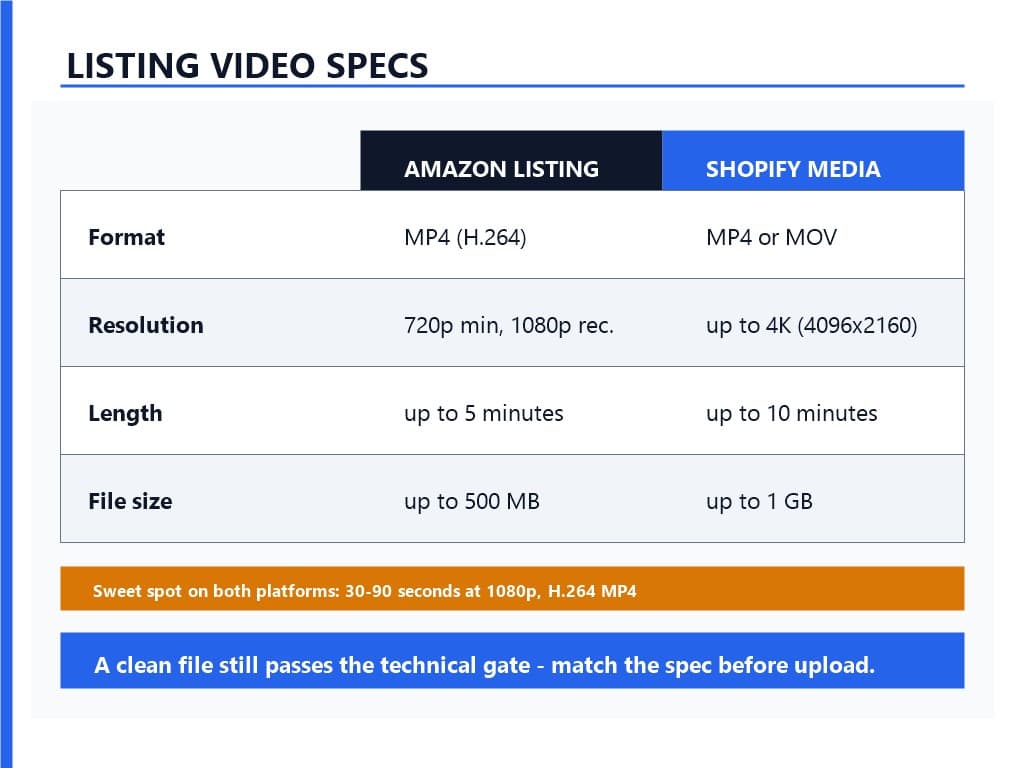
Amazon listing videos need MP4 or MOV, at least 720p resolution, and up to 5 GB per file; Sponsored Products ads add a 7-second minimum and a 50-percent product-frame rule. Shopify accepts MP4 or MOV up to 10 minutes, 1 GB, and 4K. Clean the watermark before you encode — not after.
That last sentence is the one people skip, and it costs quality. Encode a cleaned file a second time and you stack compression artifacts on rebuilt pixels. Keep the cleaned master at its original resolution and do platform-specific exports from it. One quirk worth knowing: Shopify transcodes uploads on its side, so keep an H.264 export with an AAC track even when the clip is silent.
For Shopify, the official word is: "If you're uploading video files, then make sure that they meet the following requirements" — Shopify Help Center — and those requirements are up to 10 minutes long, up to 1 GB, up to 4K (4096×2160), in MP4 or MOV. Buy Button embeds pull from YouTube or Vimeo instead, so hosted files stay the safer choice for brand control. For Amazon detail pages, you'll need Brand Registry, and the practical spec floor is 1280×720 with 16:9 preferred; the review queue typically takes 24 to 72 hours. Sponsored Brands and Sponsored Display video ads are tighter — 6 to 45 seconds and 500 MB — so a listing video can't just be re-uploaded as an ad without a trim.
Two practical notes before you encode. Brand Registry is the trademark-enrollment program that ties your registered mark to the seller account, and it is what opens the detail-page video slot on Amazon. And vertical 9:16 exports letterbox inside a 16:9 player, so crop before uploading rather than pad with black bars.
How Do You Clean a Whole Catalog at Once?
Group the files by watermark source, build one mask per group, test on five videos, and inspect the corners at full zoom before you release the batch. Identical supplier stamps repeat across a product line, so shared masks turn a fifty-hour editing job into an unattended overnight run.
This is the part of the product I'm proudest of, honestly. The insight is that catalogs aren't random — one factory's stamp appears on forty clips with the same position and opacity, so the mask you drew for the first video is the mask for all of them. Batch processing with shared masks is what we built for exactly this; the full workflow is in our guide to batch video watermark removal. Odd cases — a diagonal banner mid-frame, a translucent overlay across the product itself — go single-file; shared masks only pay off when the geometry repeats. Wand stamps, woven labels, and holographic seals live there too.
Two rules from watching big runs. Pilot first: five files is enough to catch a wrong mask before it propagates to five hundred. And budget review time per group, not per file — inspecting one magnified corner frame per group catches 95 percent of the issues, because everything else in the group shares the same geometry.
In our testing, sequencing shapes the outcome: batch the plain studio shots first, hold glassware and reflective pieces for a supervised pass, and keep someone spot-checking masks while the queue drains. This is the pipeline in action — watch a watermarked clip go from upload to clean export:
Is It Legal to Remove Watermarks From Videos You Did Not Film?
Permission decides it. With the supplier's written okay, cleaning their stamp is routine post-production; without it, the mark qualifies as copyright management information under DMCA §1202, and stripping it can trigger statutory damages plus platform takedowns. When the footage belongs to nobody you can reach, don't clean it — re-shoot or license instead.
The statute reads: "No person shall, without the authority of the copyright owner or the law, intentionally remove or alter any copyright management information" — Cornell Legal Information Institute, hosting 17 U.S.C. § 1202(b). Copyright management information is the umbrella term for the marks and metadata that identify a work's owner, and a supplier stamp sits squarely inside it. Our deep dive on DMCA Section 1202 and video watermarks walks through the 2026 case law if you want the full picture, and our guide on when it's legal to remove watermarks covers the AI-generated corner of this.
The practical version for a busy seller: get the okay in writing — even a chat message stating "yes, you can use and edit the video" beats nothing — and keep it with the project file. Store the approval message alongside the batch manifest, so future audits find everything in one place. Nobody plans a lawsuit over a product demo, but takedowns and account strikes don't need a lawsuit to ruin your week. Dropshipping makes this easy to get wrong at scale, because a hundred supplier clips means a hundred separate permission questions, and "the supplier would have said yes" is not a defense.
FAQ
Q1: What's the fastest way to remove a watermark from a product video?
Ask the source for a clean master first — it beats any tool. If removal is the only route, mark the watermark region once, run AI inpainting, and verify the corners at the mark's exact timestamps. Static supplier stamps on studio backgrounds process in a couple of minutes at full resolution.
Q2: Why did Amazon reject my listing video with a supplier logo?
Amazon's video guidelines prohibit branding or logos unrelated to your product, and a supplier's stamp is exactly that — it signals the footage belongs to someone else. Detail-page videos also can't reference your company as a seller, show pricing, or use footage you don't hold rights to, which catches unlicensed supplier clips.
Q3: What are the Shopify product video requirements in 2026?
Shopify accepts MP4 or MOV files up to 10 minutes, up to 1 GB, at up to 4K (4096×2160) resolution, per its official product media documentation. There's no branding prohibition the way marketplaces have — your store, your rules — but 30 to 90 seconds at 1080p remains the sweet spot for conversion and page speed.
Q4: Can I use an AliExpress product video for my own listing?
Only with the supplier's permission. The footage belongs to its creator, the stamp is a copyright claim, and removing it without authority risks DMCA §1202 exposure. Most suppliers send clean masters to active buyers on request — that unwatermarked file is better quality than any cleaned copy, and it comes with the rights question answered.
Q5: How do I remove watermarks from hundreds of product videos at once?
Group files by watermark source, define one mask per group, pilot on five files, and inspect corners at full zoom before releasing the batch. Identical factory stamps repeat across a product line, so shared masks let the batch run unattended — fifty hours of manual editing becomes an overnight job.
References
- Amazon Ads — Sponsored Products video guidelines
- Amazon Ads — Sponsored Products video: complete guide (67% CTR / 9% CVR data)
- Shopify Help Center — Product media types: video requirements
- Cornell Legal Information Institute — 17 U.S.C. § 1202: Integrity of copyright management information
- Amazon Seller Central — Product image requirements (watermark restrictions)
- Niche Dropshipping — How to download and reuse AliExpress product videos
Last updated: September 2026