Runway Watermark Removal: Free Plan Logo, Export Traps, and Clean Files (2026)
A Runway watermark usually means one of two very different problems. If you generated the clip on the free plan, the corner logo is baked into every export and the fix is knowing the paid lane. If you are paying and the logo still shows up, the problem is almost never your plan — it is the export path you took, because Runway has at least three routes that quietly hand you a branded file even on a paid account.
We deal with the second case constantly on the processing side: files arrive where the watermark survived an upgrade, and the story is nearly always a shared link, a right-click save, or an asset generated back when the account was free. This guide separates the two problems — what the free plan does and why, the three export traps that brand paid users' files, the correct export path, and what to do when the file you have is already stamped. It closes with the layer most guides skip: the invisible C2PA provenance inside the file container regardless of plan, and why our approach removes the visible logo while leaving that layer alone.
Last updated: September 2026
What Is the Runway Watermark?
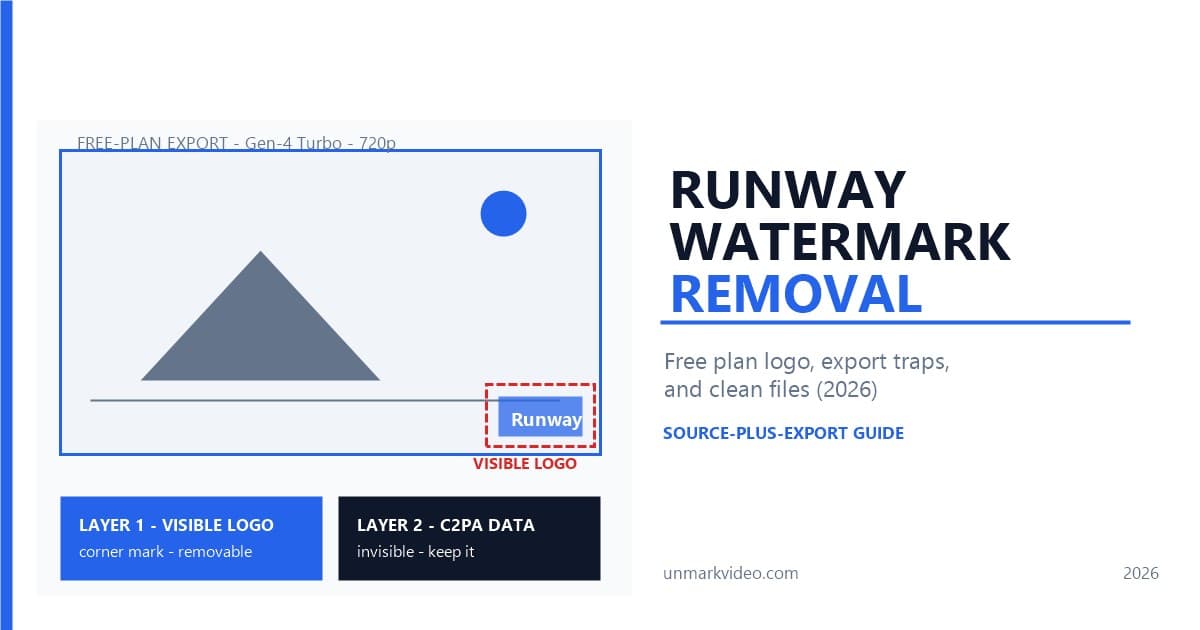
Two separate marks travel with a Runway video, and confusing them causes most of the bad advice online. The first is the visible one: a semi-transparent Runway logo placed in a corner of the frame, stamped onto every export from a free account. The second is invisible: a C2PA provenance manifest embedded in the file container on supported tiers, recording that the content was AI-generated, which model made it, and when.
The visible logo is a business gate — it exists to convert free users into subscribers, and it comes off the moment your plan and export path are both right. The invisible mark is a compliance layer, part of the same provenance push as SynthID and the C2PA standard, and it survives independently of what you pay. An export can be perfectly clean of the logo and still carry the manifest, and a file that lost its manifest — through a re-encode, for instance — can still carry the logo. Anything you read that treats "the watermark" as one removable thing will steer you wrong on at least one of these layers.
The visible logo is the removable one for almost every reader: it is a flat, static, corner-anchored graphic, which makes it the easiest category of mark for detection models to find and the easiest for inpainting to rebuild over — the same principle that makes static logos the gentlest case in watermark detection generally.
Why Does Runway Watermark Free Plan Exports?
Because the free plan is priced as a sample, not a studio. Runway's free tier includes 125 one-time credits that never refresh, access limited to the Gen-4 Turbo image-to-video model, 720p output, a three-project cap, and 5GB of storage — and a Runway logo on every single export. There is no in-app switch to turn it off; the mark is the product demo's price of admission.
That pricing shape explains the platform's watermark logic better than any technical detail. Generation burns real GPU time, Runway prices that time in credits, and the free 125 credits exist to let you evaluate the interface before deciding whether output quality justifies a subscription. The watermark converts evaluation into revenue: the clip proves the model is good, and the corner logo reminds you who made it. Paid tiers start at Standard — $12 per month billed annually or $15 monthly — and every paid tier exports without the visible logo, with commercial usage rights starting at that same Standard tier. The Pro plan at $28/$35 adds 2,250 monthly credits and 4K export, and credits on paid plans refresh monthly rather than running out permanently.
One more mechanic matters for what comes later: the watermark decision attaches at generation time on the free plan, not at download time. The branded render is the file. That is why upgrading mid-project does not retroactively clean old assets — more on that in the export traps below.
Why Is My Paid Export Still Watermarked?
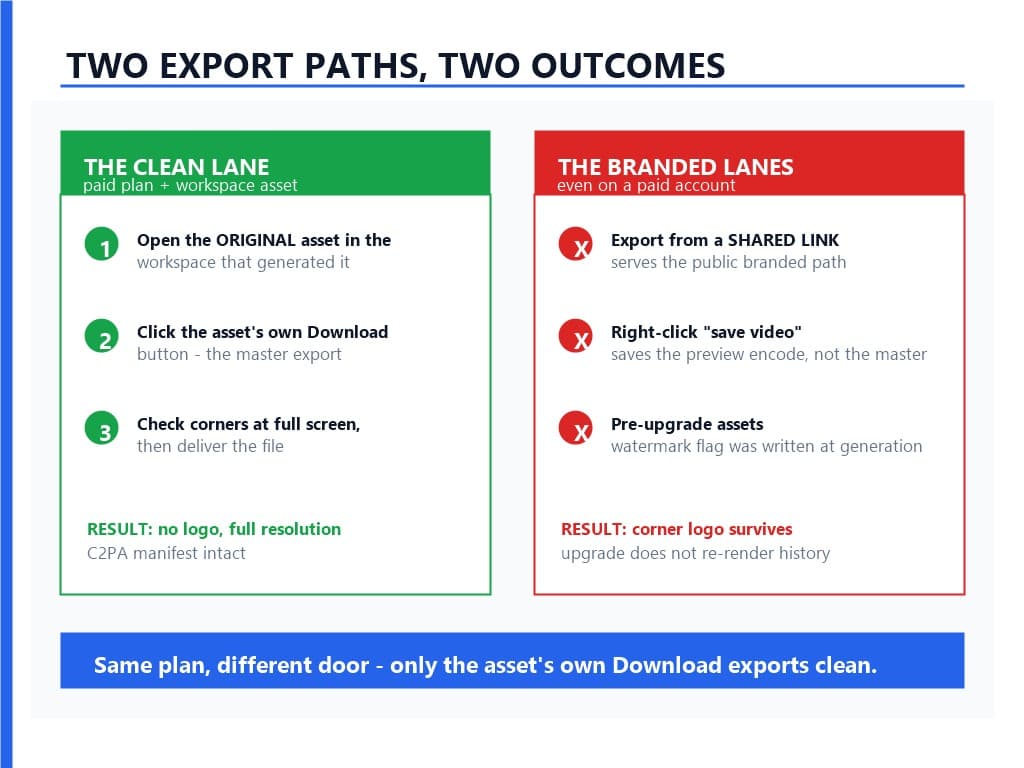
Because you took one of three paths that bypass the clean lane, and all three look completely reasonable from the inside. This is the section most Runway users actually need, because paying does not automatically de-brand your files.
Trap 1: Exporting from a shared link. When a teammate or collaborator sends you a share URL and you hit Export on that page, the file flows through the public sharing path — the same one that serves branded previews to logged-out visitors. A paid plan on the viewing account does not clean what the sharing pipeline serves. The fix is not a better button on the share page; it is opening the asset inside the workspace it was generated in and exporting from there.
Trap 2: Right-click "save video." The video playing in Runway's preview player is a preview encode, and the browser's save command grabs exactly that — a file that may carry the branded frame treatment regardless of your plan and that is not the master export in any case. The preview exists to be watched, not delivered. Grabbing it means accepting a transcode you did not choose, with branding baked in on some paths, and calling it an export.
Trap 3: Assets generated on the free tier, viewed on a paid one. The watermark flag was written into those renders when they were generated. Upgrading the account changes what future generations get; it does not reach back and re-render history. We tested this exact case during processing: a Pro account's file arrived with the corner logo intact, and the asset history confirmed it was generated weeks before the upgrade. The only fixes for that file are re-generation or post-processing.
There is a fourth, historical footnote worth knowing so old forum advice does not mislead you: Runway's Gen-1 era help documentation described a "Remove watermark" checkbox on exports. That option no longer exists in the current product; the equivalent capability now rides on plan tier plus export path, not a toggle.
How Do You Export Without the Watermark?
The clean lane is one sentence: open the original asset in the workspace where it was generated, on a plan at Standard or above, and use that asset's Download — not the share page, not the preview player. Everything else is verification detail, so here is the full sequence.
Step 1: Open the Original Asset, Not the Share Page
Log into the account that generated the clip — the one with the paid plan — and open the asset from the workspace's asset list or inside its original project. If the video only exists as a link someone sent you, stop there: the share page cannot produce a clean file no matter who clicks Export. Ask the workspace owner to export it, or get added to the workspace as a member.
Step 2: Download, Don't Right-Click
Use the asset's Download control. The downloaded file is the master export — full resolution your plan allows, no logo at Standard and above, C2PA manifest per platform policy. Resist the browser's right-click menu entirely; as covered above, it saves the preview encode, which is a different, inferior file even when it looks similar.
Step 3: Verify the File Before You Close the Tab
Play the downloaded file locally and check the corners at full screen — a ten-second check that catches trap 1 and trap 2 instantly. Then confirm the resolution matches what you expect (720p on free, 1080p upscaling from Standard, 4K on Pro) and spot-check the file properties: a genuine Runway export on supported tiers carries its provenance manifest, so its presence alongside a clean frame is actually the signature of the real lane.
We ran this sequence against a paid workspace during our own testing, comparing the Download-button file with the right-click save from the same preview: the downloaded master came back clean at full resolution, and the right-click file was both smaller and carried the branded treatment — one comparison, and the trap became obvious.
How Do You Remove the Logo From an Existing File?
When the file you have is already stamped — a free-plan generation you cannot regenerate because the prompt and seed produced something you love, or an old asset from before an upgrade — the logo has to be cleaned from the pixels. The good news: a static corner logo is the most tractable watermark case there is.
The process is targeted inpainting. Detection finds the logo's exact frame region across the whole clip — it stays anchored in the corner and does not change shape — then the masked region gets rebuilt frame by frame from surrounding pixels, and everything outside the mask is left untouched. That last part matters: a corner logo covers a few percent of the frame, so a mask-limited pass preserves nearly all of the original render, motion included. Our own pipeline works exactly this way, from detection through mask to rebuild, and it is why the result does not have the soft, regenerated look that full re-encodes leave. The method comparison covers why inpainting beats cropping here — cropping a corner logo means reframing the entire shot, and blurring just relocates the attention problem. Upload the exported file to UnMark's processing page, and the logo region is detected, masked, and rebuilt while the rest of the frame passes through untouched.
Is Runway's Own Aleph Editor a Better Option?
It is the honest in-house alternative, with a different tradeoff. Aleph is Runway's Gen-4-based in-context editor: you select or describe a region — a logo, a passerby, a prop — and the model regenerates the video with that element gone. For creative object removal it is genuinely impressive, and if you are already living inside Runway's workflow, it keeps the whole job on one platform.
The tradeoff is what "regenerates" means. Aleph produces a new AI generation of the clip: it consumes credits, the output is a re-render rather than a pixel-preserving cleanup, and details outside the removed region can drift — texture, motion nuance, faces at the edge of frame. For removing a logo while keeping the original render exactly as generated, a targeted removal pass is the more conservative tool: only the masked region changes. If you want the removal to also survive as provenance-clean per your disclosure obligations, note that a regenerated Aleph output is again an AI generation with its own provenance handling — which is the correct behavior, but it does mean the file you ship is twice-generated.
Our take, tested across both routes: use Aleph when the "removal" is actually creative revision — erase a person, change an object. Use targeted watermark removal when the goal is the same video, minus the logo.
What About the C2PA Metadata?
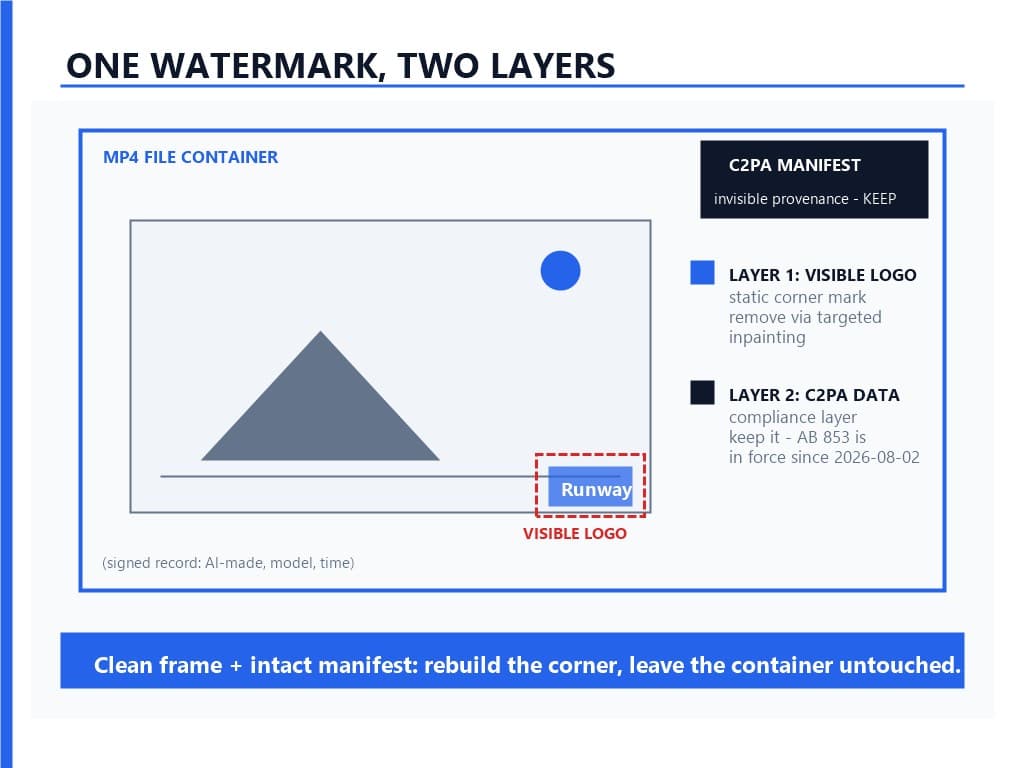
Runway embeds C2PA provenance manifests in exports on supported tiers — a signed record in the file container stating the content is AI-generated, along with model information, timestamps, and cryptographic signatures. Invisible in playback, readable by any C2PA-aware verifier, and increasingly the compliance-relevant layer: California's AB 853 took effect on August 2, 2026, joining the regulatory push that treats provenance disclosure as a real obligation for AI-generated media.
Our position is the same one we apply to every platform in this series, Sora and Veo included: remove the visible logo your audience should not be distracted by, preserve the provenance layer your compliance depends on. Stripping C2PA manifests from AI-generated content is its own legal question — a different one from logo removal — and it is covered in depth in our legal guide. The practical workflow point is simpler: a targeted logo removal that leaves the container untouched delivers a clean frame and an intact manifest, which is exactly the combination disclosure-oriented workflows want.
What Are Common Issues and How Do You Fix Them?
The failure modes cluster into four patterns, and each has a short diagnostic.
Paid account, logo still on export. Walk the three traps in order: was it a shared-link export, a right-click save, or a pre-upgrade asset? The first two are fixed by re-exporting from the original asset's Download button; the third is a re-generation or post-processing job.
Upgraded today, old files still branded. Expected behavior — the flag rode with the render. Re-generate from the same prompt on the paid plan (accepting that the result will differ), or clean the existing files with targeted removal; a folder of pre-upgrade renders can go through the batch workflow in one session.
Export looks lower quality than expected. Check plan-based resolution: free tops out at 720p, Standard gains 1080p upscaling, Pro unlocks 4K. A "blurry export" on free is not a watermark bug; it is the tier ceiling.
Logo removed but the corner looks smudged. The mask was too tight or the background too complex for the fill — grass, foliage, and moving water are the hard cases. Retry with the mask expanded a few pixels, or check the detection-model overview for why high-frequency backgrounds cost more reconstruction effort.
Is It Legal to Remove the Runway Watermark?
For your own generations on a paid plan, the question mostly dissolves: the logo is not on your file to begin with, and Runway's terms give paid subscribers ownership of their outputs with commercial use rights from Standard upward. Free-plan outputs are licensed for personal, non-commercial use only, and Runway's terms reserve training use of user content on non-Enterprise tiers — worth knowing before building a workflow on the free lane.
Removing the visible logo from a file you generated, of your own prompt, on a plan whose terms entitle you to clean output, is a cleanup of your own asset — the same position our legal guide and the DMCA Section 1202 analysis take on attribution-removal risk: the serious legal exposure sits with removing CMI from someone else's work or stripping provenance to deceive, not with cleaning your own render's corner. What no plan changes is disclosure obligations: an AI-generated video may need to be disclosed as such regardless of whether its corner wears a logo, which is precisely why we recommend leaving the C2PA layer intact.
One copyright footnote for commercial users: under Thaler v. Perlmutter (D.C. Cir. 2025), purely AI-generated content cannot be registered for copyright, so your clean export may be free to use commercially without being fully protectable as your own property. Human editing and direction on top of the generation is what builds registrable authorship.
Conclusion
The Runway watermark is two systems wearing one name, and almost every frustrated user is stuck on the visible one for an avoidable reason. The free plan stamps every export because it is a sample tier — 125 one-time credits, 720p, logo included. Paid plans remove the logo, but only if the file leaves through the right door: the original asset's Download button, inside the generating workspace, never the share page and never a right-click save. Files that are already stamped — pre-upgrade renders, free-tier keepers — come clean through targeted inpainting that rebuilds the masked corner and leaves the rest of the frame exactly as generated, C2PA manifest and all.
The decision sequence in one line: generate on a plan that exports clean, export from the asset not the share page, verify corners before delivery, and post-process the stragglers.
References
- Runway Help Center - export behavior, plan features, and download paths
- Runway pricing plans and per-tier credits
- Runway Terms of Use - output ownership, commercial rights, training use
- GPTCleanup - Runway C2PA provenance and container metadata analysis
- California AB 853 - AI provenance and disclosure requirements, effective August 2, 2026
FAQ
Q1: Does the Runway watermark go away if I upgrade?
For future generations, yes — every paid tier from Standard up exports without the visible logo. For clips generated while you were on the free plan, no: the branding was written into those renders at generation time, so the file needs re-generation or post-processing.
Q2: Can I remove the Runway watermark for free?
Not inside Runway — there is no toggle on the free plan. Third-party removers exist, but for your own files a targeted inpainting pass is the quality-safe route, and it leaves the provenance container intact.
Q3: Why is my video still watermarked after paying?
You almost certainly exported from a shared link or saved the preview with a right-click — both routes serve branded files even to paid accounts. Re-export from the original asset's Download button inside the workspace.
Q4: Does Runway add C2PA metadata to videos?
Yes, on supported tiers the export container carries a C2PA provenance manifest recording the content as AI-generated. It is invisible during playback and independent of the visible corner logo.
Q5: Is it legal to remove the Runway logo from my own video?
For your own generation, on terms that entitle you to clean output, cleaning your own render is a normal asset cleanup. The legal risk sits elsewhere: removing provenance or CMI from others' work, or missing AI-disclosure obligations.