Agency Video Watermark Removal: The Client Handoff Guide
Mark Ma
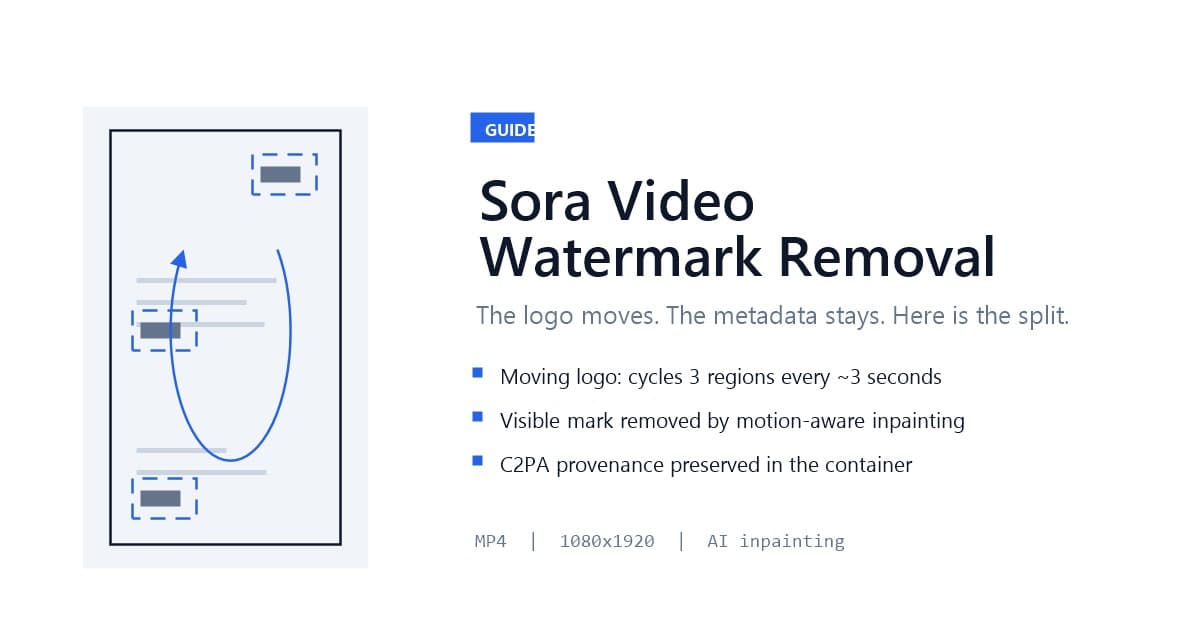
Sora video watermark removal is the process of removing the visible OpenAI logo and account username from a Sora-generated clip using AI inpainting that tracks the mark as it moves. The Sora watermark is unusual: it cycles position every few seconds across three screen regions and adjusts its opacity to stay readable against changing backgrounds, so cropping and blurring fail where they might work on a static mark. The invisible C2PA provenance metadata in the file is a separate layer — it persists after visual cleanup, and under California's AI transparency law that is exactly how a compliant workflow should behave.
If that surprises you, the context will too: most Sora watermark guides still describe a product that no longer exists. The standalone Sora app shut down in April 2026 and the API is scheduled to sunset on September 24, 2026 — yet creators and teams still hold archives of watermarked Sora clips, API contracts run through the fall, and Sora 2 remains available on Microsoft Azure Foundry. This guide covers how to clean those files in late 2026, based on the runs I did with my own archived Sora exports and a batch of API-generated test clips.
Last updated: August 2026
The Sora video watermark is the visible branding OpenAI renders into every generated clip: the OpenAI cloud logo (typically in the lower-right corner) plus the account username of the creator, composited directly into the pixels during generation rather than layered on afterward. Because the mark is baked into the frame data at render time, a metadata editor or a simple overlay toggle cannot remove it — the pixels themselves carry the branding.
That is the visible layer, and it is what most people mean by "the Sora watermark." But the full system is two layers, and the distinction drives everything about removal strategy. The second layer is invisible: a C2PA content credential manifest embedded in the MP4 or MOV container, carrying the model identifier, a generation timestamp, and a cryptographic signature chain. OpenAI has said Sora outputs carry both visible and invisible provenance signals, and the company sits on the C2PA steering committee alongside Adobe and Microsoft.
For the workflow in this guide, the split matters in one practical way: you can clean the visible logo from pixels you own while leaving the provenance metadata intact. That is not a limitation of the removal tool — it is the correct division of labor, and the section on California law explains why keeping it that way is now the safe default.
The Sora watermark moves on a rotation cycle: it repositions across three screen regions roughly every three seconds, and it adapts opacity to the background — darker on bright scenes, lighter on dark ones — to remain legible. Toolmakers tracking the pattern report the cycle repeats through the whole clip, which makes Sora one of the harder consumer watermarks to defeat with naive methods.
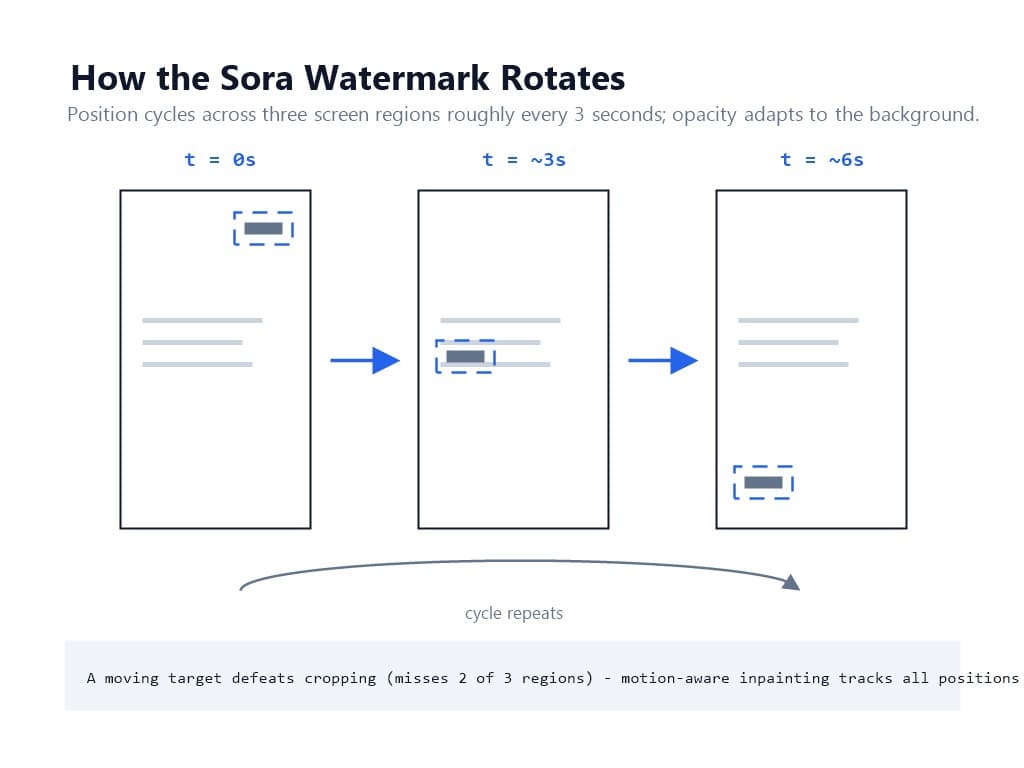
The three standard methods rank like this against a moving target:
This puts Sora in the same difficulty class as TikTok's bouncing mark, not the static overlays of YouTube Shorts or Facebook Reels. We documented the moving-target mechanics frame by frame in our TikTok moving watermark test, and the same detection-then-reconstruction chain applies here with a three-region rotation instead of corner bouncing. For the underlying method comparison, see AI inpainting vs cropping vs blurring.
The fact that reshapes every Sora workflow: the product landscape moved under the guides. The standalone Sora app was shut down on April 26, 2026, and OpenAI's API access is scheduled to end September 24, 2026. Reporting at the time framed the exit as OpenAI stepping back from consumer video-social products. Sora 2 remains reachable through Microsoft Azure Foundry as a preview for enterprise users.
None of that deletes the watermarks. Three groups still need this workflow:
If you want the full landscape — how Veo doubled down on SynthID, where Runway landed on C2PA, what regulators did — our 2026 AI video watermarking industry overview covers it. This guide stays on the narrow, practical question: you have the file, now what.
No — and it should not. Removing the visible Sora logo with inpainting rebuilds pixels; it does not touch the C2PA manifest in the file container. The metadata is a separate structure that survives visual cleanup, and any C2PA-compatible inspection tool can still read that the file originated from OpenAI Sora.
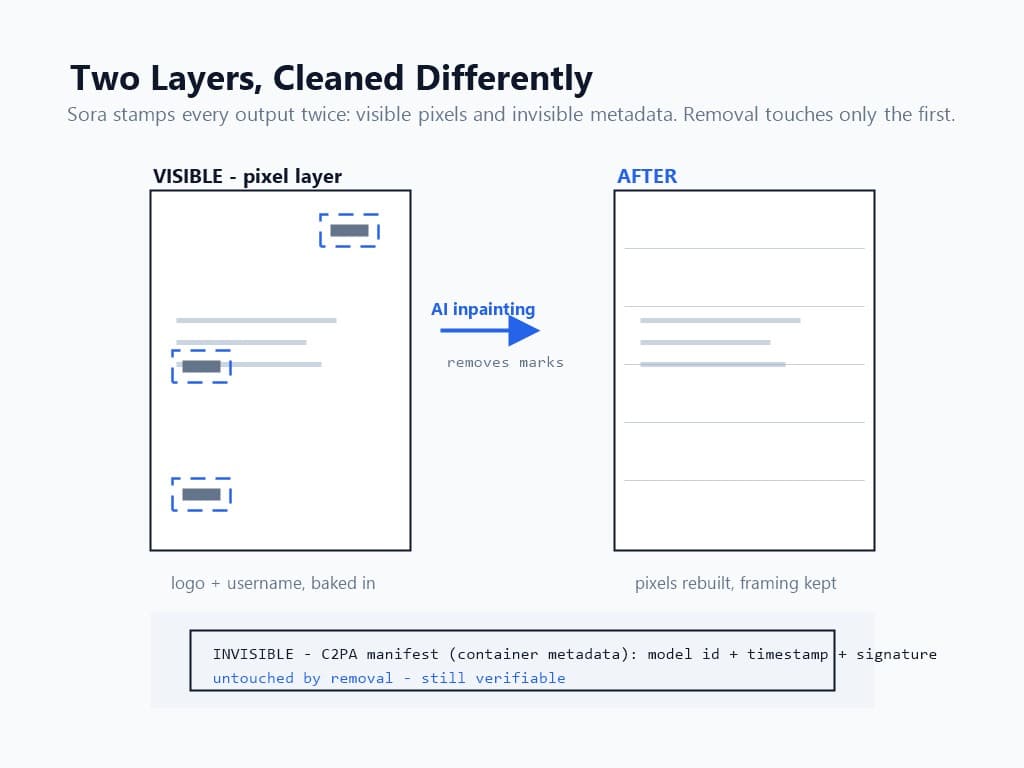
This division is worth understanding rather than fighting, for two reasons.
First, provenance and branding are different problems. The visible logo answers "who made this look branded"; the C2PA manifest answers "was this synthetically generated." You have legitimate reasons to remove the first (repurposing your own content without platform branding) and far fewer legitimate reasons to defeat the second. Our SynthID vs C2PA comparison works through the technical differences between the two dominant provenance standards and what each survives.
Second, as of August 2, 2026, the law draws the same line — which is the next section.
California's AI Transparency Act (SB 942), amended by AB 853, became operative on August 2, 2026. It requires covered generative AI providers — those with more than one million monthly California users — to offer a free public detection tool, to provide an optional visible ("manifest") disclosure, and to embed a hidden ("latent") watermark or provenance signal in AI-generated image, video, and audio to the extent technically feasible. The law also bars covered platforms from knowingly stripping that provenance data where it is feasible to detect.
Translated into workflow terms:
This is the same compliance posture we take with Google Veo content: remove the visible branding, preserve the invisible provenance. The Veo 3.1 watermark removal workflow applies the identical principle to SynthID, and the 2026 legal guide covers the full framework including DMCA Section 1202.
Three prerequisites, each one preventing a specific failure mode.
First, the actual file. Your source is the MP4 or MOV you exported from the Sora app before shutdown, generated through the API, or produced on Azure Foundry. Downloaded re-encodes that passed through third-party "watermark-free downloader" sites are the wrong input: they violate the platform terms that applied at generation time, re-compress unpredictably, and — because the Sora watermark is rendered into pixels — several of them simply return the watermarked stream with extra compression artifacts. Work from your own export.
Second, format and resolution. The pipeline accepts MP4 and MOV, with MP4 in H.264 or H.265 giving the most reliable results. Sora exports are MP4 at up to 1080×1920 vertical or landscape variants; paid plans process at full source resolution and the free tier caps at 720p HD.
Third, rights. Everything here assumes you generated the content or hold a license to it. Sora's terms covered your outputs differently depending on plan and era, and the legal section below draws the ownership line explicitly.
Pull the clip from wherever it actually lives: your export archive, your team's API output bucket, or your Azure Foundry workspace. Before uploading, open the file and watch it once at full screen, specifically tracking the watermark.
You are looking for three things: which of the three screen regions the mark visits, roughly when it jumps (the ~3-second cadence), and where the username sits relative to the logo. Some exports carry the username as a separate static element while the cloud logo rotates — if your file has both a moving and a static mark, you are cleaning two patterns, not one, and the static one is the easier job.
One habit from my own archive cleanup: batch by source. I separated my app-era exports from the API test clips because they arrived at different resolutions and with slightly different username placements, and a homogeneous queue is faster to spot-check than a mixed one. If you are cleaning more than a handful of clips, the batch processing workflow handles up to 20 files per run.
Upload the MP4 to UnMark. The detection pass scans the clip, maps the watermark's rotation across all three regions, and locks a tracking mask to it — the same motion-aware approach our process walkthrough documents for moving marks generally. The reconstruction pass then rebuilds the covered pixels region by region, using surrounding frame context and temporal information from adjacent frames, so the background stays continuous even where the mark passes over motion.
Timing from my runs: a typical 1-minute 1080p clip processes in 2-5 minutes, at roughly 1 credit per minute of 1080p video. Moving watermarks sit at the high end of that range because every frame needs region tracking — a static mark reconstructs faster, a moving one pays for the chase. GPU acceleration keeps longer clips proportionally manageable.
What the output does not contain matters as much as what it does: no visible logo, no username, no smudge fields where the marks traveled — and, deliberately, no change to the C2PA manifest still embedded in the container. You get a visually clean file that remains verifiably attributable to its AI origin.
A moving watermark demands a moving verification pass. Do not just freeze one frame — scrub through the full clip with attention to the timestamps where the mark used to jump regions, because that is where a sloppy reconstruction shows its seams.
My four-point check per clip:
If you plan to publish the cleaned clip, run one extra check: open the file in a C2PA inspection tool and confirm the credential still reads. That is not paranoia — it is your receipt. A file that both looks clean and still carries provenance is the exact artifact the August 2026 legal environment rewards, and it is the difference between repurposing your content and laundering it.
Four failure modes account for nearly everything I saw across my Sora runs.
Ghost text where the username sat. The username is a text element, and text edges are what a loose mask misses first. Re-run with the mask tightened to the text bounds; a static username usually clears on the second pass.
A faint trail following the mark's rotation path. This happens when the reconstruction averages across the position jumps instead of treating them discretely. Re-running the clip resolves it in most cases; if it persists, the clip has high-frequency background motion in all three regions and deserves a manual look.
Output softer than the source. A 1080p export processed on the free tier returns at 720p — a plan limit, not an inpainting failure. Check the plan before re-running and blaming the model.
The file came from a third-party downloader. Re-compressed, artifact-laden inputs confuse detection and degrade reconstruction. Replace the source with your own original export; every downstream step improves immediately.
For content you generated yourself, removing the visible logo is a standard repurposing step — you are managing your own presentation, not forging provenance. The C2PA manifest survives your cleanup, so the file still truthfully discloses its AI origin to anyone who checks.
For content you did not generate, the familiar walls stand: copyright remains with the rights holder regardless of overlay removal, and DMCA Section 1202 specifically covers stripping rights-management information from works. The 2026 addition is enforcement energy — California's AB 853 regime, platform provenance checks, and OpenAI's own tracing tools all make silent AI-origin laundering harder and more expensive than licensing. The 2026 legal guide walks the full framework; the operating rule is the same one this guide has repeated: clean your own content, keep the provenance, license or leave everything else.
Sora video watermark removal in late 2026 is an archive-and-API exercise: the app is gone, the API sunsets September 24, but the watermarked files remain — and the moving three-region logo still defeats cropping and blurring exactly as it always did. AI inpainting with motion tracking cleans the visible marks while the C2PA manifest stays in the container, which is precisely the split California's transparency law now rewards. Locate your source, run the removal, verify all three regions, and confirm the credential still reads.
If you are sitting on a folder of app-era exports, start with five clips through UnMark, verify the routine, then let the batch queue clear the rest.
Q1: Is the Sora watermark static or moving?
Moving. The visible logo cycles across three screen regions roughly every three seconds and adapts its opacity to the background. The account username may sit statically depending on export era. This is why cropping fails and motion-aware inpainting is required.
Q2: Can I still remove Sora watermarks after the shutdown?
Yes. The watermark lives in the file's pixels, not in the service. Archived app-era exports, API-generated clips (until the September 24, 2026 sunset), and Azure Foundry outputs can all be cleaned locally with upload-based AI inpainting.
Q3: Does removing the logo also remove C2PA metadata?
No. C2PA provenance is embedded in the MP4/MOV container, separate from pixel data. Inpainting rebuilds pixels only — the manifest persists, and under California's AB 853 keeping it intact is the compliant posture.
Q4: How long does removal take for a Sora clip?
A 1-minute 1080p clip processes in 2-5 minutes at roughly 1 credit per minute. Moving watermarks like Sora's sit at the high end because every frame requires region tracking.
Q5: Is it legal to remove the Sora watermark from my own videos?
Generally yes for content you generated — you are removing visible branding while provenance metadata remains. Removing watermarks from content you do not own implicates copyright and DMCA Section 1202 regardless of the tool used.
Mark Ma is the founder and lead engineer at UnMark, where he leads the development of AI-powered video watermark removal technology. With over a decade of experience in computer vision, deep learning, and video processing, he has built production systems that process millions of frames per month across TikTok, Instagram Reels, and Google Veo content. His technical work focuses on motion-compensated watermark detection, spatial-temporal inpainting, and quality-preserving reconstruction for short-form vertical video. Before UnMark, Mark shipped computer vision infrastructure at scale for content moderation and ad compliance platforms. He writes this blog to document the real engineering, testing, and regulatory reasoning behind UnMark's processing pipeline — every test result, frame analysis, and benchmark published here is reproduced from actual production data, not synthetic examples. His goal is to give creators, brands, and regulators a verifiable technical reference for AI video watermark removal in 2026.