Video Inpainting Mask Size: The Repair-Area Economics Behind Cleaner Watermark Removal
Last updated: September 2026
I have been building watermark removal tooling at UnMark since early 2024, and the question I get most often from creators is not "which model do you use" — it is "how tight should my selection be." There is a whole economics hiding inside that question. Every pixel you place inside the mask is a pixel the system must rebuild, and every pixel you leave outside is context the system gets to keep for free. Get that trade right and even a modest model hands you a clean fill. Get it wrong and no model on earth saves the export.
This piece is the deep dive on watermark removal mask size, behind a point I made in passing in our overview of video inpainting models: the mask is the quality lever. Here I want to open up the mechanics — bounding boxes versus traced selections, dilation budgets, detection quality, and the 30-second check I run before any export leaves the building.
If you want the model-family timeline first, the video inpainting models walkthrough covers five generations end to end. This article stays on one axis only: the mask.
Why Does Mask Size Decide Watermark Removal Quality?
The math is brutal: every pixel inside the mask is a pixel the model must either copy from elsewhere in the clip or invent from a learned prior. Copying is cheap and reliable. Inventing is where blur, halos, and hallucination live. Bigger mask, more invention, more risk.
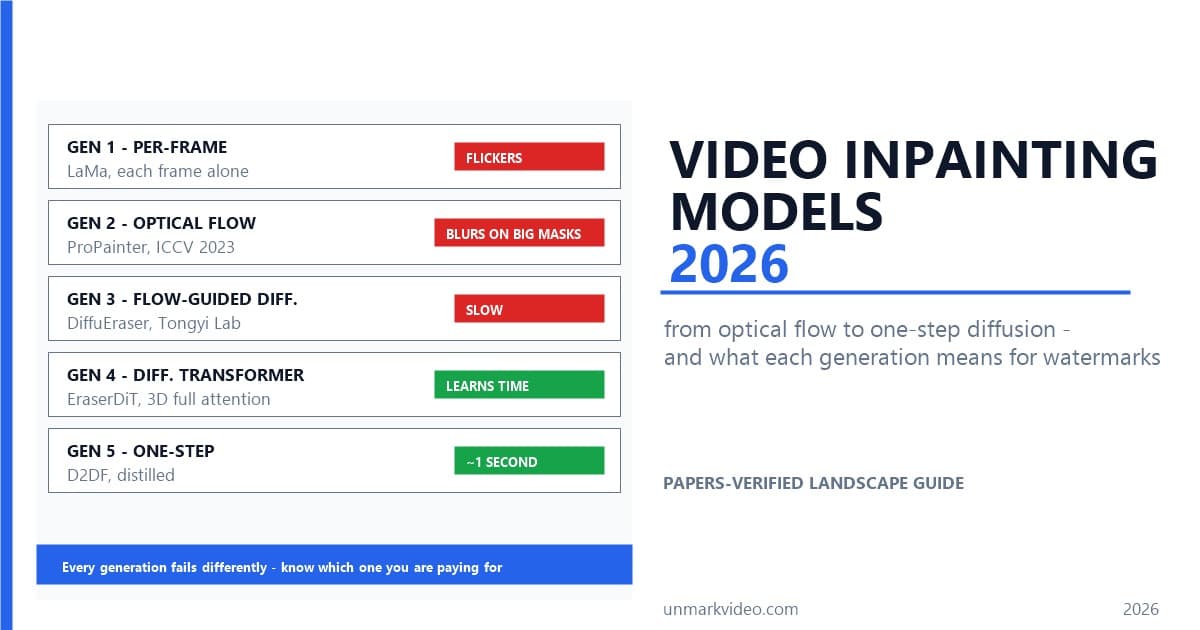
Video inpainting splits into two very different jobs, and the DiffuEraser paper — from Alibaba's Tongyi Lab, January 2025 — draws the line exactly where your mask does. The authors decompose the problem into "propagation of known pixels (pixels that have appeared in some masked frames), generation of unknown pixels (pixels that have never appeared in any masked frames)" — Xiaowen Li, DiffuEraser Technical Report. Read that twice, because it is the entire economics of this article in one sentence. If a pixel you masked is visible somewhere else in the clip, the system can find it, track it through motion, and copy it home. Copying is the cheap, reliable job — the one ProPainter, the ICCV 2023 reference implementation from S-Lab, industrialized.
If the pixel is visible nowhere, the model has to invent it. Invention runs on a learned prior over what footage looks like, and it is where blur, hallucination, and texture drift all live. The same paper is blunt about what happens when you ask a model to invent too much: "when the mask size is large, the generative capability of the Transformer model proves insufficient, leading to significant artifacts" — Xiaowen Li, DiffuEraser Technical Report.
So the quality chain reads: mask area up, unknown pixels up, invention up, risk up. That is why I keep telling people mask granularity matters more than model choice, up to a point. Swapping a mid-tier model for a frontier one improves your fill at the margins. Shrinking the mask by half removes half the problem from the model's plate entirely — those pixels flip from "invent" to "copy," or better yet, from "repair" to "leave alone."
How Big Is the Difference Between a Bounding Box and a Pixel-Precise Mask?
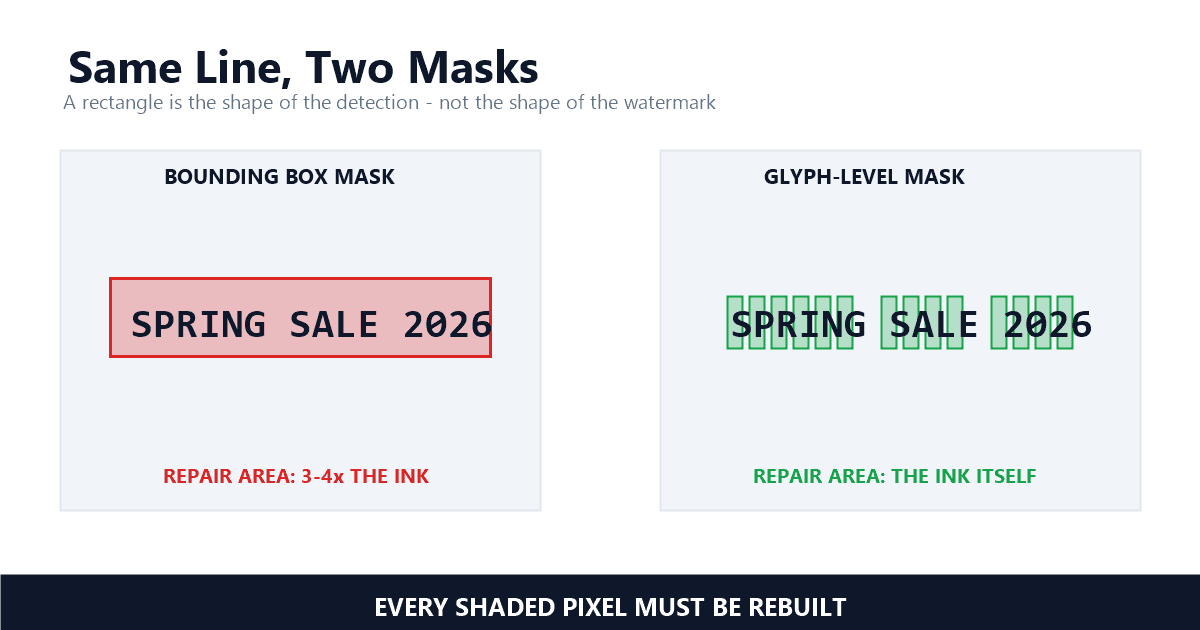
A bounding box around a subtitle line covers every gap between characters. Pixel-precise masks trace the glyphs themselves. In our pipeline, box masks on typical title cards marked roughly 3 to 4 times the glyph-level area — and every one of those extra pixels had to be rebuilt from scratch.
Most detection pipelines — OCR for burned-in text, template matchers for logos — hand you rectangles. A rectangle is the honest shape of a detection, not the honest shape of a watermark. Text is the extreme case: a 12-character title's bounding box is mostly air between the glyphs, and all of that air becomes repair area if you feed the box straight through to the inpainter.
I compared both approaches on our own stack before we switched. Feeding detection boxes through unchanged marked roughly 300% to 400% of the glyph-level area on typical title cards; on sparse captions floating over quiet backgrounds it ran higher. After the switch to glyph-level masks, the total marked area on those same clips dropped by about 70%. Every one of those reclaimed pixels was original footage — pixels that were perfectly good and now get to stay that way.
The pixels between characters do something valuable when you leave them alone: they anchor the fill. The model sees unmasked strokes and unmasked gaps on both sides and rebuilds a glyph that is consistent with both. A box mask throws that guidance away and asks the model to re-derive spacing it could have simply kept. This is the exact failure the Volcano Engine write-up on subtitle erasure targets with font-level masks — masks that trace the type itself rather than boxing the line — and it is the same economics we apply to segmentation after detection in our stack.
Why Not Mask a Bigger Area, Just to Be Safe?
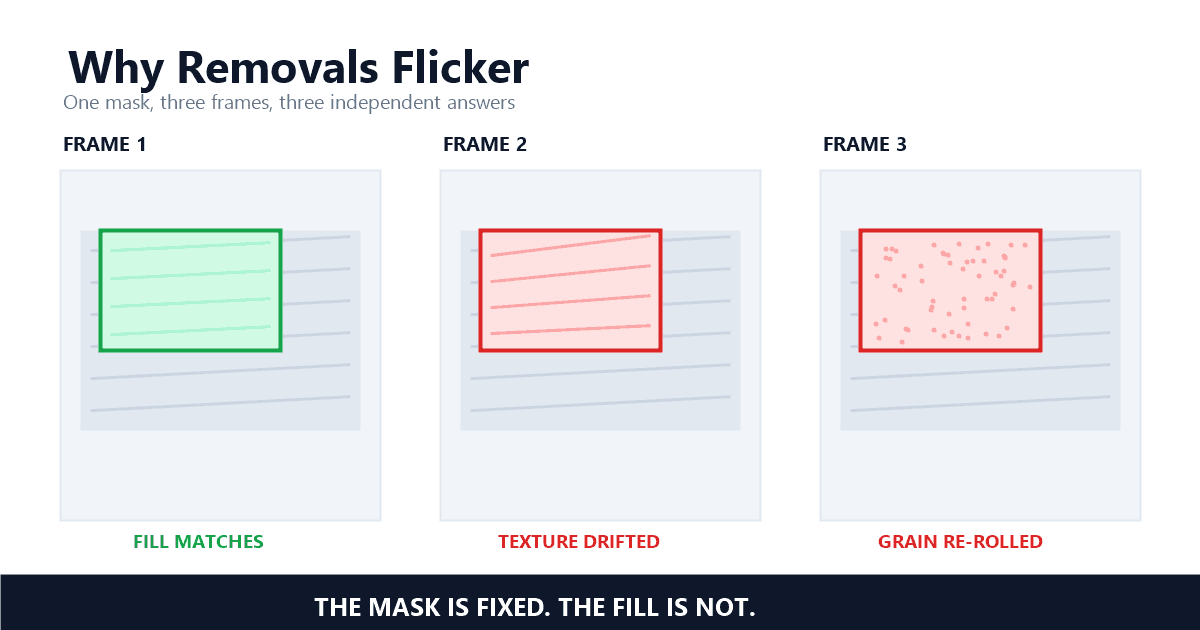
Because safety padding is paid in invented pixels. Oversized masks remove the context the model needs — the texture it would have copied from around the mark is gone, so hallucination risk climbs. On video there is a second bill: bigger per-frame fills drift more between frames, and that drift reads as flicker.
The "generous selection" instinct comes from photo editing, where a padded mask costs you a slightly softer patch and not much else. Video charges differently, and the second half of the bill is temporal. The more area a remover invents per frame, the more its answers can diverge frame to frame — and divergence is what your eye reads as flicker. I covered that mechanism in the flicker deep dive: a big logo over foliage flickers with almost any per-frame tool, while a thin ticker over a static wall barely notices. Mask size is one of the knobs that decides which side of that line your clip lands on.
There is a counter-intuition worth naming here: sometimes the visible mark is not the whole job. The UnderEraser team — Peking University working with Tencent's WeChat Vision — study exactly this in object removal. Their framework derives a side-effect mask that "localizes object-induced residual changes beyond the object region" — Dingming Liu, UnderEraser — the shadows, reflections, and illumination changes that survive a literal, minimal mask of the thing itself. A watermark with a drop shadow is the everyday version of the same problem — mask only the white text and the gray shadow band beneath it outlives your edit. So granularity is not a race to the smallest possible polygon. It is the smallest polygon that covers everything the mark actually changed, and nothing else.
How Much Should a Watermark Mask Grow Beyond the Mark?
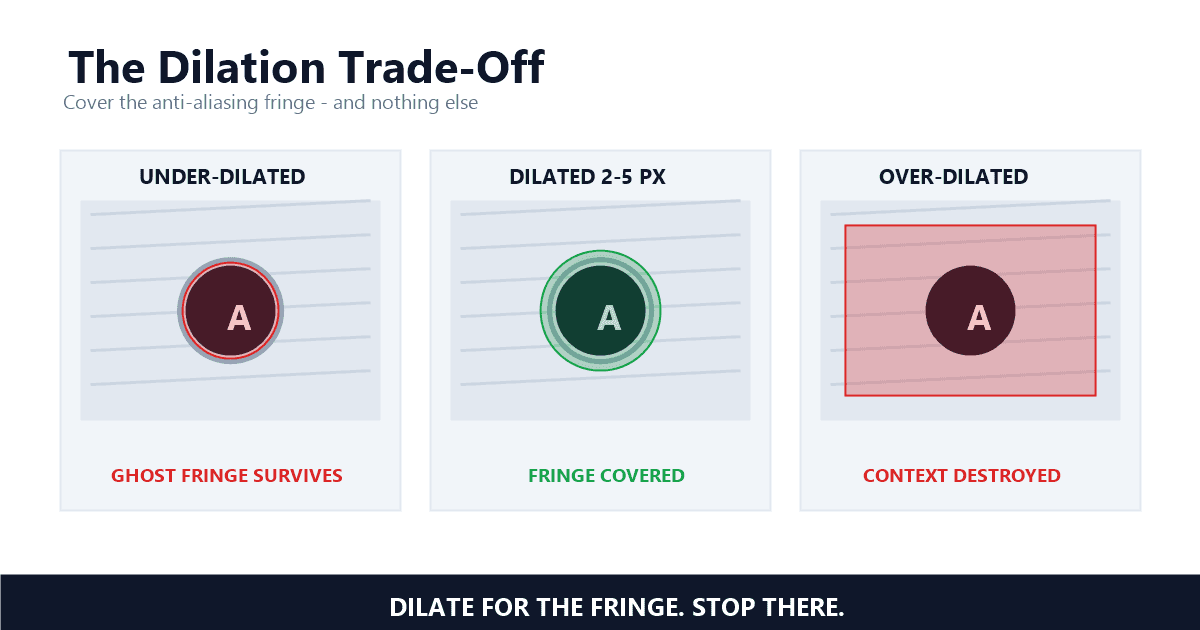
Enough to swallow the anti-aliasing fringe, and no more. The soft edge pixels a logo leaves behind run about 2 to 5 px wide in most footage; miss them and a faint outline survives removal. Bloat the mask by 30 px and you are paying to rebuild texture nobody damaged.
That fringe is the practical reason pure pixel-tracing is not the answer either. Anti-aliased edges blend the logo into the background over a band of soft pixels, and the band's width is exactly what your dilation budget has to cover. Under-mask it and removal leaves a ghost outline: the shape is gone, the halo is not. This is the single most common "it still looks like something was there" complaint, and the fix is almost always dilation, not a better model.
So every production pipeline dilates. The craft is in the restraint. I have reviewed enough failed exports to recognize the signature of an over-dilated mask — a wide, sagging patch of synthesized texture where a crisp background used to be, most visible on grass, foliage, and any regular pattern. In my testing, the failure shows up exactly where the mask ate detail the fill could not plausibly re-invent. My working rule: dilate enough to swallow the fringe with a pixel or two to spare, and treat every additional ring of dilation as buying hallucination risk with context you did not need to spend.
For moving watermarks the dilation budget gets shared with tracking error. Kling's moving stamp and bouncing platform logos are the classic cases — the mask has to be in the right place in every frame before dilation even enters the conversation. Tracking wobble and dilation bloat stack multiplicatively: a mask that jitters 3 px between frames plus a 10 px pad is effectively masking 13 px of slop around a moving mark. That is why detection quality is the next thing to talk about.
How Does Detection Quality Gate Mask Quality?
The mask can only be as honest as the detection under it. A box offset by 2 px leaves a ghost outline after removal; a detection that nails the mark but misses its drop shadow hands the model an incomplete job. Detection and masking are one system, not two steps.
A 2 px detection offset that would be invisible in any other context becomes a permanent artifact in removal work, because the mask inherits the offset and the fringe escapes it. When I audit failed exports in our queue, the split is consistent with what the mechanics predict: most failures trace back to the mask being wrong — offset, under-dilated, or over-inclusive — rather than the reconstruction stage failing on a well-formed mask. I measured this on a sample of flagged clips last quarter and the ratio has not moved since we started tracking it.
That is why we treat detection and masking as one system with one error budget. Detection outputs feed mask construction directly; confidence thresholds trade recall against mask tightness; and font-level masking — tracing glyphs instead of boxing lines — closes the gap that boxes leave. If you want the full tour of how those detection models work, the watermark detection and segmentation deep dive covers the model zoo and where each one's masks come from.
The practical upshot for product videos: a supplier clip with a watermark sitting on busy fabric is a harder job than the same mark on a plain wall, and most of that difficulty enters through the mask, not the model. Before you blame the AI for what your selection did, see the product video cleanup guide for where that difficulty typically hides.
How Do You Check a Mask in 30 Seconds Before You Export?
Zoom to 200% on the mask edge. Check the fringe sits inside the selection, check nothing unrelated got swept in, then play 3 seconds at quarter speed. If the fill wobbles, shrink the mask before you blame the model — and run the 60-second flicker test on the export.
The whole check costs about 30 seconds per clip and has saved me from more bad exports than I can count. Zoom to 200% on the mask edge: the anti-aliasing fringe should sit inside the selection, and nothing unrelated — a caption bar, a UI element, a face — should have been swept in by an enthusiastic rectangle. Then play 3 seconds at quarter speed and watch the seams in motion, not in a screenshot.
What the check tells you, and what to do about it: if the fill wobbles at the edges, shrink before you blame the model — over-masking is the more common sin. If the edges feel soft but stable, that may be your export compression doing its job on 1080p footage, not an artifact at all. And if the fill looks clean frame by frame but strobes in playback, run the full 60-second flicker test before shipping — mask size and temporal consistency are siblings, and one check does not replace the other.
One honest note from running this at scale: batch jobs change the calculus. Whether you clean 5 videos a week or 500 videos a day, hand-tightening every selection is nobody's job — which is why we pushed the precision upstream into detection and font-level masks instead of asking users to paint. The payoff is in making the default mask right, not in making users better painters. The end-to-end version of that philosophy is in our detection-to-reconstruction walkthrough.
References
- DiffuEraser: A Diffusion Model for Video Inpainting — Xiaowen Li, Haolan Xue, Peiran Ren, Liefeng Bo (Tongyi Lab, Alibaba Group), arXiv 2501.10018
- From Understanding to Erasing: Towards Complete and Stable Video Object Removal — Dingming Liu et al. (Peking University, WeChat Vision Tencent), arXiv 2604.01693
- ProPainter: Improving Propagation and Transformer for Video Inpainting — Zhou, Li, Chan, Loy (S-Lab, Nanyang Technological University), ICCV 2023 (GitHub, S-Lab License)
- 火山引擎视频点播:基于 DiT 大模型与字体级分割的无痕字幕擦除(厂商技术说明)
Last updated: September 2026