COPIED Act vs Watermark Removal: What's Actually Illegal (2026)
Mark Ma
Last updated: October 2026
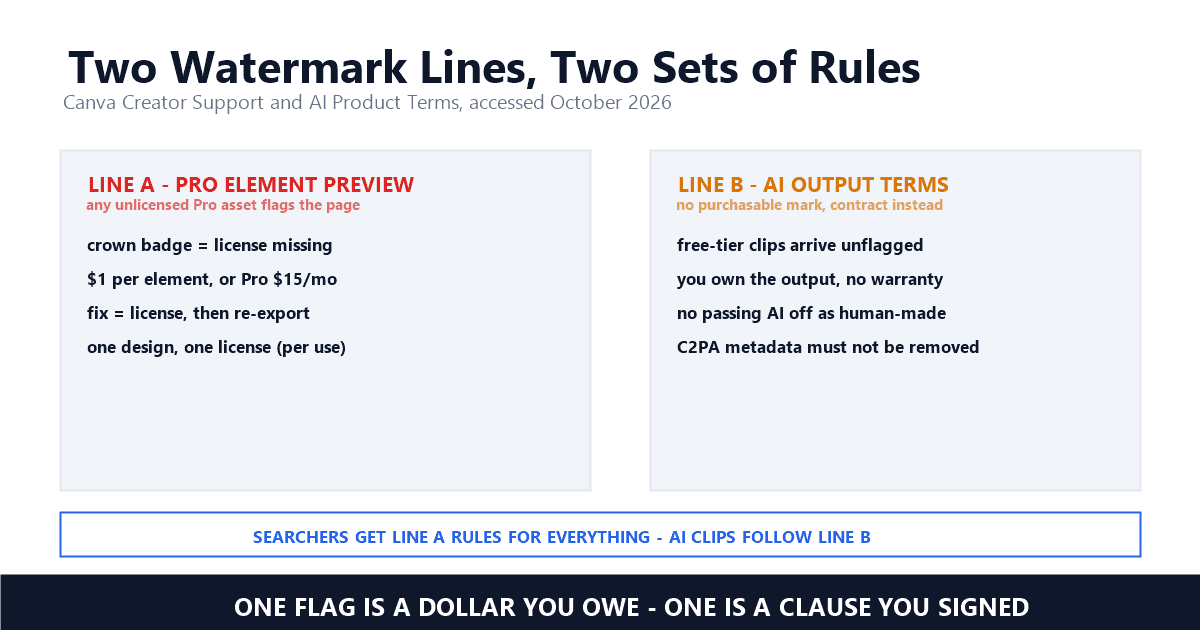
Search results for canva video watermark removal are a wall of stripper tools: AI erasers, editor tutorials, plugin walkthroughs. None of them lead with the fact that Canva runs two completely different marking systems, and only one can be paid off. The first is a license preview attached to any Pro element in a composition — removable for a dollar per item or through a subscription. The second covers AI-generated output, which carries no purchasable flag at all but does carry contract terms about metadata that no remover mentions.
My day job is building UnMark, a watermark removal product, and Canva is the platform users ask about most that ships no official remover page. Vidu runs its own owned-media cleanup tool; Canva does everything inside the editor. That makes the help-center pages unusually important, because they are the only place the company states what its marking means — and what they say settles most questions the tool listings muddy.
The short version: a Canva mark on a video almost always means one asset was never licensed. The sanctioned fix is buying that item for $1, subscribing to Pro, or swapping in free media and re-exporting. AI-generated clips skip that system entirely — yet they arrive with provenance terms that make stripping metadata a contract breach. Everything else in the rankings is navigation around those two facts.
Only when the underlying composition uses unlicensed Pro content. There is no separate video rule — an export inherits the element licensing of the design behind it, so one unpaid photo flags the whole timeline. Projects built purely from free media come out clean, even on the no-cost tier.
This is what most searchers miss, because Canva now presents itself as a video editor. It is a design editor that exports MP4s. When you download a clip, the dialog checks what it checks for a PDF or PNG: does this composition contain Pro assets without a license? If yes, the flag lands on every frame; if no, the file arrives clean at no charge. Wondershare's FAQ, verified October 10, 2026, puts the paid side plainly: "No, Canva's free version does not allow the removal of watermarks from downloaded videos. To remove watermarks from videos in Canva, you'll need to upgrade to Canva Pro" — Wondershare, Canva Watermark Remover. Correct as far as it goes, though the $1 per-item route it skips is cheaper for one-off fixes.
The diagnostic takes half a minute. Click through each item and look for the crown or diamond badge; open the export dialog and read the premium notice. Every flagged piece is a purchase decision. Clear each one — buy it, replace it, or subscribe — and the clip comes out clean, because unlike generation platforms, Canva's flag is not baked into pixels by a render farm. It is a preview layer the editor controls, which is why the cure always runs through re-export, never through an eraser.
A preview watermark is the visible half of a license Canva sells per item or per subscription. The company's own Creator Support page says this without hedging: free users see Pro media flagged, and the marking leaves once a license attaches. The flag is the unpaid state made visible.
The language, verbatim from Canva's official Creator Support Zendesk, accessed October 2026: "For Canva Free users, Pro content is watermarked. You can remove this watermark by buying a license to use the content in that design for $1, or you can also subscribe to Canva Pro or Canva for Enterprise - where there is nothing more to pay" — Canva Creator Support, Using Canva for Commercial Purposes. Three doors, one sentence: pay a dollar for that asset in that composition, or carry a plan that licenses whatever you touch. The dollar route is what third-party tutorials rarely mention, and it matters precisely because most searches start from a layout holding one or two flagged items.
That page also defines what the license buys: "Use our content in a Canva design, for a wide range of personal and commercial uses. You can use our content in marketing or social media, or even sell merchandise with your design on it" — Canva Creator Support. Two boundaries sit beside the permission: "Don't resell, redistribute, or take credit for unaltered media provided through Canva", plus a trademark rule — library pieces cannot become your logo, because every other subscriber licenses the same assets. For video teams the summary is short: licensed assets inside an edited composition are safe for ads and merch; raw library clips passed through untouched are not.
Through the license, then re-export. Buy the flagged item for $1, take a Pro plan, or substitute a free equivalent — then download again. No tool, toggle, or support ticket strips the flag from a file, because the marking is the editor's signal that a license is missing.
The workflow splits by situation. One layout, one flagged photo: pay the dollar and the export cleans itself. Ongoing output: Pro licenses everything at $15 month-to-month or $120 billed yearly — figures three independent pricing guides agree on, verified October 10, 2026 — and issues fresh licenses automatically as you work. Zero budget: swap each flagged asset for a free-library match, resize, re-export. WatermarkRemover.now's guide, reviewed October 2026, describes that route accurately: "If your design uses only free elements, Canva does not watermark it at all, even on the free plan" — WatermarkRemover.now.
What if the composition is gone and only the flagged MP4 survives? That is the one scenario WatermarkRemover.now concedes to removal tools: "you have a finished image you already own, the watermark is your own, and you can no longer re-export it from Canva" — WatermarkRemover.now, How to Remove a Canva Watermark. A preview on footage you licensed, whose source was lost, is your file to clean — the same ownership logic we documented in UGC handoff workflows. What no scenario licenses is stripping the flag to use unpurchased Pro media: the preview exists because a contributor is owed a dollar, and an AI eraser does not pay them. When the footage is yours and volume is real, our processing walkthrough shows what a defensible cleanup chain looks like — rights verified before the first frame is touched.
Pro runs $15 monthly or $120 yearly — $10 a month effective, a $60 annual saving. But the mechanics bite harder than the price: Pro media is licensed per composition, so the same paid photo in a second project draws on the plan again. One layout, one license, every time.
For free users the arithmetic is spelled out: "Each Pro content license allows you to use the content in one design, so you must pay to obtain a new license each time you'd like to use the same piece of Pro content in a new design. If you have a Canva Pro or Canva for Enterprise subscription, then a new license is automatically issued to you each time you use Pro content in a new design" — Canva Creator Support. LicenseOrg's comparison of Canva's terms, pulled October 2026, adds the detail that stings resize-heavy teams: variants produced by Canva's resize feature count as fresh compositions under the One Design rule, drawing new licenses per variant — a trap for anyone assuming one purchase covers a campaign.
Two more edges matter for clip output. The support article notes a pixel limit on Pro media used in certain online embeds — "please be aware that there is a pixel limit for unedited media in your design (e.g. a large photo being included on a web page design)" — Canva Creator Support, which LicenseOrg pegs at 480,000 pixels outside Canva-hosted surfaces. And Pro audio carries a channel restriction: "They can't be used in traditional media advertisements or commercials on paid channels (such as TV, cinema, radio, podcasts, or billboards)" — Canva Creator Support. A clip that exports clean can still breach its audio license by where it plays — a distinction none of the remover ads we read acknowledged.
A separate line entirely. Canva's AI video generator produces clips that skip the per-item license preview — outside testers report free-tier output arrives unmarked. What it does carry is contract terms: you own the output, provenance rules apply, and the embedded metadata is not yours to strip.
The distinction confuses tools and testers alike, because the two systems look identical in a rankings list. Digiweblog, seen October 10, 2026, frames it correctly: "Canva only lets you export watermark-free videos if you use free assets. If your project includes a premium image, Pro template, or licensed music track, your video will show a watermark or ask you to upgrade before exporting" — Digiweblog, Free AI Video Generators. The same guide puts Canva's AI clips at roughly eight seconds each; ClipCreator's testing, seen October 2026, matches the credit side: free accounts get "a small, lifetime credit allotment" for generation. Short, credit-capped, unflagged — that is the AI line.
The terms are where this line grows teeth. Canva's AI Product Terms — as summarized by LicenseOrg's comparison, pulled October 2026, from the November 2025 version — state that you own your Output with no accuracy warranty, that AI media must not be passed off as human-made, and that C2PA provenance metadata must not be removed. PopularAItools quotes the audio clause verbatim: "You may not sell, license, sublicense, or distribute Audio Output on a standalone basis…you do not own your Audio Output" — PopularAItools, Canva AI Voice Generator Review. Read together: the clip arrives clean but conditioned. Stripping its provenance data is the exact violation our C2PA and SynthID comparison maps across platforms — invisible terms, unlike the visible preview, but enforced by contract rather than pixels. Regulators converge on the same ground: the EU AI Act requires machine-readable marking of synthetic media, and China's labeling measures ban tools that maliciously erase such labels.
Because the rankings are written by vendors, not license readers. The front page mixes two errors: strippers pitched at flags you are not allowed to remove, and claims that Canva itself erases markings it actually applies. Neither survives a minute with the official pages.
The first error dominates. HitPaw's guide, checked October 10, 2026, pitches its editor at Canva exports: "HitPaw Edimakor AI still image reconstruction technology is also used in video watermark removal" — HitPaw, Remove Canva Watermarks. Miracamp's tutorial, checked that day, walks through iMyFone MarkGo in four steps toward the same end. Neither asks whose flag it is. On an unlicensed Pro asset, that marking is a contributor's unpaid dollar — erasing it is the move Canva's license forbids, the same category we flagged when Grok Imagine and Seedance results filled with plan-bypass pitches. The second error is subtler: WatermarkRemover.io's piece, checked October 10, 2026, claims "Canva watermark remover isn't a traditional video editor, but it can help with removing watermarks from videos" — WatermarkRemover.io — which inverts reality; Canva applies license previews, it does not erase them.
The honest exceptions prove the pattern. WatermarkRemover.now covers the license line accurately and concedes removal tools only the lost-source case — yet never mentions the AI terms line. The generic listicles (PixelBin, AEANet, Wink) restate the upgrade path without checking either line against official language. The sequence that worked for us: official support page first, pricing cross-checked across three guides, tool claims tested against both lines. The same discipline sorts Luma's double paywall and Pika's clean-export rules from their own result-page noise.
When every asset under the flag is licensed to you. A preview on unlicensed Pro media is a purchase reminder — the dollar, the plan, or the swap clears it. A mark on your own finished file with a lost source is yours to clean. A stripped preview on unpaid content is neither — it is using a contributor's work for free.
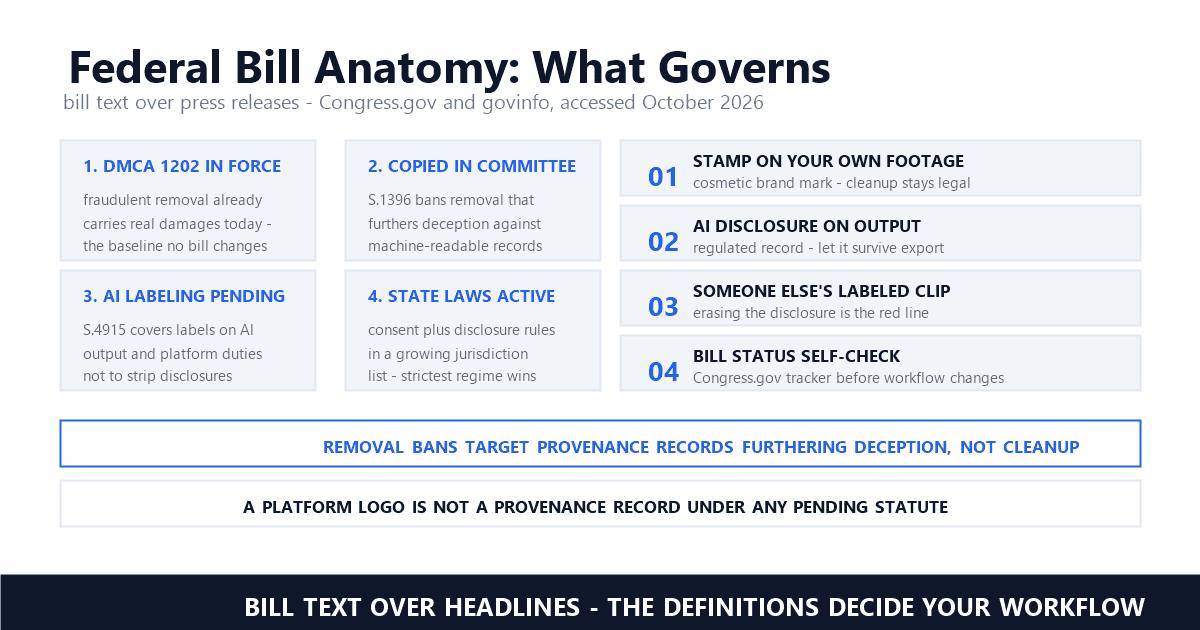
The legal layers around that line are the ones we track across this series. When a marking qualifies as copyright management information, 17 U.S.C. § 1202 attaches statutory penalties to stripping it; our four-question legality guide — whose flag, whose footage, which statute, which contract — resolves most cases before the layers load. Canva adds a contract layer the generation platforms lack: its AI Product Terms make provenance metadata non-strippable by agreement, which puts metadata erasure in the same bucket as the visible flag. The technical side favors care either way — inpainting beats cropping and blurring on quality, mask size drives the cost, and preview layers usually cover more of the frame than people expect.
Our position as a removal product is the one Canva's pages imply: in our queue, license previews on unlicensed media are out of scope, because the vendor sells the clean file for a dollar and the license is the product. What we tested and do accept are lost-source exports and owned assets — the narrow case WatermarkRemover.now also concedes. Volume there is batch-shaped, which is why batch cleanup beats single-file heroics, and why platforms that bake marks into renders — Runway, Hailuo, Veo — behave so differently from an editor that re-exports on demand.
Canva's two lines — a purchasable preview on unlicensed items, contract terms on AI output — are easier to respect than to explain, and the rankings barely try. The help center explains both in three paragraphs. Everything a stripper tool promises beyond the lost-source case is either the dollar you have not paid or metadata you agreed not to touch.
Does the free Canva plan watermark videos?
Only compositions containing unlicensed Pro assets. Canva's support page: free users see Pro media flagged, removable via the $1 per-item license, Pro, or Enterprise. A video built entirely from free-library media exports clean on the free plan — the plan itself applies no flag.
Can I remove a Canva watermark without paying?
Yes, by swapping every flagged Pro item for a free-library equivalent and re-exporting — WatermarkRemover.now documents that route and notes free content comes out clean. Erasing the preview off unpaid media with a third-party tool is not a free path; it is unlicensed use.
Do Canva AI-generated videos have a watermark?
Output from Canva's AI generator carries no per-item license preview — testers report free-tier clips arrive unmarked. The binding terms are contractual instead: you own the output, cannot pass it off as human-made, and cannot remove C2PA provenance metadata under Canva's AI Product Terms.
Last updated: October 2026
Canva Creator Support — Using Canva for Commercial Purposes (Official) (accessed October 2026)
Canva — AI Product Terms (Official; cited via LicenseOrg and PopularAItools, October 2026)
LicenseOrg — Canva vs Creative Market: License Comparison (pulled October 2026)
PopularAItools — Canva AI Voice Generator Review (seen October 2026)
WatermarkRemover.now — How to Remove a Canva Watermark (reviewed October 2026)
Wondershare — Canva Watermark Remover: How to Use It (verified October 10, 2026)
HitPaw Edimakor — How to Remove Canva Watermarks from Images and Designs (checked October 10, 2026)
WatermarkRemover.io — How to remove a watermark from a video (checked October 10, 2026)
Digiweblog — 7 Free AI Video Generators For YouTube Without Watermark (seen October 10, 2026)
ClipCreator — Top 12 Text to Video Generator Free Tools (seen October 2026)
AIToolsSet — Canva Pricing in 2026: Free, Pro, Teams, and Enterprise Costs Explained (verified October 10, 2026)
Analytics Insight — Canva Pro Pricing Explained (verified October 10, 2026)
Mark Ma is the founder and lead engineer at UnMark, where he leads the development of AI-powered video watermark removal technology. With over a decade of experience in computer vision, deep learning, and video processing, he has built production systems that process millions of frames per month across TikTok, Instagram Reels, and Google Veo content. His technical work focuses on motion-compensated watermark detection, spatial-temporal inpainting, and quality-preserving reconstruction for short-form vertical video. Before UnMark, Mark shipped computer vision infrastructure at scale for content moderation and ad compliance platforms. He writes this blog to document the real engineering, testing, and regulatory reasoning behind UnMark's processing pipeline — every test result, frame analysis, and benchmark published here is reproduced from actual production data, not synthetic examples. His goal is to give creators, brands, and regulators a verifiable technical reference for AI video watermark removal in 2026.