COPIED Act vs Watermark Removal: What's Actually Illegal (2026)
Mark Ma
Last updated: October 2026
Search capcut video watermark removal and every front-page slot belongs to CapCut itself: the AI remover tool page, two resource tutorials, one help article, and a wall of template pages. That is unusual in this series — for Grok Imagine and Seedance the rankings were third-party guesswork — but official dominance has not produced clarity. CapCut's answer to the watermark question is scattered across seven separate documents, two vocabularies deep, and none of the rankings assembles them.
We make UnMark, a watermark removal product, and CapCut is the one editor in our research that plays both sides: it attaches a branded ending clip to template exports and gates watermark-free output behind its subscription, while also shipping an AI remover that erases marks from footage you already have — powered by the same Seedance model family we covered separately. We compared how each official page frames that arrangement, and the picture that emerges is more useful than any remover listing.
The short version: the mark usually enters through elements, not the export step — a template's ending clip, a Pro-tagged asset, or a length limit — so the fix depends on which trigger fired. Delete the clip, swap the asset, subscribe, or, for marks already burned into your own footage, run the official AI remover within its stated limits.
Sometimes — and CapCut's help center says so with unusual precision: it is possible to export without a watermark, "depending on the editing features you use and the version of the app" — CapCut Help, March 18, 2026. The flag is a consequence of specific choices, not a constant tax on free users.
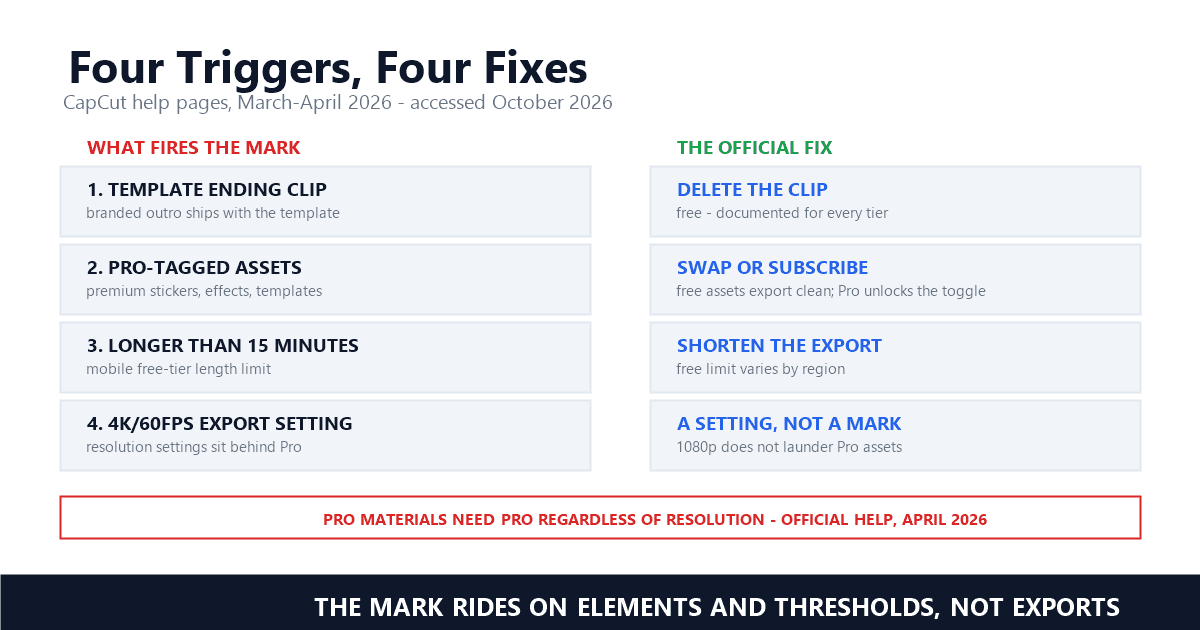
The same page names the sources: "Certain advanced templates, effects, and stock elements add a watermark when used in the free version" — CapCut Help, Is it Possible to Export Videos from CapCut without a Watermark?. That phrasing separates CapCut from most of the generation platforms this series tracks, where Kling and Hailuo stamp every free-tier render by default. In CapCut a manually built project — your own clips, music, text — exports clean without paying anything, which the help page calls "the most reliable method for creators who want clean, professional results." The watermark is attached to inventory, not to people: it arrives with the template you applied or the premium sticker you dropped in, and it can leave the same way.
One source sits outside the asset system entirely. The export-panel pages note that on mobile, choosing no watermark "on a video that exceeds free-tier length/resolution" also triggers the paywall, and one page puts a number on the length: "you're trying to export longer than 15 minutes (free limit varies by region)" — CapCut Help, Why Am I Prompted to Join CapCut Pro When Exporting?, April 2, 2026. A 16-minute home movie needs no template and no premium sticker to hit the wall — duration alone is enough.
By cutting it out of the timeline — CapCut documents the removal for Web, Desktop, and Mobile and frames the mark as removable inventory: "In most cases, the watermark comes from a default ending clip or built-in template element—not from the export itself" — CapCut Help, March 25, 2026.
Templates are prebuilt project structures, and many ship with a branded outro that the export step renders faithfully. The official page gives six steps per platform, and they compress to one action: scroll to the end of the timeline, select the CapCut-branded ending clip, delete it, check the remaining tracks for logo overlays, then export. On desktop the page adds that placeholder layers can carry branding, so a clean preview is the verification step — if the mark survives, an overlay track is still hiding it. Nothing here requires a subscription; the deletion is presented as ordinary editing on every tier.
This is the detail most third-party tutorials skip, and it changes the economics for template-based output at volume — the agency handoff workflow we covered earlier hits the same junction, where a client deliverable inherits whatever the template shipped with. There we quoted CapCut's tutorial line "However, you need CapCut Pro for no watermark" and left it as a workflow footnote; the fuller picture is that the Pro quote applies to the watermark toggle in the export panel, while the ending-clip deletion — the trigger behind most template marks — needs no payment at all. Two mechanisms, two answers, and the tutorials that recommend subscribing first are solving the cheaper problem with the expensive tool.
When the project itself contains subscriber-only material — CapCut's export-panel pages draw that line in three places that agree: no-watermark output is listed among Pro capabilities, Pro-tagged assets demand Pro "regardless of resolution," and the toggle follows the subscription, not the project.
The tier definition, verbatim: "certain advanced capabilities—such as 4K/60fps export, no watermark, AI-powered generation, exclusive templates, premium effects, and expanded cloud storage—are part of the CapCut Pro (Premium) tier" — CapCut Help, Why Am I Prompted to Purchase CapCut Pro?, April 2, 2026. Pro is a subscription tier whose export privileges include the watermark toggle itself: free users can preview Pro assets, but "exporting videos that use them requires an active Pro subscription" — CapCut Help.
The same help block adds the clause that settles most resolution confusion: "Even if you choose 1080p, you may still be blocked from removing the watermark—because watermark removal on videos using Pro materials always requires Pro, regardless of resolution" — CapCut Help, the export-panel page, April 2, 2026. Dropping from 4K to 1080p does not launder a project that contains Pro-tagged assets. The gate is live in both directions, too: "If you cancel, you can still export—but with a CapCut watermark, even at 1080p" — CapCut Help. Last month's clean export and this month's marked one can come from the identical project file.
The export panels we compared across the three platform pages apply the same logic on different surfaces — a modal on web, a lock icon on desktop, a full-screen overlay on mobile — but the mobile page carries one qualifier the others lack: the paywall triggers on "1080p+ or no watermark (on longer videos)" — CapCut Help, April 2, 2026. Short mobile exports at modest settings are the one path where the toggle stays free, which matches the ending-clip mechanics above: the mark follows assets and thresholds, not the act of exporting. Where the thresholds themselves live is a pricing question, and CapCut's 2026 membership changes made that question harder to answer.
A restructure that split the product line and its own terminology. On March 25, 2026 CapCut announced a brand-new membership structure with upgraded Pro limits and a second paid tier, Standard — then spent the summer describing Standard as the free version on a different page.
The March announcement runs: "previous pricing is no longer available for new subscribers" — CapCut Help, Understanding the Pricing Change — with the upgraded Pro plan carrying "AI points increased from 550 to 1200" and "cloud storage expanded from 100GB to 1TB" — CapCut Help. Beside it sits the new tier: "CapCut has also launched a Standard Plan...ideal for editing enthusiasts and offers a wide selection of templates, materials, and a complete suite of advanced editing tools" — CapCut Help. Standard is a mid-tier subscription for creators who want the template library and toolkit without Pro's AI and storage scale, per the April pricing page, which calls it "a more budget-friendly option compared to Pro" — CapCut Help, April 8, 2026.
What no official page publishes is Standard's price. Third-party coverage fills the gap with a specific claim: Standard at $9.99 per month "removes watermarks from Pro-tagged templates but does not include 4K export, voice cloning, the full AI toolkit, or 100GB+ cloud storage" — RenderCut, CapCut Pro vs Free, checked October 10, 2026. CapCut's own subscription activity page advertises Pro "As low as $9.99/monthly or $89.99/year" (checked October 2026), while its August comparison page lists Pro at "$19.99 per month" or "$179.99 per year" — CapCut, CapCut Standard vs Pro. The numbers do not reconcile from the outside; regional pricing and promotions likely explain it, but a reader assembling the matrix from official sources alone cannot close the gap.
The terminology drifts worse than the pricing. The same August page that lists Pro rates opens its Standard section with: "The CapCut Standard plan, commonly referred to as the free version, is designed to provide users with the essential basic necessities" — CapCut, CapCut Standard vs Pro, updated August 20, 2026. Three months after Standard launched as a paid tier, CapCut's own resource page uses Standard to mean the free plan. A reader arriving from Canva's per-element pricing or Vidu's plan matrix — tables where each tier name means exactly one thing — finds the same word naming two different products. Until CapCut reconciles its pages, the safe reading is the feature list, never the plan name.
Yes — CapCut is unique in this series: the vendor that adds watermarks also sells the eraser. Its remover runs on Dreamina Seedance 2.0, brushes marks out of existing footage, and carries an IP notice that limits use to personal or authorized materials.
The tool page instructs: "Go to 'Video' > 'Basic' and locate the 'AI remove' feature. Select the 'Brush' tool and adjust its size based on the watermark you want to remove. Then, brush over the entire watermark area and click 'Remove'" — CapCut, Remove Watermark from Videos Effortlessly, checked October 10, 2026. The engine is named on the same page: "With Dreamina Seedance 2.0, removing watermarks is effortless" — CapCut — which makes the remover a sibling of the generation model whose watermark rules the Seedance coverage documented from the model side.
The mechanism is inpainting, and CapCut's own tutorial sets expectations honestly: "CapCut's AI fills the selected area by sampling nearby pixels to produce a natural-looking result, though effectiveness may vary depending on the background complexity" — CapCut, CapCut No Watermark Tutorial, updated August 20, 2026. That is the same quality boundary our inpainting comparison measures — reconstruction succeeds or fails on the background behind the mark, not on the mark itself. The tutorial stacks fallbacks for stubborn cases: crop for edge-sitting logos, a sticker cover-up for static marks, background removal when the mark lives in a patterned layer, and screen recording last, which the official page recommends with the caveat that it "can reduce quality slightly."
What the tool page does not do is license everything. Its opening note, verbatim: "CapCut does not support removing watermarks from copyrighted or paid content. Please respect creators' and platforms' intellectual property rights. This feature is intended only for personal or authorized materials" — CapCut, Remove Watermark from Videos Effortlessly. Yet the same page's scenario section suggests the remover to "clean existing marks or logos, allowing easy rebranding" of old ad videos — CapCut, the same page. A red line in paragraph one and a rebranding use case further down: the tool reaches exactly as far as your rights to the underlying footage, and CapCut's own pages show how easily those two sentences blur. Set it against Filmora's support pages, which define their trial mark as permanent pixel data and offer no tool at all, and the arrangement reads as a bet that the eraser business and the marker business can share one customer.
Because CapCut executed the official-content takeover most platforms never attempt: five of five front-page slots for the core query belong to capcut.com, and the only substantive third-party pages are a competitor's complaint and a pricing blog. Every fact is verifiable at the source — if you can find which page holds it.
Long-tail variants surface the same wall, with one exception worth reading. "after capcut update added watermarks paywalls the recent capcut update has left many content creators frustrated as the platform quietly shifted several previously free tools" — Wondershare's Filmora answers page, checked October 10, 2026. The complaint comes from a company that sells watermark-free exports itself, which makes it less an exposé than a mirror: the two vendors run the same playbook, and only one of them also sells the eraser. For the searcher, official dominance cuts both ways — no fake sites like the ones we documented for Luma Dream Machine, no gray-market listings like the Grok Imagine results — but the official pages compete with each other. The export article says watermark-free output "is absolutely possible" for free; the export-panel pages say the toggle is Pro-tier; the pricing pages renamed the tiers mid-year and then reused the old name for the free plan.
The reading order we found works: the March export help article first for the trigger mechanics, the two April export-panel pages second for the Pro gates, the tools page last for the remover — the same official-first discipline we applied to Vidu's self-owned remover and Canva's license pages. What the rankings lack is anyone stating the system the pages jointly describe, so here it is in three sourced sentences: the mark enters through template elements, Pro-tagged assets, or free-tier thresholds — not through the export step itself; deleting the element is free, subscribing unlocks the toggle, and Pro materials demand Pro regardless of resolution; and for marks already in your own footage, CapCut offers an official AI remover whose engine it also sells as a generative model. Every remover listing below the official wall is a slower route to decisions CapCut's own pages already made.
CapCut's own documents answer this clearly. Deleting the ending clip and swapping Pro assets are ordinary edits the help center teaches on every tier; the AI remover operates inside a stated boundary — personal or authorized materials only — which puts one question first: whose footage, and whose mark?
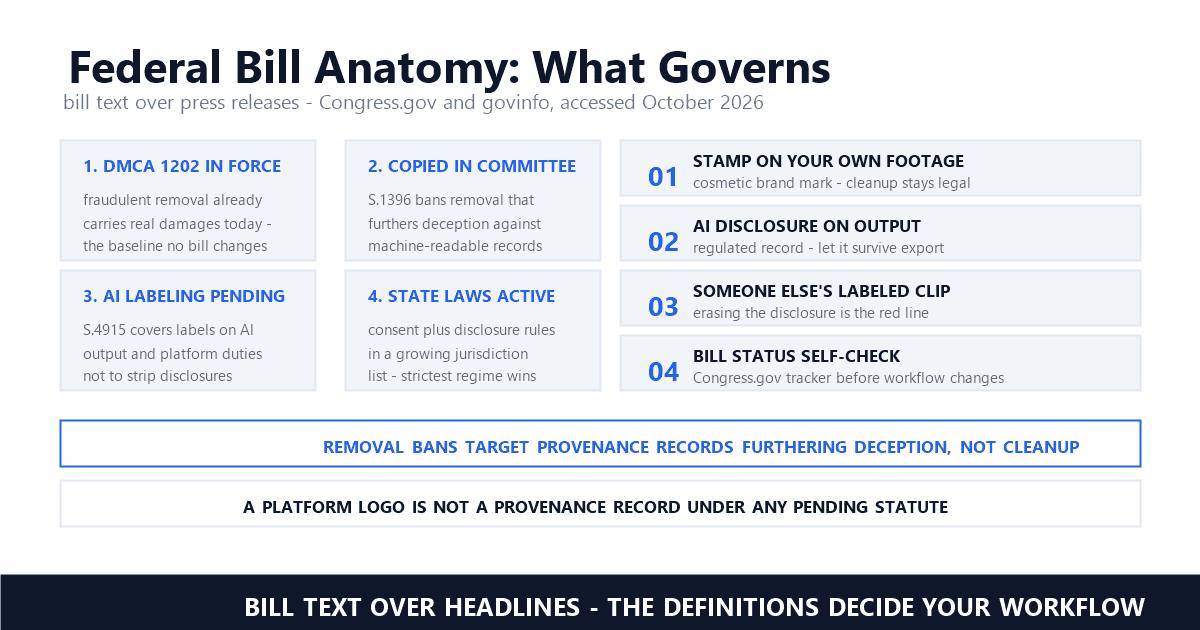
When a mark qualifies as copyright management information, 17 U.S.C. § 1202 attaches statutory penalties to stripping it, and the EU AI Act and China's labeling measures govern the synthetic-content subset. The four questions in our legality guide resolve the common cases quickly. A template's ending clip on your own edit: the mark is CapCut's branding on footage you assembled, and the vendor's own help page instructs deletion — legitimate. A third-party logo burned into someone else's upload: the mark is that owner's claim, the IP notice excludes it, and the remover's brush does not change the answer. Your own footage carrying someone else's overlay — the UGC handoff pattern or the ad-compliance cleanup — is the owned-asset lane where removal work belongs, and at volume that lane is batch-shaped, documented in our processing walkthrough.
Across the platforms we track — Veo's invisible synthid, Sora's moving logo, Runway's plan-gated exports, the already-final marks Udemy hands instructors — CapCut sits alone in selling both sides of the transaction. That makes its documentation the clearest map of where removal is legitimate: the vendor tells you exactly which marks it expects you to delete, which ones it expects you to subscribe around, and which ones belong to someone else entirely.
Is CapCut free without a watermark?
Often, yes. A manually built project with free assets exports clean on every tier, and the template ending clip can be deleted from the timeline at no cost. The watermark toggle and Pro-tagged assets are where the subscription gate sits — CapCut's help pages list no-watermark export among Pro capabilities, and mobile free exports face a length limit around 15 minutes that varies by region.
Does CapCut Pro remove watermarks from already-exported videos?
No. The subscription applies at export time, like a license checked on the way out. For marks already in footage, CapCut's official path is the AI remover — brush over the area and the model reconstructs the background by sampling nearby pixels, with results that depend on background complexity. Its use is limited to personal or authorized materials by the tool page's own notice.
What is the CapCut ending clip and why is it there?
It is a short branded segment CapCut appends to template projects, rendering the company's logo at the end of the video. CapCut's help center describes it as the most common watermark source — "not from the export itself" — and documents the same removal on Web, Desktop, and Mobile: scroll to the timeline end, select the clip, delete it, and check remaining tracks for logo overlays before exporting.
Last updated: October 2026
CapCut Help — Is it Possible to Export Videos from CapCut without a Watermark? (Official) (accessed October 2026; updated March 18, 2026)
CapCut Help — How Can I Remove the Watermark When Exporting a CapCut Template Video? (Official) (accessed October 2026; updated March 25, 2026)
CapCut Help — Why Am I Prompted to Purchase CapCut Pro? (Official) (accessed October 2026; updated April 2, 2026)
CapCut Help — Why Am I Prompted to Join CapCut Pro When Exporting? (Official) (accessed October 2026; updated April 2, 2026)
CapCut Help — Understanding the Pricing Change (Official) (accessed October 2026; updated March 25, 2026)
CapCut Help — What Is the Price of CapCut for New Subscribers? (Official) (accessed October 2026; updated April 8, 2026)
CapCut — Remove Watermark from Videos Effortlessly (Official tools page) (accessed October 2026)
CapCut — CapCut No Watermark Tutorial: How to Remove Watermark in CapCut (Official) (accessed October 2026; updated August 20, 2026)
CapCut — CapCut Standard vs Pro: Full Comparison of Features and Pricing (Official) (accessed October 2026; updated August 20, 2026)
RenderCut — CapCut Pro vs Free: Is It Worth Paying in 2026? (third-party pricing claim, accessed October 10, 2026)
Mark Ma is the founder and lead engineer at UnMark, where he leads the development of AI-powered video watermark removal technology. With over a decade of experience in computer vision, deep learning, and video processing, he has built production systems that process millions of frames per month across TikTok, Instagram Reels, and Google Veo content. His technical work focuses on motion-compensated watermark detection, spatial-temporal inpainting, and quality-preserving reconstruction for short-form vertical video. Before UnMark, Mark shipped computer vision infrastructure at scale for content moderation and ad compliance platforms. He writes this blog to document the real engineering, testing, and regulatory reasoning behind UnMark's processing pipeline — every test result, frame analysis, and benchmark published here is reproduced from actual production data, not synthetic examples. His goal is to give creators, brands, and regulators a verifiable technical reference for AI video watermark removal in 2026.