COPIED Act vs Watermark Removal: What's Actually Illegal (2026)
Mark Ma
Last updated: October 2026
Search interest in luma dream machine watermark removal has a strange economy: the guides ranking highest quote Luma's licensing documentation accurately, while a site that looks more official than Luma itself prices the clean tier wrong. Between those poles sit thousands of creators who upgraded, paid, regenerated — and still downloaded a stamped file, because the tier they bought was never the clean one.
My day job is building UnMark, a watermark removal product, and we treat platform-protected marks as out of scope — so when a vendor's own plan pages settle a question that its third-party ecosystem keeps getting wrong, I go read those pages the way I would read a contract. For Luma that meant the Dream Machine plan matrix and the payments guide on Luma's learning hub, a three-generation archive of Luma's pricing page, and the tool posts competing to "fix" the mark. The documents agree with each other and disagree with half the SERP.
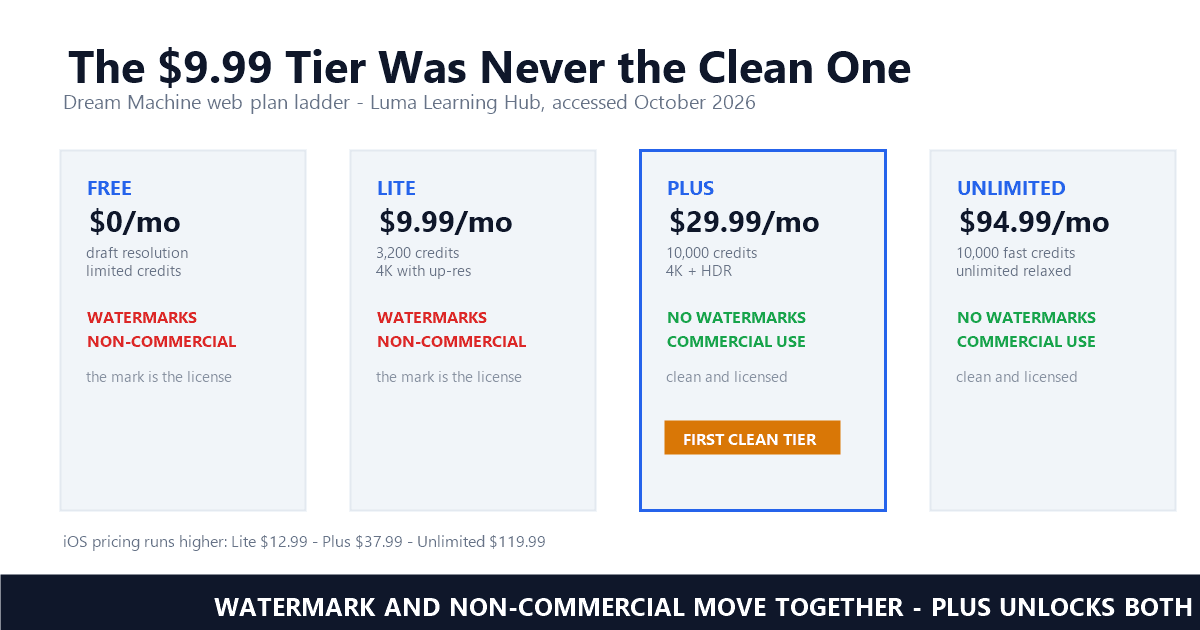
The short version: on Luma's classic web ladder, both the $0 and the $9.99 tiers ship watermarks and non-commercial restrictions; watermark-free, commercially licensed output begins at Plus, $29.99 per month. The license attaches when the clip is generated, not when you upgrade. Everything else — the lookalike sites, the C2PA strippers, the stale guides — is noise around those two facts.
Yes — on the free and Lite plans, by design. Luma's own plan pages list watermarks and non-commercial use together on both tiers, and the mark is a licensing signal tied to the moment a clip was generated, not a removable sticker. Watermark-free output begins at the Plus plan, $29.99 per month.
The documentation is unusually blunt about it. Luma's payments guide, updated January 25, 2026, walks the web ladder tier by tier: the free plan generates at draft resolution "effective for testing the platform's capabilities, though usage is limited to personal projects only"; Lite, at $9.99 monthly on web, "provide[s] 3,200 credits monthly with priority processing for both images and videos... but content includes watermarks and remains restricted to non-commercial use" — Payments & Subscriptions, Luma Learning Hub. Then the pivot: "Plus Plans... Unlock commercial capabilities for professional creators. With 10,000 monthly credits, no watermarks, and full commercial rights, this plan serves most users with regular project requirements."
The plan matrix on the same hub repeats the pairing as bare feature bullets: Lite gets "Full Ray3 access" and "4k with up-res" but also "Non-commercial use only" and "Watermarks"; Plus gets "4k with up-res and HDR", "Commercial use allowed", and "No watermarks". Resolution and the mark are different columns, which is the whole trap in one table: a $9.99 upgrade buys 4K video you are still not allowed to monetize, stamped with the same badge as the free tier. And the mobile ladder prices it higher — iOS Lite runs $12.99 and iOS Plus $37.99 — so the "cheap clean tier" some guides describe does not exist on any platform at any price below Plus.
Because Luma is one of the exceptions to the industry pattern where the first paid tier buys a clean export. The Lite tier upgrades resolution, credits, and queue priority — the watermark and the non-commercial restriction stay. Clean output and commercial rights arrive together at Plus, which is also the first tier with 10,000 credits.
A troubleshooting guide updated in June 2026 by the AI Productivity Guide team states the pattern explicitly: "Watermark-free is on the first paid tier for most platforms, with two notable exceptions (Luma and Veo)." Its comparison table gives Luma's row in one line: "Lite ($7.99) STILL watermarks — Plus is the first clean tier" — the $7.99 being Lite's discounted annual rate, which only sharpens the point. If you have read the Kling guide, the Pika breakdown, or the Runway export notes, the reflex that a paid plan equals a clean download is understandable — Hailuo runs the same play, and Veo is the other carrier of the exception. Luma simply never signed on.
The same guide adds a distinction most tool posts skip: "For commercial delivery, confirm the source plan grants commercial rights, not just a clean visual — these are separate flags on Pika and Luma." Separate flags, but on Luma they move together — the watermark is the visible face of the non-commercial license, which is why a stripped badge changes nothing about what you may lawfully do with the file. The badge and the restriction are one mechanism, documented in the next tier up.
Not on any official path. AI Tool Curator quotes Luma's licensing documentation directly: the watermark on free- and Lite-plan videos cannot be removed, even if you later upgrade. Rights attach at generation time — a watermarked clip stays watermarked, and the compliant fix is regenerating under an active paid plan.
The quoted passage deserves its full length, because it settles three questions at once: "videos produced on the Free and Lite plans include a watermark that cannot be removed, even if you later upgrade your subscription. The watermark indicates that the clip was generated under a non-commercial license" — Luma licensing documentation, as quoted by AI Tool Curator. Permanence, meaning, and the generation-time rule in two sentences. The same documentation covers the paid side with a phrase worth memorizing: commercial rights and watermark-free output apply to "videos created while those plans are active."
That phrase is the load-bearing one. Your plan at the moment of generation decides the clip's status forever; upgrading is not a metadata update that sweeps your library. The practical workflow follows directly, and the June 2026 guide compresses it: "If a clip was created while you were on Free, the watermark flag is baked in. Re-run the prompt on your current paid plan so the new render inherits the watermark-free flag." A regeneration costs credits; a stripper costs a terms violation and, as the section below shows, a metadata trail you cannot see. Whether even a visible-badge edit is lawful for your situation runs through the four-question legality check — ownership of the clip, the nature of the mark, the statute in play.
By pricing the wrong tier. A site at lumadreammachine.net — not a Luma domain — tells readers that plans starting at $9.99 unlock watermark-free downloads, and even lists its Lite column as "No watermark." Luma's own matrix says the opposite: Lite carries watermarks and non-commercial restrictions; Plus is the first clean tier.
The site contradicts itself in the same FAQ block: "Draft videos include a Luma watermark and are for personal use only. Paid plans start at $9.99/month and unlock more credits, commercial rights, and watermark-free downloads." Two sentences later its own pricing table awards Lite "No watermark" alongside "Non-commercial use" — a pairing that is both internally incoherent and flatly against the vendor's matrix, which ties the watermark to the non-commercial license itself. A separate page on the same site goes further, claiming Luma "aims to provide clean, watermark-free video downloads on its free tier." No Luma document has ever said that; every Luma document accessed for this piece says the reverse.
The damage is concrete, not academic. A reader who believes the $9.99 claim upgrades to Lite, generates client work at 4K, and receives a stamped, non-commercial file — then searches for a remover and lands on a tool page, often the same site's. The pattern rhymes with the Seedance ecosystem, where a ranking guide pointed readers to a lookalike domain as the "official platform." Domain check is a five-second habit: Luma's real estate is lumalabs.ai, and every fact in this piece traces to a page on that domain or to named third parties quoting it with dates.
The ladder and the names. ToolColumn's pricing archive shows lumalabs.ai/pricing restructured around August 7, 2026 into Plus, Pro, and Ultra tiers — $30, $90, and $300 monthly — with the legacy Dream Machine Lite, Plus, and Unlimited plans no longer listed. What did not change: commercial use and clean output begin at Plus.
ToolColumn, which snapshots Luma's pricing pages with dated sources, records the July 18, 2026 state straight from the learning hub — the Free/Lite/Plus/Unlimited ladder quoted above — and the August 7, 2026 state straight from the pricing page: Plus at $30 monthly ($25 on yearly billing, 10,000 credits, commercial use), Pro at $90 (40,000 credits), Ultra at $300 (150,000 credits), Team and Enterprise behind sales. Its note on the transition: "The older Dream Machine Web plans (Lite, Plus and Unlimited at $9.99 to $94.99) are no longer shown on Luma's pricing page, and Luma's API documentation now calls the Dream Machine video API a legacy route." The learning hub's help articles still describe the classic ladder, which means two official sources now describe two generations of the same product — check which one your guide read.
The developer track has its own price sheet. Ray3.2 through the API runs $0.15 per five-second clip at 540p, $0.30 at 720p, and $1.20 at 1080p, with HDR at twice the SDR price and HDR plus EXR at three times; the Scale tier adds dedicated capacity, an SLA, and a no-training guarantee from four capacity units. What the overhaul did not touch is the rule this piece is about: on the new ladder as on the old one, commercial use is the Plus-and-up benefit, and the watermark is its visible boundary. A reorganized pricing page is not a licensing change.
They trade a visible problem for a legal one. Calabi's own post describes stripping the C2PA manifest, XMP AI flags, and encoder fingerprints, then injecting a fake phone-capture identity — Make, Model, GPS coordinates, capture timestamp. Cropping a corner logo is an edit; laundering provenance is closer to evidence tampering.
The tool's own words are the case against it: "crop out the visible corner logo if your clip has one, then run the file through Calabi to strip the invisible layer platforms actually scan — the C2PA manifest, XMP AI flags, generator tags, and encoder fingerprints — and inject a real phone-capture identity" — Calabi Labs, August 2026. The device profiles it offers include "iPhone 17 Pro Max, iPhone 16 Pro, iPhone 15 Pro, Pixel 8 Pro, and Galaxy S24 Ultra," and the proof card brags that "ExifTool showed 18 JUMBF/C2PA atoms reduced to 0." C2PA is a standard for cryptographically signed, machine-readable media provenance — we explained how it differs from invisible watermarks — and stripping it is a different act from tidying a logo, with a different set of laws attached.
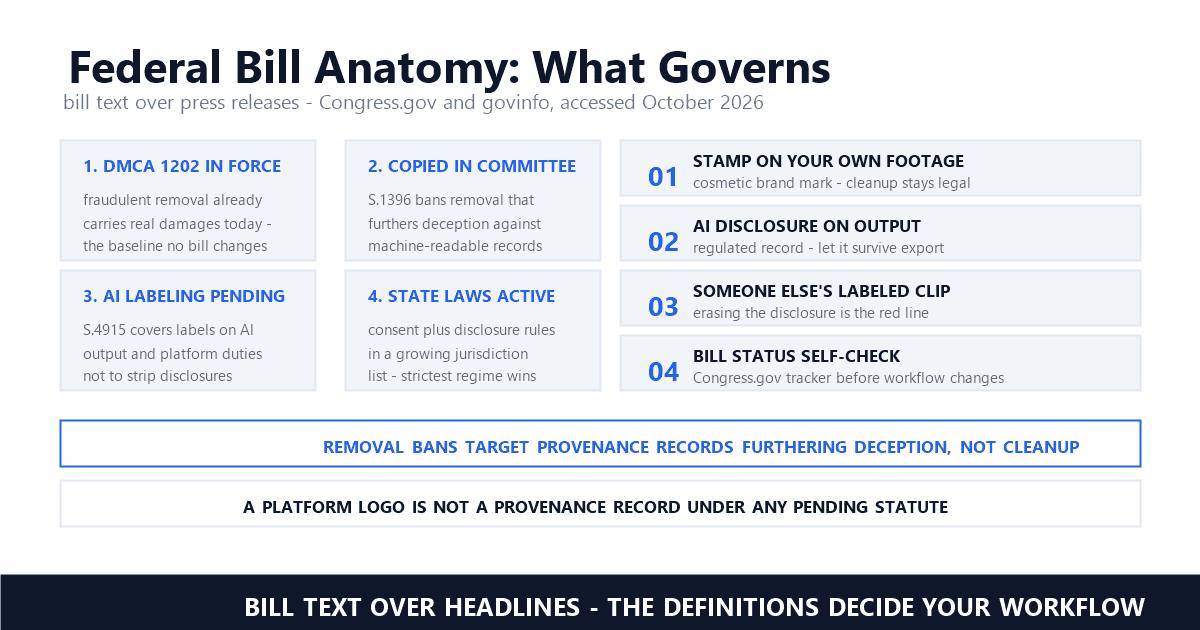
Those laws bite on both sides of the Pacific. In Europe, the AI Act's Article 50 obliges providers to mark synthetic content in machine-readable form; a creator who launders that marking out of distributed clips is defeating a transparency obligation, not optimizing a file. In China, the labeling measures go further — Article 10 bans malicious deletion, tampering, forgery, and concealment of content labels, and bans providing tools or services that do it for others, which is a precise description of the product category Calabi sits in. And on the federal layer, when a mark qualifies as copyright management information, "No person shall, without the authority of the copyright owner or the law—(1) intentionally remove or alter any copyright management information" — Legal Information Institute, 17 U.S.C. § 1202. None of this even reaches the contract layer: a laundered file is still a non-commercial license with its receipt burned off. The metadata strip does not relicense anything; it just makes the licensing harder to audit — which is the point, and the problem.
Iterate free, deliver paid. Refine prompts on the free tier's draft resolution, then regenerate the approved shot under Plus — or the current Plus, Pro, Ultra ladder — so the export is born clean and commercially licensed. Keep a record of which plan was active when each clip was generated; your rights follow that moment.
AI Tool Curator's workflow advice survives the pricing overhaul intact: "Before upgrading, spend time refining your prompt on the free tier — iterate there, then execute the final version on the paid plan." Credits scale with quality — a five-second 1080p Ray3.2 clip costs 400 credits against 20 for a draft — so the economics favor exactly that split: explore cheap, render once, clean. The one discipline worth adopting from the same guide is record-keeping: note which plan was active per generation, because when a client asks for the license trail months later, "the plan status at generation time is what matters."
For footage already on disk, the honest edges are narrow. In our testing, a static corner mark is the mechanically easy case — the tradeoffs against cropping and blurring and mask-size economics all apply — but on Luma output the vendor itself sells the clean version, so a remover's legitimate window is footage that predates your subscription or comes from a source you cannot regenerate. Based on our processing data, UGC handoffs and ad-platform compliance are where licensed cleaning actually happens.
When the queue is dozens of legacy clips you own outright, batch removal over our documented pipeline exists for exactly that footage — rights in, marks out, nothing laundered. Sora's moving logo and Grok Imagine mark the hard end of the spectrum: vendors whose marks do not respond to any tier. Luma sits at the soft end — it will sell you the clean file. Take the deal that is actually on the table: Plus, at generation time, with the receipt kept.
Does the free Luma Dream Machine plan add a watermark?
Yes. Luma's plan pages list watermarks and non-commercial use on the free tier, alongside draft-resolution output and limited credits. The mark is the visible face of the non-commercial license, and it cannot be removed from existing clips — even by upgrading — because licensing attaches at generation time.
Which Luma plan removes the watermark and grants commercial use?
On the classic web ladder, Plus at $29.99 per month: 10,000 credits, 4K with HDR, no watermarks, full commercial rights. Lite at $9.99 still ships watermarks and non-commercial restrictions. Since August 2026 the pricing page shows a Plus/Pro/Ultra ladder, where commercial use still begins at Plus.
Can you remove a watermark from a Luma video generated on the free plan?
Not on any official path. Luma's licensing documentation, as quoted by AI Tool Curator, states the watermark on Free and Lite videos cannot be removed even after upgrading, and third-party strippers breach the non-commercial terms while leaving the license problem intact. The compliant fix is regenerating the prompt under an active paid plan.
Last updated: October 2026
Luma AI — Dream Machine Plans Pricing Comparison (accessed October 2026)
Luma AI — Payments & Subscriptions (accessed October 2026)
AI Tool Curator — How to Remove Luma Dream Machine Watermark (accessed October 2026)
AI Productivity Guide — Remove the Watermark From an AI Video Export (accessed October 2026)
ToolColumn — Luma Pricing 2026: Plus, Pro, Ultra, Credits and API (accessed October 2026)
Calabi Labs — How to Remove the Luma Dream Machine Watermark (accessed October 2026)
Legal Information Institute — 17 U.S.C. § 1202 · Copyright management information (accessed October 2026)
Mark Ma is the founder and lead engineer at UnMark, where he leads the development of AI-powered video watermark removal technology. With over a decade of experience in computer vision, deep learning, and video processing, he has built production systems that process millions of frames per month across TikTok, Instagram Reels, and Google Veo content. His technical work focuses on motion-compensated watermark detection, spatial-temporal inpainting, and quality-preserving reconstruction for short-form vertical video. Before UnMark, Mark shipped computer vision infrastructure at scale for content moderation and ad compliance platforms. He writes this blog to document the real engineering, testing, and regulatory reasoning behind UnMark's processing pipeline — every test result, frame analysis, and benchmark published here is reproduced from actual production data, not synthetic examples. His goal is to give creators, brands, and regulators a verifiable technical reference for AI video watermark removal in 2026.